 UAU Ready
Description
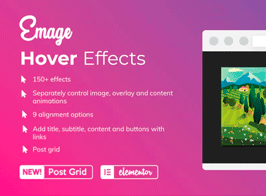
Emage adds image hover effect widgets to Elementor, applying CSS3 transitions to titles, descriptions, and call-to-action buttons when the cursor hovers over each image. It is aimed at those who build pages in Elementor and need interactive image blocks with animated overlays, without writing manual CSS or relying on external JavaScript libraries to generate zoom, fade, slide, or reveal effects.
Key Features of Emage
- Native widgets for Elementor
Ready-made blocks that appear in the builder’s side panel during editing. - Collection of hover effects
Zoom, fade, slide, blur, and overlay variations applied on hover. - CSS3-based transitions
Animations rendered via CSS, without loading additional scripts on the page. - Overlay with title and description
Text fields and a button overlaid on the image, configured through the visual editor. - Color, timing, and direction controls
Dedicated panel to adjust duration, animation direction, and overlay palette.
Benefits of Emage
- More interactive pages in Elementor
Static images become blocks with visual call and clear action. - Editing without touching code
Effects come from the configured widget, without custom CSS or manual snippets. - Light front-end load
With no reliance on heavy scripts, rendering time remains predictable. - Consistent look in portfolios and galleries
The same effects applied in series maintain graphic identity across sections.
Who Is Emage For?
- Those who build portfolios, galleries, and service sections in Elementor and need to highlight images with interaction.
- Designers and freelancers delivering landing pages who want ready-made hover effects without opening the CSS inspector.
- Creative agencies producing websites in volume and reusing animated image blocks across different projects.
How to Download Emage
Emage is available for download here at Ultrapack. After downloading the .zip file, install it under Plugins > Add New > Upload Plugin, select the file, and activate it; the new widgets will appear in Elementor’s side panel while editing any page.
For those who already work with Elementor and want to enrich pages with interactive image blocks, Emage brings together ready-made widgets that eliminate the need for custom code. The effect collection ranges from simple transitions to more elaborate overlays, keeping the editing flow within the visual builder and saving hours of manual CSS tweaking for galleries, portfolios, and call-to-action sections.
Frequently asked questions
Is the Emage – Image Hover Effects for Elementor plugin GPL?
Yes. Emage – Image Hover Effects for Elementor is distributed under the GPL (GNU General Public License). You may legally use, modify and redistribute it on as many sites as you want.
Can I use the Emage – Image Hover Effects for Elementor plugin on more than one site?
Yes. There is no domain limit: you can install Emage – Image Hover Effects for Elementor on as many sites (domains) as you wish.
How much does the Emage – Image Hover Effects for Elementor plugin cost at Ultrapack?
O Emage – Image Hover Effects for Elementor sai por R$ 14,90 as a single purchase, and it is also included in the subscription plans starting at R$ 59,00/mês (VIP I).
Does the Emage – Image Hover Effects for Elementor plugin include updates?
Sim. Cada nova versão do Emage – Image Hover Effects for Elementor é sincronizada automaticamente no Ultrapack. Você baixa a última versão quando quiser, e os assinantes atualizam direto do painel do WordPress com o UAU (Ultrapack Auto Updater).
Is the Emage – Image Hover Effects for Elementor plugin safe to download and install on my WordPress?
Sim, pode baixar com tranquilidade. Cada versão do Emage – Image Hover Effects for Elementor é escaneada antes da publicação pelo motor próprio do Ultrapack (UltraHub), que combina ClamAV e regras YARA, tecnologias usadas para detectar malware e código malicioso. Assim você instala no seu WordPress sem preocupação.