 UAU Ready
Description
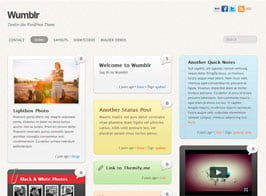
Built on the Themify framework, Wumblr turns WordPress into a Tumblr-style blog, with support for nine post formats, fifteen individual color schemes, and three column layouts for pages. It serves those who publish visual content, quick notes, links, quotes, audio, and video in a more dynamic editorial flow, while keeping control over menus, widgets, and footer organization.
Main Features of Wumblr
- Nine post formats
Organizes general posts, notes, video, image, gallery, quote, audio, link, and status. - Colors per post
Applies fifteen color schemes to visually differentiate each content type. - Column layouts
Lets you choose three column structures for theme pages. - Header widgets
Inserts social media buttons and additional elements in the top area. - Multi-level menus
Creates navigation with dropdowns and hierarchical structure from the WordPress dashboard.
Benefits of Wumblr
- More visual publishing
Makes it easier to separate content formats without relying on manual layouts. - A blog with its own identity
Helps each post stand out by format, color, and context. - Simple editorial organization
Reduces repetitive adjustments by structuring text, media, links, and quotes. - Clearer navigation
Improves access to categories, pages, and important blog sections.
Who Is Wumblr For?
- Those who publish content frequently and want a blog with a Tumblr-inspired look.
- Creators who switch between text, images, videos, links, quotes, and short posts on the same site.
- Editorial projects that need to highlight different publication formats without editing code.
How to Download Wumblr
Wumblr is available for download here at Ultrapack. After downloading the .zip file, install it under Appearance > Themes > Add New > Upload Theme, select the file, and activate it from the WordPress dashboard. After activation, configure layouts, menus, and widgets according to the project.
Wumblr works well for blogs that rely on visual variety and editorial cadence, especially when each post needs to carry its own format. With post formats, individual colors, column layouts, widgets, and hierarchical menus, the theme helps organize multimedia content into a structure familiar to social blog readers, without turning daily editing into technical work.
Frequently asked questions
Is the Themify Wumblr theme GPL?
Yes. Themify Wumblr is distributed under the GPL (GNU General Public License). You may legally use, modify and redistribute it on as many sites as you want.
Can I use the Themify Wumblr theme on more than one site?
Yes. There is no domain limit: you can install Themify Wumblr on as many sites (domains) as you wish.
How much does the Themify Wumblr theme cost at Ultrapack?
O Themify Wumblr sai por US$ 2,89 as a single purchase, and it is also included in the subscription plans starting at US$ 11,44/mês (VIP I).
Does the Themify Wumblr theme include updates?
Sim. Cada nova versão do Themify Wumblr é sincronizada automaticamente no Ultrapack. Você baixa a última versão quando quiser, e os assinantes atualizam direto do painel do WordPress com o UAU (Ultrapack Auto Updater).
Is the Themify Wumblr theme safe to download and install on my WordPress?
Sim, pode baixar com tranquilidade. Cada versão do Themify Wumblr é escaneada antes da publicação pelo motor próprio do Ultrapack (UltraHub), que combina ClamAV e regras YARA, tecnologias usadas para detectar malware e código malicioso. Assim você instala no seu WordPress sem preocupação.