

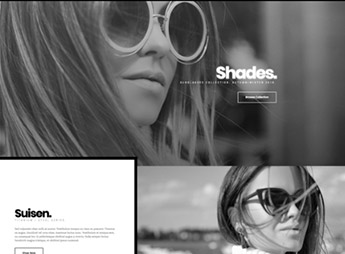
Description
Shades brings together page templates ready for direct import into Elementor, with store layouts, product showcases, and campaign landing pages built by Elementorism. Every section arrives editable in the visual builder, which lets you build sales pages without writing code, adjusting colors, typography, and images right from the Elementor panel until the look matches your brand identity.
Key Features of Shades
- Templates importable into Elementor
Ready-made files that drop into the builder library and open fully assembled. - Landing page layouts
Page structures focused on presenting an offer and capturing leads. - Sections built for ecommerce
Showcase blocks, product highlights, and buy calls ready to adapt. - Full visual editing
Every element responds to Elementor’s native style controls. - Consistent modern aesthetic
Typography, spacing, and palette follow the same standard across all pages.
Benefits of Shades
- Publish in less time
A page goes from scratch to live with just a few hours of content tweaks. - Less technical dependence
Whoever edits the site doesn’t need HTML, CSS, or help from a developer. - Visual consistency maintained
New pages stay aligned with the rest of the site without rework. - Reuse across campaigns
The same set works for launches, seasonal promos, and product pages.
Who Is Shades For?
- Anyone selling products online who needs campaign pages that publish fast.
- You, if you already work with Elementor and want to start from finished layouts instead of a blank canvas.
- Anyone building sites for clients who wants to cut the layout time on every delivery.
How to Download Shades
Shades is available for download here on Ultrapack. After downloading the .zip file, upload the templates through the WordPress panel at Elementor > Templates > Import Templates and select the file. Once imported, the pages are available in the builder library, ready to edit.
For anyone promoting products who needs visually polished pages without spending days on layout, this kit shortens the slowest part of the process: building the structure. The work becomes swapping text, images, and colors, keeping a steady publishing pace even during heavy campaign seasons.
Frequently asked questions
Is Elementorism Shades – eCommerce Landing Page GPL?
Yes. Elementorism Shades – eCommerce Landing Page is distributed under the GPL (GNU General Public License). You may legally use, modify and redistribute it on as many sites as you want.
Can I use Elementorism Shades – eCommerce Landing Page on more than one site?
Yes. You can use Elementorism Shades – eCommerce Landing Page on as many sites as you want.
How much does Elementorism Shades – eCommerce Landing Page cost at Ultrapack?
Elementorism Shades – eCommerce Landing Page costs US$2.99 as a single purchase, and it is also included in the subscription plans starting at US$17/mo (Desenvolvedor I).
Does Elementorism Shades – eCommerce Landing Page include updates?
When a new version of Elementorism Shades – eCommerce Landing Page becomes available in the catalog, you can download the file during the access period of your purchase or subscription. To update, follow the installation or import procedure described in the documentation for the item and its platform.
Is Elementorism Shades – eCommerce Landing Page checked before it is made available for download?
Files for Elementorism Shades – eCommerce Landing Page are scanned before publication by UltraHub using ClamAV and YARA rules to detect known threats. This check does not guarantee the absence of risks. Check the item requirements, make a backup, and follow the installation or import instructions for its platform.
How to install
Updates: manual. When a new version comes out, download it on this same page and import it again under Saved Templates. Importing creates new templates and does not touch the pages you already built.
This item is not a theme: it is an Elementor template, with one or more ready-made pages saved as .json files that you import inside Elementor itself.
- Install and activate the Elementor plugin, which is also here in the catalog.
- Download the file
shades.zip. You do not need to extract it: Elementor imports the ZIP as is. - In the WordPress dashboard, open Templates > Saved Templates. Starting with Elementor 4, that menu sits inside Elementor.
- Click Import Templates, select the file
shades.zipand click Import Now. If Elementor shows the unfiltered file uploads warning, Import Without Enabling is enough: only SVG images are left out. - To use it, create a page, open it in Elementor, click the folder icon and insert the template from the My Templates tab.
- Do not upload this ZIP under Appearance > Themes. There is no theme inside it, and WordPress will reject the file.
- If your theme header and footer show up around the template and you do not want them, open the page settings in Elementor and set Page Layout to Elementor Canvas.
- This template uses widgets from Elementor Pro, which is also here in the catalog. Activate Pro before you insert the template into a page; without it, those widgets are left out.
Stuck on a step? Open a ticket telling us which one you stopped at.


