

Description
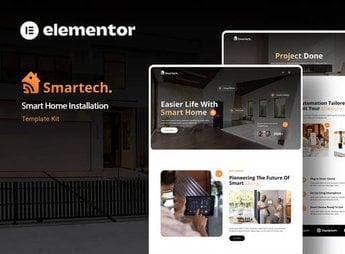
Smartech sets up the institutional website for a home automation company, with ready-made sections to showcase smart home projects, a catalog of connected devices, and installation packages, from the initial contact to the closed budget. It serves those who install home automation, connected security, and intelligent air conditioning systems and need a website that translates this technical service into a clear visual presentation for the end customer, without depending on another developer.
Smartech’s Main Features
- Project sections
Presents gallery blocks to display completed residential installations with photos and technical details. - Device catalog
Lists sensors, cameras, locks, and hubs compatible, organized by category and room of the house. - Installation package block
Compares automation plans by the number of devices and the level of home integration. - Budget form
Receives the address and type of property to generate an installation proposal. - Testimonials and certifications
Displays customer reviews alongside seals of partner automation brands.
Smartech’s Benefits
- Accessible technical presentation
Explains complex automation systems in visual language that any customer quickly understands. - Less budgeting time
The form already filters the type of project before the first conversation with the customer. - Credibility with seals
Partner seals alongside testimonials reinforce the trust of those visiting the website. - Consistent visual identity
Unifies colors, typography, and icons across all pages without requiring manual design adjustments.
Who is Smartech for?
- Those who install residential and home automation systems.
- Integrators of electronic security who serve houses and apartments.
- Those who assemble custom climate and lighting projects.
- Resellers of connected devices who need a visual catalog.
How to Download Smartech
Smartech is available for download here on Ultrapack. After downloading the file, import the complete kit in Elementor > Tools > Import Kit and choose which pages and blocks to apply to the ongoing automation project, maintaining the kit’s global styles.
Once applied, the content can be adapted to other technical installation branches, such as electronic security or solar energy, without having to start the layout from scratch. The sections follow the standard Elementor structure, which facilitates text and color adjustments without programming knowledge.
Frequently asked questions
Is Smartech – Smart Home Installation Elementor Template Kit GPL?
Yes. Smartech – Smart Home Installation Elementor Template Kit is distributed under the GPL (GNU General Public License). You may legally use, modify and redistribute it on as many sites as you want.
Can I use Smartech – Smart Home Installation Elementor Template Kit on more than one site?
Yes. You can use Smartech – Smart Home Installation Elementor Template Kit on as many sites as you want.
How much does Smartech – Smart Home Installation Elementor Template Kit cost at Ultrapack?
Smartech – Smart Home Installation Elementor Template Kit costs US$2.99 as a single purchase, and it is also included in the subscription plans starting at US$17/mo (Desenvolvedor I).
Does Smartech – Smart Home Installation Elementor Template Kit include updates?
When a new version of Smartech – Smart Home Installation Elementor Template Kit becomes available in the catalog, you can download the file during the access period of your purchase or subscription. To update, follow the installation or import procedure described in the documentation for the item and its platform.
Is Smartech – Smart Home Installation Elementor Template Kit checked before it is made available for download?
Files for Smartech – Smart Home Installation Elementor Template Kit are scanned before publication by UltraHub using ClamAV and YARA rules to detect known threats. This check does not guarantee the absence of risks. Check the item requirements, make a backup, and follow the installation or import instructions for its platform.
How to install
Updates: manual. When a new version comes out, download it on this same page and import it again with Template Kit Import. Template Kits are not updated from the WordPress Themes or Plugins screen.
A template kit is neither a theme nor a plugin. It is imported, and it needs Elementor installed on the site.
- Install and activate the Template Kit Import plugin, which is also here in the catalog.
- Download the file
elements-smartech-smart-home-installation-elementor-templ.zip. - In the WordPress dashboard, go to Template Kits > Import Kit and upload the file
elements-smartech-smart-home-installation-elementor-templ.zip. - Pick the templates you want to import and confirm.
- The imported templates end up under Templates > Saved Templates, ready to open in Elementor.
- Some kits use Elementor Pro features. Without it the templates still import, but some blocks have no effect.
Stuck on a step? Open a ticket telling us which one you stopped at.


