Description
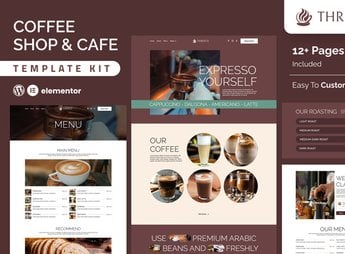
Thrivce organizes, within Elementor, the pages of a coffee shop or small restaurant with ready-made blocks for menus, a gallery of dishes and drinks, opening hours, and a table reservation form. It is ideal for those who manage a neighborhood coffee shop, a craft roastery, or a small restaurant and need a website to present the menu, show photos of dishes, and receive orders or reservations online without relying on another system.
Key Features of Thrivce
- Digital menu
Displays dishes and drinks organized by category, with photo, name, and price. - Photo gallery
Shows images of the environment and dishes in a mosaic on the homepage. - Table reservation
Provides a form for the customer to book a time and number of people. - Opening hours
Displays the days and times of service directly on the website’s homepage. - Customer testimonials
Gathers customer reviews in a carousel near the page footer.
Benefits of Thrivce
- Fast publishing
Reduces website creation time by already including pre-built pages. - Appetizing visual
Uses photos and colors that enhance dishes and drinks to attract customers. - Fewer calls to reserve
Allows customers to book a table directly through the website, without having to call. - Editing without programming
Allows you to adjust the menu, photos, and colors directly in the Elementor visual editor.
Who is Thrivce for?
- Those who manage a neighborhood coffee shop.
- Those who run a specialty coffee roastery or shop.
- Those who manage a small restaurant or bistro.
- Those who sell cakes and sweets by order with in-person service.
How to Download Thrivce
Thrivce is available for download here on Ultrapack. After downloading the file, import the kit in Elementor > Tools > Import Kit, choosing the package to upload the pages, the example menu, and the global color and typography settings.
Once imported, simply replace the photos and menu with the restaurant’s dishes to prepare the website for publication. It is an option for those who want to move away from the social media profile as the only showcase and gain a website for the business.
Frequently asked questions
Is Thrivce – Coffee Shop & Cafe Elementor Template Kit GPL?
Yes. Thrivce – Coffee Shop & Cafe Elementor Template Kit is distributed under the GPL (GNU General Public License). You may legally use, modify and redistribute it on as many sites as you want.
Can I use Thrivce – Coffee Shop & Cafe Elementor Template Kit on more than one site?
Yes. You can use Thrivce – Coffee Shop & Cafe Elementor Template Kit on as many sites as you want.
How much does Thrivce – Coffee Shop & Cafe Elementor Template Kit cost at Ultrapack?
Thrivce – Coffee Shop & Cafe Elementor Template Kit costs US$2.99 as a single purchase, and it is also included in the subscription plans starting at US$17/mo (Desenvolvedor I).
Does Thrivce – Coffee Shop & Cafe Elementor Template Kit include updates?
When a new version of Thrivce – Coffee Shop & Cafe Elementor Template Kit becomes available in the catalog, you can download the file during the access period of your purchase or subscription. To update, follow the installation or import procedure described in the documentation for the item and its platform.
Is Thrivce – Coffee Shop & Cafe Elementor Template Kit checked before it is made available for download?
Files for Thrivce – Coffee Shop & Cafe Elementor Template Kit are scanned before publication by UltraHub using ClamAV and YARA rules to detect known threats. This check does not guarantee the absence of risks. Check the item requirements, make a backup, and follow the installation or import instructions for its platform.
How to install
Updates: manual. When a new version comes out, download it on this same page and import it again with Template Kit Import. Template Kits are not updated from the WordPress Themes or Plugins screen.
A template kit is neither a theme nor a plugin. It is imported, and it needs Elementor installed on the site.
- Install and activate the Template Kit Import plugin, which is also here in the catalog.
- Download the file
elements-thrivce-coffee-shop-cafe-elementor-template-ki.zip. - In the WordPress dashboard, go to Template Kits > Import Kit and upload the file
elements-thrivce-coffee-shop-cafe-elementor-template-ki.zip. - Pick the templates you want to import and confirm.
- The imported templates end up under Templates > Saved Templates, ready to open in Elementor.
- Some kits use Elementor Pro features. Without it the templates still import, but some blocks have no effect.
Stuck on a step? Open a ticket telling us which one you stopped at.