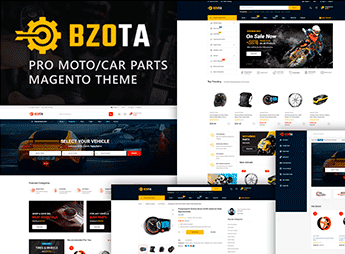
Description
BzoTa is a theme for Magento 2 intended for auto parts, vehicle accessories, and car and motorcycle equipment stores, featuring a mega menu for large catalogs, attribute and category search. The theme covers three homepage layouts and offers variable columns (1, 2 or 3) per page, supporting multiple currencies, languages, and RTL layout for international markets.
Key Features
- Magento 2.4.x compatibility
Works on Magento versions 2.4.1 through 2.4.7, with PHP 8.2 support. - Attribute and category search
Allows customers to locate parts by filtering specifications and catalog categories. - Mega menu for large catalogs
Organizes hundreds of parts and accessories categories in a navigable visual structure. - Integrated Ajax features
Includes Ajax Wishlist, Ajax Compare, Quick View, Ajax Add to Cart, and Login Popup without page reload. - Responsive Bootstrap 4 layout
Built on Bootstrap 4.x, supporting Chrome, Firefox, Safari, Opera, and Edge.
BzoTa Benefits
- Navigable automotive catalog
The mega menu and attribute search speed up locating specific parts for customers. - International reach
Native support for multiple currencies, languages, and RTL opens the catalog to external markets. - Faster shopping
Quick View, Ajax Add to Cart, and Login Popup reduce clicks from browsing to checkout. - Layout flexibility
Three column options per page (1, 2 or 3) and three homepage layouts allow reorganizing the store by category.
Target Audience
- Online stores selling auto parts and accessories for cars and motorcycles.
- Automotive distributors and retailers operating on Magento 2.
- Store owners of tools, equipment, and vehicle products selling in multiple markets.
Tailored for online automotive retail, BzoTa focuses on the features this niche demands: a mega menu for dense catalogs, attribute filterable search, and Ajax tools that shorten the path to checkout. The combination of support for multiple currencies, languages, and RTL makes the theme suitable for international operations of auto parts and accessories on Magento 2.
Frequently asked questions
Is BzoTa – Vehicles, Parts & Accessories Magento 2 Theme GPL?
Yes. BzoTa – Vehicles, Parts & Accessories Magento 2 Theme is distributed under the GPL (GNU General Public License). You may legally use, modify and redistribute it on as many sites as you want.
Can I use BzoTa – Vehicles, Parts & Accessories Magento 2 Theme on more than one site?
Yes. You can use BzoTa – Vehicles, Parts & Accessories Magento 2 Theme on multiple sites. The number of sites connected to Ultrapack Auto Updater is limited by your plan.
How much does BzoTa – Vehicles, Parts & Accessories Magento 2 Theme cost at Ultrapack?
BzoTa – Vehicles, Parts & Accessories Magento 2 Theme costs US$2.99 as a single purchase, and it is also included in the subscription plans starting at US$17/mo (Desenvolvedor I).
Does BzoTa – Vehicles, Parts & Accessories Magento 2 Theme include updates?
When a new version of BzoTa – Vehicles, Parts & Accessories Magento 2 Theme becomes available in the catalog, you can download the file during the access period of your purchase or subscription. To update, follow the installation or import procedure described in the documentation for the item and its platform.
Is BzoTa – Vehicles, Parts & Accessories Magento 2 Theme checked before it is made available for download?
Files for BzoTa – Vehicles, Parts & Accessories Magento 2 Theme are scanned before publication by UltraHub using ClamAV and YARA rules to detect known threats. This check does not guarantee the absence of risks. Check the item requirements, make a backup, and follow the installation or import instructions for its platform.
How to install
Updates: manual. When a new version comes out, download it on this same page and follow the replacement or import process for the platform shown. This item is not updated through WordPress.
Extras gathers what is neither a WordPress theme nor a plugin: templates, scripts, project files and supporting material.
- Download the file
elements-bzota-parts-accessories-magento-2-theme.zipand extract it on your computer. - Open the author documentation that came in the package. It tells you where each file goes.
- When there is a
Como Instalar.txtfile in the main folder of the package, read it first.
Stuck on a step? Open a ticket telling us which one you stopped at.