Description
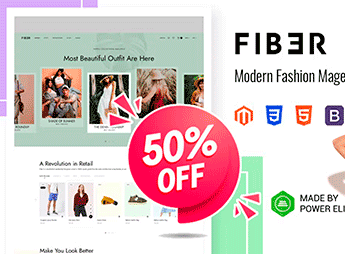
Fiber is a Magento 2 theme prepared for fashion stores, clothing brands, and accessory e-commerce, with a responsive layout, visual megamenu, and product pages designed for high-resolution photography. Built on the native Magento 2 framework, it organizes extensive catalogs by department, gender, and collection, integrating highlighted storefronts, lookbooks, and checkout flows optimized for conversion on desktop and mobile.
Key Features
- Magento 2 Compatibility
Structure built on the native Magento 2 architecture with support for standard platform modules. - Configurable Megamenu
Multilevel navigation menu with columns, promotional images, and category organization. - Advanced Product Pages
Gallery with zoom, quick variant change, color swatches, and configurable description tabs. - Lookbook and Collection Galleries
Dedicated pages to showcase seasonal collections with clickable hotspots over photos. - Fully Responsive Layout
Adaptive grid that adjusts to desktop, tablet, and smartphone, maintaining catalog readability. - Simplified Checkout
Single-page checkout flow reducing steps between cart and order confirmation. - Refined Catalog Filters
Navigation by attributes such as size, color, price, and brand with dynamic result updates.
Fiber Benefits
- Scalable Fashion Stores
Supports large catalogs with multiple categories and variations without compromising navigation speed. - Product-Focused Visual Experience
Product pages highlight photography and details of the item, enhancing brand quality perception. - Optimized Mobile Conversion
Interface adapted to small screens keeps purchase flow smooth on smartphones and tablets. - Checkout Friction Reduction
Fewer steps in order completion decrease cart abandonment in high-traffic stores. - Premium Brand Visual Identity
Clean and modern aesthetic positions the store as a reference in style, fashion, and lifestyle.
Who Is It For?
- Fashion and apparel brands that need a virtual store on Magento 2.
- Apparel, footwear, and accessory e-commerce with large catalogs and multiple collections.
- Fashion retailers for women, men, or children selling seasonal pieces.
- Boutiques and premium brands seeking sophisticated visual presentation of their products.
- Fashion retail businesses migrating from other platforms to the Magento ecosystem.
Targeted at fashion retail on the Magento 2 platform, Fiber combines elaborate visual presentation, catalog organization by collection, and navigation tools typical of apparel and accessory e-commerce. The responsive structure and simplified checkout reinforce conversion across different devices, catering from independent boutiques to multi-brand operations with extensive inventory.
Frequently asked questions
Is Fiber – Modern Fashion Store Magento 2 Theme GPL?
Yes. Fiber – Modern Fashion Store Magento 2 Theme is distributed under the GPL (GNU General Public License). You may legally use, modify and redistribute it on as many sites as you want.
Can I use Fiber – Modern Fashion Store Magento 2 Theme on more than one site?
Yes. You can use Fiber – Modern Fashion Store Magento 2 Theme on multiple sites. The number of sites connected to Ultrapack Auto Updater is limited by your plan.
How much does Fiber – Modern Fashion Store Magento 2 Theme cost at Ultrapack?
Fiber – Modern Fashion Store Magento 2 Theme costs US$2.99 as a single purchase, and it is also included in the subscription plans starting at US$17/mo (Desenvolvedor I).
Does Fiber – Modern Fashion Store Magento 2 Theme include updates?
When a new version of Fiber – Modern Fashion Store Magento 2 Theme becomes available in the catalog, you can download the file during the access period of your purchase or subscription. To update, follow the installation or import procedure described in the documentation for the item and its platform.
Is Fiber – Modern Fashion Store Magento 2 Theme checked before it is made available for download?
Files for Fiber – Modern Fashion Store Magento 2 Theme are scanned before publication by UltraHub using ClamAV and YARA rules to detect known threats. This check does not guarantee the absence of risks. Check the item requirements, make a backup, and follow the installation or import instructions for its platform.
How to install
Updates: manual. When a new version comes out, download it on this same page and follow the replacement or import process for the platform shown. This item is not updated through WordPress.
Extras gathers what is neither a WordPress theme nor a plugin: templates, scripts, project files and supporting material.
- Download the file
elements-fiber-modern-fashion-store-magento-2-theme.zipand extract it on your computer. - Open the author documentation that came in the package. It tells you where each file goes.
- When there is a
Como Instalar.txtfile in the main folder of the package, read it first.
Stuck on a step? Open a ticket telling us which one you stopped at.