Description
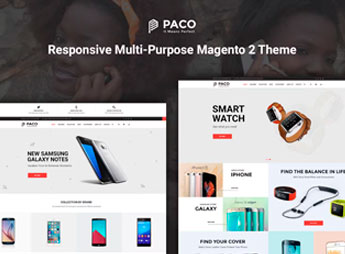
Paco allows you to create Magento 2 stores for electronics retailers, watch shops, and accessories, with ready responsive layouts and visual configuration for header, footer, and category pages. The theme imports complete store demos, organizes catalogs by department, and adapts the storefront for phones, tablets, and desktops, catering to merchants who need to launch a multi-purpose e-commerce without starting from scratch in Magento.
Key Features
- Importable demos for Magento 2
Includes ready layouts for technology, watch, and accessory stores, importable via the panel. - Fully responsive layout
Adjusts storefront, menu, and checkout for phones, tablets, and desktops without manual CSS adjustments. - Category mega menu
Organizes departments such as smartphones, watches, and accessories into columns with highlights and banners. - Optimized product pages
Features a gallery with zoom, description tabs, reviews, and a related products block. - Visual personalization panel
Allows adjustment of colors, typography, header, and footer through the native Magento 2 administrator.
Benefits of Paco
- Accelerated store launch
Ready demos reduce the time between Magento installation and final storefront publication. - Consistent mobile experience
The responsive design maintains usability and conversion rates for orders placed from mobile. - Multi-niche support
The multi-purpose structure allows reusing the same theme in stores across different segments. - Less developer dependency
The visual panel avoids direct editing of XML and PHTML files for day-to-day changes.
Who Is Targeted?
- Smartphone, electronics, and technology accessory retailers.
- Watch shops and resellers of watches and fashion products.
- Agencies and developers delivering projects on Magento 2.
- Entrepreneurs looking for a multi-purpose theme for different catalogs.
Targeted at merchants operating wide catalogs in Magento 2, Paco combines importable demos, category mega menus, and product pages with advanced galleries to support technology, watch, and accessory storefronts. The responsive base and visual personalization panel shorten the path between installation and real store operation without rewriting templates from scratch.
Frequently asked questions
Is Paco – Responsive Multi-Purpose Magento 2 Theme GPL?
Yes. Paco – Responsive Multi-Purpose Magento 2 Theme is distributed under the GPL (GNU General Public License). You may legally use, modify and redistribute it on as many sites as you want.
Can I use Paco – Responsive Multi-Purpose Magento 2 Theme on more than one site?
Yes. You can use Paco – Responsive Multi-Purpose Magento 2 Theme on as many sites as you want.
How much does Paco – Responsive Multi-Purpose Magento 2 Theme cost at Ultrapack?
Paco – Responsive Multi-Purpose Magento 2 Theme costs US$2.99 as a single purchase, and it is also included in the subscription plans starting at US$17/mo (Desenvolvedor I).
Does Paco – Responsive Multi-Purpose Magento 2 Theme include updates?
When a new version of Paco – Responsive Multi-Purpose Magento 2 Theme becomes available in the catalog, you can download the file during the access period of your purchase or subscription. To update, follow the installation or import procedure described in the documentation for the item and its platform.
Is Paco – Responsive Multi-Purpose Magento 2 Theme checked before it is made available for download?
Files for Paco – Responsive Multi-Purpose Magento 2 Theme are scanned before publication by UltraHub using ClamAV and YARA rules to detect known threats. This check does not guarantee the absence of risks. Check the item requirements, make a backup, and follow the installation or import instructions for its platform.
How to install
Updates: manual. When a new version comes out, download it on this same page and follow the replacement or import process for the platform shown. This item is not updated through WordPress.
Extras gathers what is neither a WordPress theme nor a plugin: templates, scripts, project files and supporting material.
- Download the file
elements-paco-responsive-multi-purpose-magento-2-theme.zipand extract it on your computer. - Open the author documentation that came in the package. It tells you where each file goes.
- When there is a
Como Instalar.txtfile in the main folder of the package, read it first.
Stuck on a step? Open a ticket telling us which one you stopped at.