

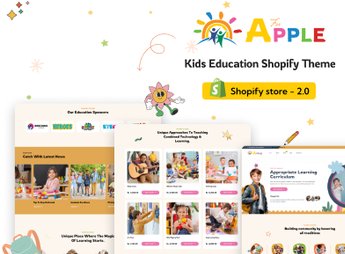
Description
AforApple builds a Shopify store aimed at people who sell teaching material, kids’ courses and school stationery products, with showcase blocks that organize kits by age range, class and education level right on the home page. It serves schools, daycares, teachers who resell workbooks and children’s education platforms that need to show classes, course packages and materials clearly to parents who make the final purchase decision.
Main Features of AforApple
- Showcase by age range
Organizes products into collections separated by age and school level. - Courses and classes section
Displays course cards with hours, teacher and available spots. - Colorful and responsive layout
Adapts banners and menus for phone screens without losing the layout. - Blog integrated into the theme
Publishes teaching tips and school news in the same visual identity. - Filters by category and age
Helps the visitor find the right kit without scrolling through the whole page.
Benefits of AforApple
- Store ready in hours
Cuts down the time needed to build the school catalog pages from scratch. - More trust from parents
Presents classes and materials in an organized way, which makes the purchase decision easier. - Faster browsing
Lets the visitor find the right kit without going through several pages. - Consistent visual identity
Keeps the same style from the blog site to the product pages.
Who Is AforApple Recommended For?
- Anyone who sells workbooks and teaching material for children’s schools.
- Teachers who offer online courses for children and parents.
- Daycares and small schools that resell teaching kits online.
- Stationery stores that put together school packages by age range.
How to Download AforApple
AforApple is available for download here at Ultrapack. To install it, go to Online Store > Themes > Add theme in the Shopify dashboard and upload the theme file. After activating it, publish the collections and adjust the colors according to your school’s or course’s catalog.
The theme comes with a ready-made structure for those who already sell in person and want to bring the school catalog to Shopify without depending on a developer to build each page. The organization by course and age range helps keep the site updated as new classes open throughout the school year.
Frequently asked questions
Is AforApple – Kids School Education & Online Courses Shopify Theme GPL?
Yes. AforApple – Kids School Education & Online Courses Shopify Theme is distributed under the GPL (GNU General Public License). You may legally use, modify and redistribute it on as many sites as you want.
Can I use AforApple – Kids School Education & Online Courses Shopify Theme on more than one site?
Yes. You can use AforApple – Kids School Education & Online Courses Shopify Theme on as many sites as you want.
How much does AforApple – Kids School Education & Online Courses Shopify Theme cost at Ultrapack?
AforApple – Kids School Education & Online Courses Shopify Theme costs US$2.99 as a single purchase, and it is also included in the subscription plans starting at US$17/mo (Desenvolvedor I).
Does AforApple – Kids School Education & Online Courses Shopify Theme include updates?
When a new version of AforApple – Kids School Education & Online Courses Shopify Theme becomes available in the catalog, you can download the file during the access period of your purchase or subscription. To update, follow the installation or import procedure described in the documentation for the item and its platform.
Is AforApple – Kids School Education & Online Courses Shopify Theme checked before it is made available for download?
Files for AforApple – Kids School Education & Online Courses Shopify Theme are scanned before publication by UltraHub using ClamAV and YARA rules to detect known threats. This check does not guarantee the absence of risks. Check the item requirements, make a backup, and follow the installation or import instructions for its platform.
How to install
Updates: manual. When a new version comes out, download it on this same page and upload the new file from the Shopify admin. This item is not installed through WordPress.
A Shopify theme is not installed on WordPress. It is uploaded in your store dashboard.
- Download the file
elements-aforapple-kids-school-education-online-courses.zipand extract it on your computer. - Inside the package, look for the theme ZIP, which is the file Shopify accepts. It is usually in a folder named after the theme, and it has the
assets,layout,sectionsandtemplatesfolders inside. - In the Shopify dashboard, go to Online Store > Themes.
- Under Theme library, click Add theme > Upload zip file and upload the theme ZIP.
- Use Preview to check it, and Publish when you want it live.
- Shopify rejects packages that are too large. If the upload fails because of size, take the documentation and demo files out of the folder before zipping it.
Stuck on a step? Open a ticket telling us which one you stopped at.



