

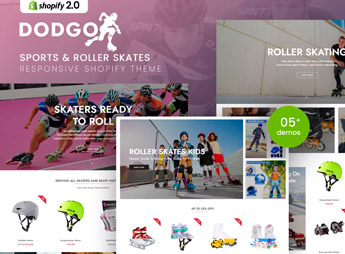
Description
Dodgo builds a Shopify store for selling skates, skateboards, and equipment for skating and extreme sports, with age-range category blocks and a size spec sheet on each product page. It serves those who sell skates and skateboards for kids or adults and need to show size, age range, and recommended skill level for each model, with photos that convey energy, movement, and fun for the whole family.
Main Features of Dodgo
- Category by age range
Separates kids’ skates and skateboards from models aimed at adults and teenagers. - Size spec sheet
Shows sizing, size fit, and recommended skill level on the product. - Gallery with action photos
Displays product images in use, in addition to standard static item photos. - Category blocks on the homepage
Organizes skates, skateboards, and protective gear into separate sections right on the home page. - Filter by skill level
Splits products between beginner, intermediate, and advanced directly in the site search.
Benefits of Dodgo
- Right choice by age
Helps the person making the purchase find the right model for the child. - Fewer exchanges and returns
The size sheet reduces sizing mistakes when buying online. - Catalog by technical level
Separates beginner equipment from equipment aimed at those who already have experience. - Photos that sell the use
Action images help the customer picture the product being used.
Who Is Dodgo For?
- Skate and skateboard shops for kids and adults.
- Anyone selling protective equipment alongside skates and skateboards.
- Distributors of sporting goods for skating and extreme sports.
- Anyone putting together skate kits with protective gear as a gift for kids.
How to Download Dodgo
Dodgo is available for download here on Ultrapack. To install, go to Online Store > Themes > Add theme in the Shopify admin, upload the theme file, and publish it from the theme library to apply the layout.
The theme separates products by age range right in the navigation, which helps anyone selling to both kids and adults in the same store avoid confusion between different models, sizes, and skill levels.
Frequently asked questions
Is Dodgo – Sports & Roller Skates Shopify Theme GPL?
Yes. Dodgo – Sports & Roller Skates Shopify Theme is distributed under the GPL (GNU General Public License). You may legally use, modify and redistribute it on as many sites as you want.
Can I use Dodgo – Sports & Roller Skates Shopify Theme on more than one site?
Yes. You can use Dodgo – Sports & Roller Skates Shopify Theme on as many sites as you want.
How much does Dodgo – Sports & Roller Skates Shopify Theme cost at Ultrapack?
Dodgo – Sports & Roller Skates Shopify Theme costs US$2.99 as a single purchase, and it is also included in the subscription plans starting at US$17/mo (Desenvolvedor I).
Does Dodgo – Sports & Roller Skates Shopify Theme include updates?
When a new version of Dodgo – Sports & Roller Skates Shopify Theme becomes available in the catalog, you can download the file during the access period of your purchase or subscription. To update, follow the installation or import procedure described in the documentation for the item and its platform.
Is Dodgo – Sports & Roller Skates Shopify Theme checked before it is made available for download?
Files for Dodgo – Sports & Roller Skates Shopify Theme are scanned before publication by UltraHub using ClamAV and YARA rules to detect known threats. This check does not guarantee the absence of risks. Check the item requirements, make a backup, and follow the installation or import instructions for its platform.
How to install
Updates: manual. When a new version comes out, download it on this same page and upload the new file from the Shopify admin. This item is not installed through WordPress.
A Shopify theme is not installed on WordPress. It is uploaded in your store dashboard.
- Download the file
elements-dodgo-sports-roller-skates-shopify-theme.zipand extract it on your computer. - Inside the package, look for the theme ZIP, which is the file Shopify accepts. It is usually in a folder named after the theme, and it has the
assets,layout,sectionsandtemplatesfolders inside. - In the Shopify dashboard, go to Online Store > Themes.
- Under Theme library, click Add theme > Upload zip file and upload the theme ZIP.
- Use Preview to check it, and Publish when you want it live.
- Shopify rejects packages that are too large. If the upload fails because of size, take the documentation and demo files out of the folder before zipping it.
Stuck on a step? Open a ticket telling us which one you stopped at.


