Description
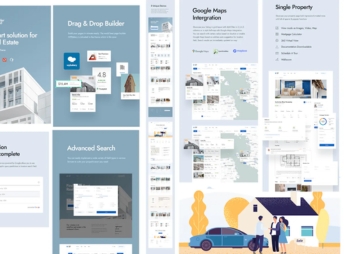
Exist builds Shopify store pages by drag and drop, with ready-made section blocks for banner, showcase, testimonial, and newsletter that rearrange right inside the visual editor, without needing to edit a single line of code. It’s meant for anyone who wants to build and rearrange the store on their own, testing different combinations of banner, showcase, and social proof until reaching the layout that converts best, without depending on a developer for every change.
Key Features of Exist
- Drag-and-drop editor
Rearranges banners, showcases, and text right on the editor screen. - Ready-made section blocks
Gathers banner, testimonial, and newsletter templates ready to use on the spot. - Responsive layout
Keeps the same visual organization on mobile, tablet, and desktop. - Testimonials section
Displays featured customer reviews right below the showcase. - Built-in email capture
Collects visitor contact info through a newsletter block on the homepage.
Benefits of Exist
- Autonomy to edit the store
Reduces reliance on a developer to change the layout. - Quick layout tests
Makes it easy to compare different banner and showcase combinations in minutes. - More purchase confidence
Uses featured testimonials to reinforce the store’s credibility. - Your own contact list
Gathers emails right in the store without relying only on social media.
Who Is Exist Recommended For?
- Anyone who wants to build and adjust their own store without hiring a developer.
- Anyone who likes testing different banner and showcase layouts before settling on the final one.
- Anyone who is just starting to collect customer emails for future campaigns.
- Anyone who relies on social proof to convince people who don’t yet know the brand.
How to Download Exist
Exist is available for download here on Ultrapack. After getting the file, go to the store dashboard under Online Store > Themes > Add theme and upload the package to install the layout. From there, it’s just a matter of arranging the sections by drag and drop in the visual editor.
The visual editor makes life easier for those who don’t code, but it’s worth keeping a certain discipline when combining sections, so the homepage doesn’t end up too cluttered. Testing the store on mobile after every change helps make sure the layout stays legible outside the desktop screen.
Frequently asked questions
Is Exist – Drag & Drop Responsive Shopify Theme GPL?
Yes. Exist – Drag & Drop Responsive Shopify Theme is distributed under the GPL (GNU General Public License). You may legally use, modify and redistribute it on as many sites as you want.
Can I use Exist – Drag & Drop Responsive Shopify Theme on more than one site?
Yes. You can use Exist – Drag & Drop Responsive Shopify Theme on as many sites as you want.
How much does Exist – Drag & Drop Responsive Shopify Theme cost at Ultrapack?
Exist – Drag & Drop Responsive Shopify Theme costs US$2.99 as a single purchase, and it is also included in the subscription plans starting at US$17/mo (Desenvolvedor I).
Does Exist – Drag & Drop Responsive Shopify Theme include updates?
When a new version of Exist – Drag & Drop Responsive Shopify Theme becomes available in the catalog, you can download the file during the access period of your purchase or subscription. To update, follow the installation or import procedure described in the documentation for the item and its platform.
Is Exist – Drag & Drop Responsive Shopify Theme checked before it is made available for download?
Files for Exist – Drag & Drop Responsive Shopify Theme are scanned before publication by UltraHub using ClamAV and YARA rules to detect known threats. This check does not guarantee the absence of risks. Check the item requirements, make a backup, and follow the installation or import instructions for its platform.
How to install
Updates: manual. When a new version comes out, download it on this same page and upload the new file from the Shopify admin. This item is not installed through WordPress.
A Shopify theme is not installed on WordPress. It is uploaded in your store dashboard.
- Download the file
exist-drag-drop-responsive-shopify-theme.zipand extract it on your computer. - Inside the package, look for the theme ZIP, which is the file Shopify accepts. It is usually in a folder named after the theme, and it has the
assets,layout,sectionsandtemplatesfolders inside. - In the Shopify dashboard, go to Online Store > Themes.
- Under Theme library, click Add theme > Upload zip file and upload the theme ZIP.
- Use Preview to check it, and Publish when you want it live.
- Shopify rejects packages that are too large. If the upload fails because of size, take the documentation and demo files out of the folder before zipping it.
Stuck on a step? Open a ticket telling us which one you stopped at.