

Description
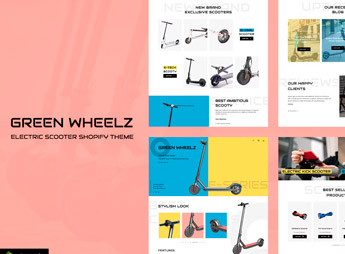
GreenWheelz builds a single-product Shopify OS 2.0 store, with a one-page structure that combines showcase, technical specifications, and a buy button on the same screen, without sending the visitor to separate detail and checkout pages. It serves those who sell a single electronics gadget, such as an electric scooter, headphones, or a mobility accessory, and need a page that explains the product and closes the sale without scattering attention across a catalog full of other items.
Main Features of GreenWheelz
- Single-page layout
Brings together showcase, specifications, and buy button in a single continuous scroll. - Structure for Shopify OS 2.0
Uses native sections and blocks from Shopify’s latest theme editor. - Product image gallery
Displays multiple photos and zoom to detail the advertised electronics item. - Social proof section
Shows testimonials and reviews right below the description to reinforce the purchase decision. - Stock counter and urgency
Displays a stock bar and urgency badges to speed up the visitor’s decision.
Benefits of GreenWheelz
- Total focus on the product
Eliminates distractions from menus and categories, keeping attention only on the offer. - Faster setup
Reduces store assembly time since there’s only one page to edit. - Simple navigation for the buyer
Takes the visitor straight from the showcase to the cart with no intermediate steps. - Mobile-adapted layout
Adjusts blocks and images for small screens without losing product readability.
Who Is GreenWheelz For?
- Anyone launching a single electronics product who wants a dedicated sales page.
- Anyone selling scooters, headphones, or electric mobility accessories online.
- Anyone already running paid traffic campaigns who needs a landing page with built-in checkout.
- Anyone migrating from a static landing page to their own Shopify store.
How to Download GreenWheelz
GreenWheelz is available for download here at Ultrapack. Installation follows the standard Shopify path: Online Store > Themes > Add theme, uploading the compressed theme file. Once installed, just publish it and configure the single-product page sections through the theme editor.
Since the layout concentrates everything into a single scroll, it’s easier to test variations of text, price, and image without reorganizing menus or categories. It’s a straightforward option for anyone who wants to quickly validate a new electronics product before expanding into a larger catalog.
Frequently asked questions
Is GreenWheelz – Single Product Shop Shopify OS 2.0 GPL?
Yes. GreenWheelz – Single Product Shop Shopify OS 2.0 is distributed under the GPL (GNU General Public License). You may legally use, modify and redistribute it on as many sites as you want.
Can I use GreenWheelz – Single Product Shop Shopify OS 2.0 on more than one site?
Yes. You can use GreenWheelz – Single Product Shop Shopify OS 2.0 on as many sites as you want.
How much does GreenWheelz – Single Product Shop Shopify OS 2.0 cost at Ultrapack?
GreenWheelz – Single Product Shop Shopify OS 2.0 costs US$2.99 as a single purchase, and it is also included in the subscription plans starting at US$17/mo (Desenvolvedor I).
Does GreenWheelz – Single Product Shop Shopify OS 2.0 include updates?
When a new version of GreenWheelz – Single Product Shop Shopify OS 2.0 becomes available in the catalog, you can download the file during the access period of your purchase or subscription. To update, follow the installation or import procedure described in the documentation for the item and its platform.
Is GreenWheelz – Single Product Shop Shopify OS 2.0 checked before it is made available for download?
Files for GreenWheelz – Single Product Shop Shopify OS 2.0 are scanned before publication by UltraHub using ClamAV and YARA rules to detect known threats. This check does not guarantee the absence of risks. Check the item requirements, make a backup, and follow the installation or import instructions for its platform.
How to install
Updates: manual. When a new version comes out, download it on this same page and upload the new file from the Shopify admin. This item is not installed through WordPress.
A Shopify theme is not installed on WordPress. It is uploaded in your store dashboard.
- Download the file
elements-greenwheelz-single-product-shop-shopify-os-2-0.zipand extract it on your computer. - Inside the package, look for the theme ZIP, which is the file Shopify accepts. It is usually in a folder named after the theme, and it has the
assets,layout,sectionsandtemplatesfolders inside. - In the Shopify dashboard, go to Online Store > Themes.
- Under Theme library, click Add theme > Upload zip file and upload the theme ZIP.
- Use Preview to check it, and Publish when you want it live.
- Shopify rejects packages that are too large. If the upload fails because of size, take the documentation and demo files out of the folder before zipping it.
Stuck on a step? Open a ticket telling us which one you stopped at.



