

Description
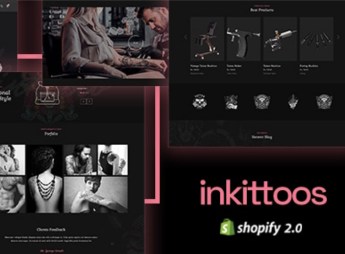
inkittoos builds a Shopify store designed for tattoo studios, piercing artists, and body art ateliers, with a portfolio gallery per artist, a flash tattoo catalog, and a booking page integrated into checkout. It’s for anyone who runs a physical studio and wants to bring together portfolio, post-tattoo care products, and appointment booking in a single place, without depending on several separate tools to serve the client.
Main Features of inkittoos
- Portfolio Gallery
Organizes tattoo photos by artist and by style within the store. - Flash Tattoo Catalog
Displays ready-made designs with price and availability for immediate booking. - Integrated Booking
Adds a session booking form directly on the product page. - Customizable Sections
Uses drag-and-drop blocks from the Shopify theme editor. - Dark-Toned Design
Applies a dark palette that showcases high-contrast tattoo photos.
Benefits of inkittoos
- Fewer External Tools
Reduces the need for extra plugins to display the tattoo portfolio. - Faster Checkout
Takes advantage of Shopify’s native checkout, already tested for conversion on quick purchases. - Consistent Visual Identity
Keeps the same visual style across the storefront, the blog, and the contact page. - Mobile-Adapted Navigation
Adjusts menus and galleries for people who search for tattoos straight from their smartphone.
Who Is inkittoos For?
- Anyone who runs a tattoo studio with a team of several artists.
- Independent tattoo artists who work by appointment and want to sell flash tattoos online.
- Piercing and body art studios that need a visual catalog.
- Anyone who already sells post-tattoo care products and wants to bring everything together in a single store.
How to Download inkittoos
inkittoos is available for download here at Ultrapack. After downloading the file, install it through your Shopify store at Online Store > Themes > Add theme, uploading the .zip package directly through the dashboard. Within minutes, the layout is ready to receive the catalog and the studio’s photos.
Anyone who already uses Shopify to sell products gets a layout ready for the tattoo segment without needing to build the sections from scratch. The dark visuals and the organization by artist help differentiate a studio from competitors that still use generic fashion or beauty themes.
Frequently asked questions
Is inkittoos – Tattoo Shopify Theme GPL?
Yes. inkittoos – Tattoo Shopify Theme is distributed under the GPL (GNU General Public License). You may legally use, modify and redistribute it on as many sites as you want.
Can I use inkittoos – Tattoo Shopify Theme on more than one site?
Yes. You can use inkittoos – Tattoo Shopify Theme on multiple sites. The number of sites connected to Ultrapack Auto Updater is limited by your plan.
How much does inkittoos – Tattoo Shopify Theme cost at Ultrapack?
inkittoos – Tattoo Shopify Theme costs US$2.99 as a single purchase, and it is also included in the subscription plans starting at US$17/mo (Desenvolvedor I).
Does inkittoos – Tattoo Shopify Theme include updates?
When a new version of inkittoos – Tattoo Shopify Theme becomes available in the catalog, you can download the file during the access period of your purchase or subscription. To update, follow the installation or import procedure described in the documentation for the item and its platform.
Is inkittoos – Tattoo Shopify Theme checked before it is made available for download?
Files for inkittoos – Tattoo Shopify Theme are scanned before publication by UltraHub using ClamAV and YARA rules to detect known threats. This check does not guarantee the absence of risks. Check the item requirements, make a backup, and follow the installation or import instructions for its platform.
How to install
Updates: manual. When a new version comes out, download it on this same page and upload the new file from the Shopify admin. This item is not installed through WordPress.
A Shopify theme is not installed on WordPress. It is uploaded in your store dashboard.
- Download the file
elements-inkittoos-tattoo-shopify-theme.zipand extract it on your computer. - Inside the package, look for the theme ZIP, which is the file Shopify accepts. It is usually in a folder named after the theme, and it has the
assets,layout,sectionsandtemplatesfolders inside. - In the Shopify dashboard, go to Online Store > Themes.
- Under Theme library, click Add theme > Upload zip file and upload the theme ZIP.
- Use Preview to check it, and Publish when you want it live.
- Shopify rejects packages that are too large. If the upload fails because of size, take the documentation and demo files out of the folder before zipping it.
Stuck on a step? Open a ticket telling us which one you stopped at.



