Description
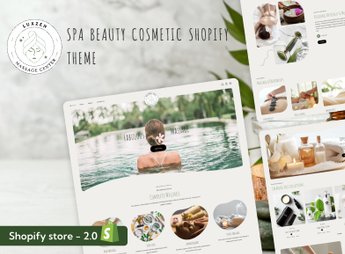
LuxZen sets up a Shopify store for beauty products, cosmetics, and spa services, with showcase sections for makeup, skincare, perfumery, and wellness treatments already separated by category and by line. Anyone running a beauty salon, a spa, or reselling cosmetics and skincare products gets a soft layout that showcases packaging and textures, with space reserved for service scheduling and highlighting seasonal releases.
Main Features of LuxZen
- Showcase by beauty category
Separates makeup, skincare, and perfumery into their own store sections. - Service scheduling section
Presents schedules and packages for aesthetic and spa treatments. - Soft and delicate layout
Uses tones and spacing that showcase product packaging and textures. - Highlight for new releases
Reserves space on the home page for new products and seasonal beauty collections. - Responsive layout for mobile
Keeps showcases and scheduling working on phone screens.
Benefits of LuxZen
- More sophisticated presentation
Reinforces the perceived quality of the products and treatments being sold. - Less friction in scheduling
Brings together service and schedule information on the same product page. - Navigation by product line
Makes it easier to browse between makeup, skincare, and perfumery in the catalog. - Less layout adjustment
Arrives ready with sections geared toward beauty, aesthetics, and wellness.
Who Is LuxZen Recommended For?
- Anyone running a beauty salon or spa.
- Anyone reselling cosmetics, makeup, or skincare products.
- Anyone providing aesthetic treatments with their own scheduling.
- Anyone selling perfumery and wellness products.
How to Download LuxZen
LuxZen is available for download here on Ultrapack. After getting the file, access the Shopify dashboard and upload the theme under Online Store > Themes > Add theme. Then just publish it and organize showcases, categories, and scheduling.
Beauty and wellness sell as much through the feeling conveyed by the store as through the product itself, and a generic e-commerce layout can hardly communicate that. With soft tones, showcases by category, and space for scheduling, LuxZen brings the online browsing experience closer to that of a physical salon or spa.
Frequently asked questions
Is LuxZen – Cosmetic Shop Shopify Theme GPL?
Yes. LuxZen – Cosmetic Shop Shopify Theme is distributed under the GPL (GNU General Public License). You may legally use, modify and redistribute it on as many sites as you want.
Can I use LuxZen – Cosmetic Shop Shopify Theme on more than one site?
Yes. You can use LuxZen – Cosmetic Shop Shopify Theme on as many sites as you want.
How much does LuxZen – Cosmetic Shop Shopify Theme cost at Ultrapack?
LuxZen – Cosmetic Shop Shopify Theme costs US$2.99 as a single purchase, and it is also included in the subscription plans starting at US$17/mo (Desenvolvedor I).
Does LuxZen – Cosmetic Shop Shopify Theme include updates?
When a new version of LuxZen – Cosmetic Shop Shopify Theme becomes available in the catalog, you can download the file during the access period of your purchase or subscription. To update, follow the installation or import procedure described in the documentation for the item and its platform.
Is LuxZen – Cosmetic Shop Shopify Theme checked before it is made available for download?
Files for LuxZen – Cosmetic Shop Shopify Theme are scanned before publication by UltraHub using ClamAV and YARA rules to detect known threats. This check does not guarantee the absence of risks. Check the item requirements, make a backup, and follow the installation or import instructions for its platform.
How to install
Updates: manual. When a new version comes out, download it on this same page and upload the new file from the Shopify admin. This item is not installed through WordPress.
A Shopify theme is not installed on WordPress. It is uploaded in your store dashboard.
- Download the file
elements-luxzen-beauty-spa-shopify-theme.zipand extract it on your computer. - Inside the package, look for the theme ZIP, which is the file Shopify accepts. It is usually in a folder named after the theme, and it has the
assets,layout,sectionsandtemplatesfolders inside. - In the Shopify dashboard, go to Online Store > Themes.
- Under Theme library, click Add theme > Upload zip file and upload the theme ZIP.
- Use Preview to check it, and Publish when you want it live.
- Shopify rejects packages that are too large. If the upload fails because of size, take the documentation and demo files out of the folder before zipping it.
Stuck on a step? Open a ticket telling us which one you stopped at.