

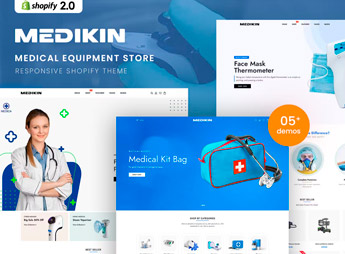
Description
Medikin builds a Shopify store made for sellers of medical equipment, dental supplies, hospital consumables, or pharmacy items, bringing together storefronts organized by technical category and product pages built for specifications, dosages, and certifications. The theme is for clinics, hospitals, distributors, pharmacies, and instrument manufacturers that need to showcase a large catalog without losing segment-based navigation, with ready-made sections for credentials, quality seals, and model comparisons.
Key Features of Medikin
- Storefront by technical category
Organizes the catalog into segments such as dental, hospital, and pharmacy to make searching easier. - Detailed spec sheet
Displays fields for specifications, dosage, and certifications right on the product page. - Credential and seal sections
Shows ready-made blocks for health registrations, seals, and quality certificates. - Filter by usage segment
Lets shoppers filter products by application area, such as clinic, hospital, or private practice. - Layout for large catalogs
Keeps navigation smooth across big collections of medical instruments and supplies.
Benefits of Medikin
- A better-organized catalog
Cuts the time customers spend searching within an extensive technical catalog. - More confidence at checkout
Visible seals and certifications help buyers verify where a product comes from. - Segment-based navigation
Makes it easy to find dental, hospital, or pharmaceutical equipment without mixing distinct categories. - Less manual customization
Arrives with ready-made blocks, so there’s no need to build the layout from scratch in the editor.
Who Is Medikin For?
- Anyone selling dental or hospital equipment through their own store.
- Pharmacies and distributors that need an organized technical catalog online.
- Clinics and practices that sell complementary products through their website.
- Medical instrument manufacturers looking to sell direct.
How to Download Medikin
Medikin is available for download here on Ultrapack. Installation in Shopify happens under Online store > Themes > Add theme, where you upload the zipped file straight from the admin. Once installed, just customize colors, blocks, and menus in the theme editor before publishing.
A niche theme like this one saves weeks of adapting a generic template to the healthcare segment, since the block and category structure was designed for technical products from the start. It works as a starting point both for anyone launching their first online store in the industry and for anyone migrating from an older platform.
Frequently asked questions
Is Medikin – Medical Equipment Shopify 2.0 Theme GPL?
Yes. Medikin – Medical Equipment Shopify 2.0 Theme is distributed under the GPL (GNU General Public License). You may legally use, modify and redistribute it on as many sites as you want.
Can I use Medikin – Medical Equipment Shopify 2.0 Theme on more than one site?
Yes. You can use Medikin – Medical Equipment Shopify 2.0 Theme on as many sites as you want.
How much does Medikin – Medical Equipment Shopify 2.0 Theme cost at Ultrapack?
Medikin – Medical Equipment Shopify 2.0 Theme costs US$2.99 as a single purchase, and it is also included in the subscription plans starting at US$17/mo (Desenvolvedor I).
Does Medikin – Medical Equipment Shopify 2.0 Theme include updates?
When a new version of Medikin – Medical Equipment Shopify 2.0 Theme becomes available in the catalog, you can download the file during the access period of your purchase or subscription. To update, follow the installation or import procedure described in the documentation for the item and its platform.
Is Medikin – Medical Equipment Shopify 2.0 Theme checked before it is made available for download?
Files for Medikin – Medical Equipment Shopify 2.0 Theme are scanned before publication by UltraHub using ClamAV and YARA rules to detect known threats. This check does not guarantee the absence of risks. Check the item requirements, make a backup, and follow the installation or import instructions for its platform.
How to install
Updates: manual. When a new version comes out, download it on this same page and upload the new file from the Shopify admin. This item is not installed through WordPress.
A Shopify theme is not installed on WordPress. It is uploaded in your store dashboard.
- Download the file
elements-medikin-medical-equipment-shopify-2-0-theme.zipand extract it on your computer. - Inside the package, look for the theme ZIP, which is the file Shopify accepts. It is usually in a folder named after the theme, and it has the
assets,layout,sectionsandtemplatesfolders inside. - In the Shopify dashboard, go to Online Store > Themes.
- Under Theme library, click Add theme > Upload zip file and upload the theme ZIP.
- Use Preview to check it, and Publish when you want it live.
- Shopify rejects packages that are too large. If the upload fails because of size, take the documentation and demo files out of the folder before zipping it.
Stuck on a step? Open a ticket telling us which one you stopped at.


