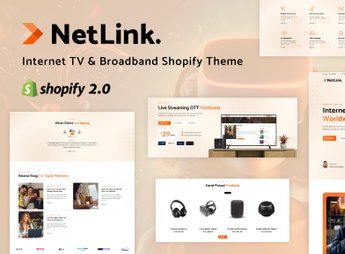
Description
Netlink builds a Shopify store geared towards internet broadband providers, cable TV, and camera monitoring services, with plan pages, package comparison, coverage map, and equipment catalog. The theme is for those who sell broadband internet plans, cable TV, or CCTV kits and need to organize price, speed, and coverage clearly so the customer can decide instantly.
Main Features of Netlink
- Plan Comparator
Displays speed, price, and benefits of each package side by side. - Equipment Catalog
Lists routers, antennas, and cameras along with subscription plans. - Coverage Section
Shows in which neighborhoods or cities the service is available. - Contract Form
Provides a field for the customer to request installation directly through the website. - Editable Shopify Sections
Allows you to assemble the homepage with drag-and-drop blocks.
Benefits of Netlink
- Fast Customer Decision
Reduces doubt when choosing between similar plans. - Less Calls to Support
Anticipates common questions about coverage and value directly on the page. - Catalog and Service Together
Combines equipment sales and plan contracting in one place. - Visual Adapted to the Segment
Avoids using a generic fashion theme to sell internet.
Who is Netlink Recommended For?
- Those who manage a regional internet provider and sell plans and equipment through the website.
- Those who assemble camera and monitoring kits with installation service.
- Those who resell satellite cable TV and need a package comparator.
- Those who serve specific neighborhoods and need to make the service coverage area clear.
How to Download Netlink
Netlink is available for download here at Ultrapack. After downloading the file, install via the Shopify store in Online Store > Themes > Add theme, sending the .zip package through the panel. The plan and coverage sections arrive ready to receive the provider’s data.
For those who work in a segment outside of traditional retail, having a theme designed for service sales avoids adapting a fashion or electronics layout. The structure by plans and coverage is born aligned with the way this type of contracting is sold.
Frequently asked questions
Is Netlink – CCTV, Broadband Services, Internet & Satellite Shopify Theme GPL?
Yes. Netlink – CCTV, Broadband Services, Internet & Satellite Shopify Theme is distributed under the GPL (GNU General Public License). You may legally use, modify and redistribute it on as many sites as you want.
Can I use Netlink – CCTV, Broadband Services, Internet & Satellite Shopify Theme on more than one site?
Yes. You can use Netlink – CCTV, Broadband Services, Internet & Satellite Shopify Theme on as many sites as you want.
How much does Netlink – CCTV, Broadband Services, Internet & Satellite Shopify Theme cost at Ultrapack?
Netlink – CCTV, Broadband Services, Internet & Satellite Shopify Theme costs US$2.99 as a single purchase, and it is also included in the subscription plans starting at US$17/mo (Desenvolvedor I).
Does Netlink – CCTV, Broadband Services, Internet & Satellite Shopify Theme include updates?
When a new version of Netlink – CCTV, Broadband Services, Internet & Satellite Shopify Theme becomes available in the catalog, you can download the file during the access period of your purchase or subscription. To update, follow the installation or import procedure described in the documentation for the item and its platform.
Is Netlink – CCTV, Broadband Services, Internet & Satellite Shopify Theme checked before it is made available for download?
Files for Netlink – CCTV, Broadband Services, Internet & Satellite Shopify Theme are scanned before publication by UltraHub using ClamAV and YARA rules to detect known threats. This check does not guarantee the absence of risks. Check the item requirements, make a backup, and follow the installation or import instructions for its platform.
How to install
Updates: manual. When a new version comes out, download it on this same page and upload the new file from the Shopify admin. This item is not installed through WordPress.
A Shopify theme is not installed on WordPress. It is uploaded in your store dashboard.
- Download the file
elements-netlink-cctv-broadband-services-shopify-theme.zipand extract it on your computer. - Inside the package, look for the theme ZIP, which is the file Shopify accepts. It is usually in a folder named after the theme, and it has the
assets,layout,sectionsandtemplatesfolders inside. - In the Shopify dashboard, go to Online Store > Themes.
- Under Theme library, click Add theme > Upload zip file and upload the theme ZIP.
- Use Preview to check it, and Publish when you want it live.
- Shopify rejects packages that are too large. If the upload fails because of size, take the documentation and demo files out of the folder before zipping it.
Stuck on a step? Open a ticket telling us which one you stopped at.