

Description
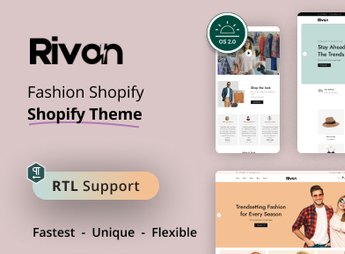
Welcome to Rivon – Fashion Store Shopify Theme OS 2.0. This is a theme specially developed for fashion stores on Shopify. With Rivon, fashion store owners have the opportunity to showcase their products in an elegant and contemporary way, creating an engaging and optimized shopping experience for customers.
Key Features
- Responsive Layout:
Rivon features a responsive design, providing an optimized user experience on any type of device. - Drag and Drop Builder:
With the drag-and-drop builder, it is easy and quick to customize your website’s layout. - SEO Optimized:
Rivon is optimized for SEO, ensuring that your online store is ready to be found by search engines. - Customizable Color Palette:
Customize the theme’s color palette to match your brand’s visual identity. - Included Pages:
Rivon comes with ready-made pages such as: Home page, Collection, Product, Blog, About Us, Contact. - Instagram Integration:
Rivon allows integration with Instagram, providing an easy way to share your images and increase your reach.
Benefits of Rivon – Fashion Store Shopify Theme OS 2.0
- Attractive aesthetics: With Rivon, your fashion store will stand out with a modern and elegant look.
- Ease of use: The drag-and-drop builder makes theme customization a simple task.
- High online visibility: Thanks to SEO optimization, your store will be more visible in search engines.
- Brand Customization: Customize the color palette so that your online store matches your brand’s visual identity.
Who Is It For?
- Fashion stores looking to improve their online presence.
- Companies that want an easy-to-use and customizable solution for their online store.
- Businesses seeking greater visibility in search engines.
- Stores that want to provide an optimized shopping experience for their customers.
Choosing Rivon – Fashion Store Shopify Theme OS 2.0 means choosing an elegant, easy-to-use, and SEO-optimized online store. With Rivon, you can provide an engaging and efficient shopping experience for your customers, standing out in the competitive fashion market. Invest in Rivon and take your fashion store to the next level.
Frequently asked questions
Is Rivon – Fashion Store Shopify Theme OS 2.0 GPL?
Yes. Rivon – Fashion Store Shopify Theme OS 2.0 is distributed under the GPL (GNU General Public License). You may legally use, modify and redistribute it on as many sites as you want.
Can I use Rivon – Fashion Store Shopify Theme OS 2.0 on more than one site?
Yes. You can use Rivon – Fashion Store Shopify Theme OS 2.0 on as many sites as you want.
How much does Rivon – Fashion Store Shopify Theme OS 2.0 cost at Ultrapack?
Rivon – Fashion Store Shopify Theme OS 2.0 costs US$2.99 as a single purchase, and it is also included in the subscription plans starting at US$17/mo (Desenvolvedor I).
Does Rivon – Fashion Store Shopify Theme OS 2.0 include updates?
When a new version of Rivon – Fashion Store Shopify Theme OS 2.0 becomes available in the catalog, you can download the file during the access period of your purchase or subscription. To update, follow the installation or import procedure described in the documentation for the item and its platform.
Is Rivon – Fashion Store Shopify Theme OS 2.0 checked before it is made available for download?
Files for Rivon – Fashion Store Shopify Theme OS 2.0 are scanned before publication by UltraHub using ClamAV and YARA rules to detect known threats. This check does not guarantee the absence of risks. Check the item requirements, make a backup, and follow the installation or import instructions for its platform.
How to install
Updates: manual. When a new version comes out, download it on this same page and upload the new file from the Shopify admin. This item is not installed through WordPress.
A Shopify theme is not installed on WordPress. It is uploaded in your store dashboard.
- Download the file
elements-rivon-fashion-store-shopify-theme-os-2-0.zipand extract it on your computer. - Inside the package, look for the theme ZIP, which is the file Shopify accepts. It is usually in a folder named after the theme, and it has the
assets,layout,sectionsandtemplatesfolders inside. - In the Shopify dashboard, go to Online Store > Themes.
- Under Theme library, click Add theme > Upload zip file and upload the theme ZIP.
- Use Preview to check it, and Publish when you want it live.
- Shopify rejects packages that are too large. If the upload fails because of size, take the documentation and demo files out of the folder before zipping it.
Stuck on a step? Open a ticket telling us which one you stopped at.


