

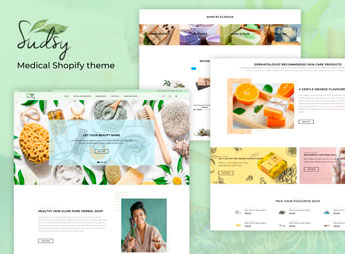
Description
Sudsy transforms the catalog of handmade soaps into a showcase by texture and fragrance, with filters for skin type and vegan ingredient badges on each product. It caters to those who sell bar soap, scrub, or solid shampoo bar and need to guide the customer to the right fragrance without wasting time explaining each option in the customer service chat, even with a large catalog of scent variations.
Key Features of Sudsy
- Filter by skin type
Allows the customer to filter products by oily, dry, or sensitive skin. - Vegan ingredient badge
Marks each product with vegan, cruelty-free, or chemical-free icons. - Fragrance comparator
Shows side by side the olfactory notes of two or more soap bars. - Recurring subscription block
Allows configuring monthly delivery for those who frequently buy soap. - Sample kits in bundle
Groups miniatures of different fragrances into a single kit for testing.
Benefits of Sudsy
- Less doubt in customer service
Reduces repeated questions about fragrance, texture, and skin type indicated. - Predictable recurring revenue
Generates a fixed monthly revenue with customers enrolled in automatic soap delivery. - Higher average ticket
Encourages the purchase of kits with various fragrances instead of just one unit. - Product visual identity
Uses pastel tones and texture photography to reinforce the handcrafted feel.
Who is Sudsy for?
- Those who manufacture handmade bar soap or solid shampoo.
- Natural skincare brands with a line of varied fragrances.
- Those who sell gift sets with bath products.
- Ateliers that test a monthly subscription model.
How to Download Sudsy
Sudsy is available for download here on Ultrapack. After downloading the file, access Storefront > Themes > Add theme in the Shopify panel, upload the package, and activate Sudsy to apply the filters and fragrance layout to the store.
Those who create a line of soaps with various fragrances gain an organized way to show each option without confusing first-time buyers. The layout already separates product, ingredient, and subscription into distinct blocks, ready to receive photos and descriptions specific to the brand.
Frequently asked questions
Is Sudsy – Handmade Shopify Theme GPL?
Yes. Sudsy – Handmade Shopify Theme is distributed under the GPL (GNU General Public License). You may legally use, modify and redistribute it on as many sites as you want.
Can I use Sudsy – Handmade Shopify Theme on more than one site?
Yes. You can use Sudsy – Handmade Shopify Theme on as many sites as you want.
How much does Sudsy – Handmade Shopify Theme cost at Ultrapack?
Sudsy – Handmade Shopify Theme costs US$2.99 as a single purchase, and it is also included in the subscription plans starting at US$17/mo (Desenvolvedor I).
Does Sudsy – Handmade Shopify Theme include updates?
When a new version of Sudsy – Handmade Shopify Theme becomes available in the catalog, you can download the file during the access period of your purchase or subscription. To update, follow the installation or import procedure described in the documentation for the item and its platform.
Is Sudsy – Handmade Shopify Theme checked before it is made available for download?
Files for Sudsy – Handmade Shopify Theme are scanned before publication by UltraHub using ClamAV and YARA rules to detect known threats. This check does not guarantee the absence of risks. Check the item requirements, make a backup, and follow the installation or import instructions for its platform.
How to install
Updates: manual. When a new version comes out, download it on this same page and upload the new file from the Shopify admin. This item is not installed through WordPress.
A Shopify theme is not installed on WordPress. It is uploaded in your store dashboard.
- Download the file
elements-sudsy-handmade-shopify-theme.zipand extract it on your computer. - Inside the package, look for the theme ZIP, which is the file Shopify accepts. It is usually in a folder named after the theme, and it has the
assets,layout,sectionsandtemplatesfolders inside. - In the Shopify dashboard, go to Online Store > Themes.
- Under Theme library, click Add theme > Upload zip file and upload the theme ZIP.
- Use Preview to check it, and Publish when you want it live.
- Shopify rejects packages that are too large. If the upload fails because of size, take the documentation and demo files out of the folder before zipping it.
Stuck on a step? Open a ticket telling us which one you stopped at.



