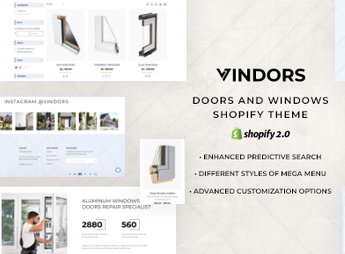
Description
Vindors sets up a Shopify store aimed at those who manufacture, sell, or install doors, windows, and frames, with product pages that detail measurements, materials, available colors, and the installation service offered for each model in the catalog. It serves those who cater to construction projects, renovations, or replacements of doors and windows in residences, condominiums, and businesses, with a budget created from the online catalog itself, without needing a prior technical visit.
Main Features of Vindors
- Product specification sheet
Displays measurements, materials, and available colors for each model. - Catalog by category
Separates doors, windows, and frames into their own sections of the store. - Service block
Describes the installation offered along with the product sale. - Image gallery
Shows the product installed in different environments and projects. - Budget form
Allows the customer to request a budget directly from the product page.
Benefits of Vindors
- Faster budgeting
Reduces back-and-forth messaging to clarify measurement details. - Clearer catalog
Facilitates comparing door and window models side by side. - More confidence in the purchase
Shows the product installed before finalizing the order. - Always up-to-date catalog
Replaces the PDF catalog with a navigable and updated store.
Who is Vindors Recommended For?
- Those who manufacture or sell custom doors, windows, and frames.
- Those who provide installation services for frames in construction and renovations.
- Those who serve condominiums and construction companies with recurring window requests.
- Those who want to replace WhatsApp budgeting with an online catalog.
How to Download Vindors
Vindors is available for download here on Ultrapack. After downloading the file, install it through the path Online Store > Themes > Add theme in the Shopify panel. Then, publish the theme and register the specification sheets for each model.
It’s worth registering the complete specification sheet for each model before promoting the store, including measurements, material, and color options. This reduces doubt messages and makes the initial budget closer to the final agreed value with the customer.
Frequently asked questions
Is Vindors – Door Systems & Windows Shopify Theme GPL?
Yes. Vindors – Door Systems & Windows Shopify Theme is distributed under the GPL (GNU General Public License). You may legally use, modify and redistribute it on as many sites as you want.
Can I use Vindors – Door Systems & Windows Shopify Theme on more than one site?
Yes. You can install Vindors – Door Systems & Windows Shopify Theme on as many sites as you want. Only automatic updates through Ultrapack Auto Updater have a limit: from 3 to 80 sites, depending on the plan.
How much does Vindors – Door Systems & Windows Shopify Theme cost at Ultrapack?
Vindors – Door Systems & Windows Shopify Theme costs US$2.99 as a single purchase, and it is also included in the subscription plans starting at US$12/mo (VIP I).
Does Vindors – Door Systems & Windows Shopify Theme include updates?
Yes. The current version of Vindors – Door Systems & Windows Shopify Theme is 1.0, published at Ultrapack on Nov 21, 2024. Subscribers update straight from the WordPress dashboard with UAU (Ultrapack Auto Updater).
Is Vindors – Door Systems & Windows Shopify Theme scanned before publication?
Yes. Every version of Vindors – Door Systems & Windows Shopify Theme goes through a malware scan (ClamAV and YARA rules, at UltraHub) before it is published.
How to install
Updates: manual. When a new version comes out, download it on this same page and upload the new file from the Shopify admin. This item is not installed through WordPress.
A Shopify theme is not installed on WordPress. It is uploaded in your store dashboard.
- Download the file
elements-vindors-door-systems-windows-shopify-theme.zipand extract it on your computer. - Inside the package, look for the theme ZIP, which is the file Shopify accepts. It is usually in a folder named after the theme, and it has the
assets,layout,sectionsandtemplatesfolders inside. - In the Shopify dashboard, go to Online Store > Themes.
- Under Theme library, click Add theme > Upload zip file and upload the theme ZIP.
- Use Preview to check it, and Publish when you want it live.
- Shopify rejects packages that are too large. If the upload fails because of size, take the documentation and demo files out of the folder before zipping it.
Stuck on a step? Open a ticket telling us which one you stopped at.