Description
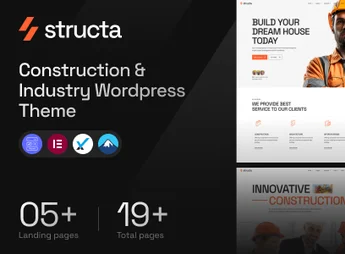
Structa is a WordPress theme built for construction companies, industrial businesses, and architecture firms, with clean layouts that let you build complete construction sites and adapt to desktop, tablet, and mobile. Simple installation and one-click demo import set up the entire site right after activation, with new demos released every two weeks by the author.
Key Features of Structa
- One-click demo import
Reproduces a complete site with pages, menus, and content right after theme activation. - Demos by segment
Includes ready-made templates for construction companies, industrial services, interior design, and architecture. - New demos every two weeks
The author keeps a continuous release cycle of new layouts for the theme. - Responsive layouts
Pages adapt to desktop, tablet, and smartphone screens with no manual code adjustments. - Visual editing with Elementor
Lets you build and reorder sections by dragging blocks directly in the editor.
Benefits of Structa
- Site live in a short time
The imported demo removes the step of building each page from scratch. - Less reliance on a developer
Text, images, and sections are adjusted directly in the visual editor. - Growing catalog
New layouts expand your design options without requiring a theme switch. - Readable on any screen
Quote requests and contacts also come in from people browsing on mobile at the job site.
Who Is Structa For?
- Anyone running construction, renovation, or building services who needs a site to showcase completed projects.
- Architecture and interior design firms that want to display a visual portfolio organized by project.
- Industries, factories, and technical service providers that need to publish their lines of work and a contact channel.
- Anyone who needs to get a professional site live quickly, without hiring custom development.
How to Download Structa
Structa is available for download here on Ultrapack. Step-by-step instructions for installing this file are in the How to install tab, next to the description. Once activated, demo import options and theme settings appear in the WordPress dashboard.
Among niche construction themes, Structa stands out on a practical point: its demo set covers everything from residential renovation companies to mid-size industrial businesses, so the same theme fits very different client profiles. For anyone delivering sites in this sector regularly, that cuts down on the work of starting from a blank base with every new project.
Frequently asked questions
Is Structa – Construction & Industry WordPress Theme GPL-licensed?
Yes. Structa – Construction & Industry WordPress Theme is distributed under the GPL (GNU General Public License). You may legally use, modify and redistribute it on as many sites as you want.
Can I use Structa – Construction & Industry WordPress Theme on multiple sites?
Yes. You can install Structa – Construction & Industry WordPress Theme on as many sites as you want. Only automatic updates through Ultrapack Auto Updater have a limit: from 3 to 80 sites, depending on the plan.
How much does Structa – Construction & Industry WordPress Theme cost at Ultrapack?
Structa – Construction & Industry WordPress Theme costs US$2.99 as a single purchase, and it is also included in the subscription plans starting at US$12/mo (VIP I).
Does Structa – Construction & Industry WordPress Theme include updates?
Yes. The current version of Structa – Construction & Industry WordPress Theme is 1.0.0, published at Ultrapack on Aug 3, 2026. Subscribers update straight from the WordPress dashboard with UAU (Ultrapack Auto Updater).
Is Structa – Construction & Industry WordPress Theme scanned before publication?
Yes. Every version of Structa – Construction & Industry WordPress Theme goes through a malware scan (ClamAV and YARA rules, at UltraHub) before it is published.
What are the requirements for the theme Structa – Construction & Industry WordPress Theme?
Requires WordPress 5.5 or higher and PHP 7.0 or higher. Tested up to WordPress 6.0.
How to install
Updates: manual. When a new version comes out, download it on this same page and upload it over the old one; WordPress asks whether you want to replace the current version.
The file on this page is the developer’s full package, with documentation, demos and plugins. Do not upload that file to WordPress. The theme comes ready inside it, as a ZIP of its own, and that is the one you upload.
- Download the file
elements-structa-construction-industry-wordpress-theme.zipand extract it on your computer. - Look inside the extracted files for the file
Structa-Main-File/structa.zip. - In the WordPress dashboard, go to Appearance > Themes > Add New > Upload Theme.
- Select that file and click Install Now.
- Click Activate.
Requirements: Requires WordPress 5.5 or higher and PHP 7.0 or higher. Tested up to WordPress 6.0.
- There is nothing to zip. The ZIP inside the package is already in the format WordPress accepts.
- Uploading the whole package is the most common mistake when installing a theme: WordPress answers that no valid theme was found, and nothing is installed.
- The rest of the package belongs to the author: documentation, demo files and, in some themes, the plugins it asks for during setup.
Stuck on a step? Open a ticket telling us which one you stopped at.