

 UAU Ready
Description
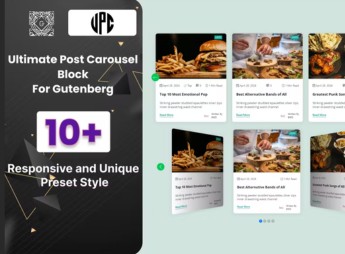
The BWD Post Carousel Block For Gutenberg adds a native Gutenberg editor block to display recent or popular posts in a carousel, with adjustable quantity, category, sorting, spacing, and rotation speed controls directly in the block’s sidebar. Those who edit pages and posts directly in Gutenberg assemble featured sections with content from the website itself, without needing to install a separate slider plugin or edit theme code or templates.
Key Features of the BWD Post Carousel Block For Gutenberg
- Native Gutenberg block
Appears directly in the blocks list, without needing a shortcode. - Category filter
Selects which post categories or tags appear in the carousel. - Quantity control
Defines how many posts appear at once and how many remain visible on screen. - Rotation speed
Adjusts the interval for switching between the displayed posts in the carousel. - Configurable visual style
Changes spacing, borders, and image proportion directly in the sidebar.
Benefits of the BWD Post Carousel Block For Gutenberg
- No additional plugin
Replaces the need to install a separate slider to display posts. - Increased page time
Encourages the visitor to navigate more content from the website itself. - Code-free editing
Adjusts the carousel directly in the visual editor, without modifying CSS. - Highlighting older content
Recovers posts published longer ago and gives them visibility again.
Who is the BWD Post Carousel Block For Gutenberg Recommended For?
- Those who edit blogs and news sites with the Gutenberg editor.
- Those who manage institutional pages and want to highlight related content.
- Those who build websites for clients without relying on extra slider plugins.
How to Download the BWD Post Carousel Block For Gutenberg
The BWD Post Carousel Block For Gutenberg is available for download here on Ultrapack. Installation is done in Plugins > Add New > Upload plugin, followed by standard WordPress activation. After activation, the file adds the carousel block to the editor’s blocks list.
Keeping visitors navigating through more pages of the website often depends on small details, such as showing related content at the right time during reading. A well-positioned post carousel helps to reuse already published material without requiring extra formatting work for each new post.
Frequently asked questions
Is BWD Post Carousel Block For Gutenberg GPL-licensed?
Yes. BWD Post Carousel Block For Gutenberg is distributed under the GPL (GNU General Public License). You may legally use, modify and redistribute it on as many sites as you want.
Can I use BWD Post Carousel Block For Gutenberg on multiple sites?
Yes. You can use BWD Post Carousel Block For Gutenberg on multiple sites. The number of sites connected to Ultrapack Auto Updater is limited by your plan.
How much does BWD Post Carousel Block For Gutenberg cost at Ultrapack?
BWD Post Carousel Block For Gutenberg costs US$2.99 as a single purchase, and it is also included in the subscription plans starting at US$12/mo (VIP I).
Does BWD Post Carousel Block For Gutenberg include updates?
Yes. The current version of BWD Post Carousel Block For Gutenberg is 1.4, published at Ultrapack on Mar 5, 2025. Subscribers update straight from the WordPress dashboard with UAU (Ultrapack Auto Updater).
Is BWD Post Carousel Block For Gutenberg scanned before publication?
Yes. Every version of BWD Post Carousel Block For Gutenberg goes through a malware scan (ClamAV and YARA rules, at UltraHub) before it is published.
How to install
Automatic updates: this item is updated by the Ultrapack Auto Updater. With it installed, the new version shows up in your dashboard like any other WordPress update (how to set it up).
The file on this page is the developer’s full package, documentation included. Do not upload that file through the dashboard: WordPress answers that the package does not contain a valid plugin. The plugin comes ready inside it, as a ZIP of its own, and that is the one you upload.
- Download the file
elements-post-carousel-block-for-gutenberg.zipand extract it on your computer. - Look inside the extracted files for the file
ultimate-post-carousel-block-main/ultimate-post-carousel-block.zip. - In the WordPress dashboard, go to Plugins > Add New > Upload Plugin.
- Select that file, click Install Now and then Activate.
- There is nothing to zip. The ZIP inside the package is already in the format WordPress accepts.
- The rest of the package belongs to the author: documentation, license and sometimes sample files. None of that is installed through the dashboard.
Stuck on a step? Open a ticket telling us which one you stopped at.


