

 UAU Ready
Description
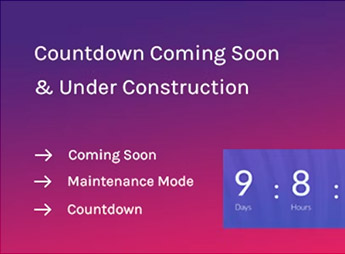
Coming Soon Widget for Elementor adds a set of native widgets to the Elementor builder to create “coming soon” and “maintenance” pages with countdown timer, subscription form, and editable animated backgrounds in visual mode. Configuration happens directly in the Elementor panel, with controls for target date, messages, colors, typography, and background image, eliminating the need for custom code during the launch of a new website or a seasonal campaign.
Main Features
- Dedicated widgets for Elementor: drag ready-made coming soon and countdown blocks into any section of the page.
- Configurable countdown timer: set final date and time, display format in days, hours, minutes, and seconds.
- Integrated capture form: collect emails from interested visitors during the pre-launch period.
- Complete visual customization: adjust colors, typography, spacing, and background images through the Elementor editor.
- Compatibility with WordPress themes: works over existing layouts without requiring additional active theme configuration.
Benefits of Coming Soon Widget for Elementor
- Agile launch: publish a professional waiting page in minutes without relying on a separate maintenance mode plugin.
- Expectation generation: the countdown timer creates a sense of urgency and anticipation among the audience.
- List building: the form turns curious visitors into qualified contacts before go-live.
- Unified workflow: keeps editing within Elementor, avoiding switching between different panels.
Who Is It For?
- Agencies and freelancers delivering new websites who need an elegant temporary page during development.
- Entrepreneurs and marketing teams preparing the launch of a product, service, or online store.
- Site owners undergoing maintenance who want to communicate deadlines and capture interested parties without exposing the final structure.
Coming Soon Widget for Elementor shortens the gap between the idea of a launch and a public page ready to receive traffic. By concentrating countdown, email capture, and visual customization in widgets within Elementor itself, it effectively serves those who need to convey professionalism during the pre-launch phase and still come away with a contact base ready for the debut.
Frequently asked questions
Is Coming Soon Widget for Elementor GPL-licensed?
Yes. Coming Soon Widget for Elementor is distributed under the GPL (GNU General Public License). You may legally use, modify and redistribute it on as many sites as you want.
Can I use Coming Soon Widget for Elementor on multiple sites?
Yes. You can install Coming Soon Widget for Elementor on as many sites as you want. Only automatic updates through Ultrapack Auto Updater have a limit: from 3 to 80 sites, depending on the plan.
How much does Coming Soon Widget for Elementor cost at Ultrapack?
Coming Soon Widget for Elementor costs US$2.99 as a single purchase, and it is also included in the subscription plans starting at US$12/mo (VIP I).
Does Coming Soon Widget for Elementor include updates?
Yes. The current version of Coming Soon Widget for Elementor is 1.0.1, published at Ultrapack on May 16, 2023. Subscribers update straight from the WordPress dashboard with UAU (Ultrapack Auto Updater).
Is Coming Soon Widget for Elementor scanned before publication?
Yes. Every version of Coming Soon Widget for Elementor goes through a malware scan (ClamAV and YARA rules, at UltraHub) before it is published.
How to install
Automatic updates: this item is updated by the Ultrapack Auto Updater. With it installed, the new version shows up in your dashboard like any other WordPress update (how to set it up).
The file on this page is the developer’s full package. Do not upload that file through the dashboard: WordPress answers that the package does not contain a valid plugin. Inside it there are one or more ZIP files, and one of them is what you install.
- Download the file
elements-coming-soon-widget-for-elementor.zipand extract it on your computer. - Look for the
.zipfiles inside. The plugin is the one named after the product. - In the WordPress dashboard, go to Plugins > Add New > Upload Plugin and upload that ZIP file.
- Click Install Now and then Activate.
- There is nothing to zip. The ZIP inside the package is already in the format WordPress accepts.
- Some packages carry more than one plugin: the main one and its add-ons. Install the ones you are going to use, each one the same way.
- If there is a documentation folder, it is not installed. It is reading material from the author.
Stuck on a step? Open a ticket telling us which one you stopped at.


