

 UAU Ready
Description
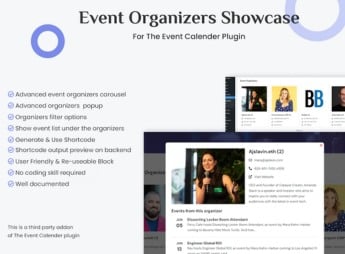
The Event Organizers Showcase for The Event Calendar displays event organizers in responsive carousels on WordPress, generating unlimited shortcodes to insert the blocks into any page, post, or site widget. Each carousel opens a popup with organizer details, event count, and a list of linked events, with live AJAX preview in the admin panel during shortcode configuration.
Main Features
- Unlimited carousels via shortcode: generate as many organizer carousels as you want and insert them into pages, posts, or widget areas using individual shortcodes.
- Live AJAX preview in the panel: see the carousel output in real-time while configuring the shortcode, before publishing it to the front-end.
- Popup with organizer details: clicking the carousel opens a window with organizer information, event count, and a list of associated events, with a Load More button.
- Responsive design with device controls: adjust the number of slides shown, navigation, and carousel behavior separately for desktop, tablet, and mobile.
- Visual customization and custom CSS: set borders, colors, hover effects, and add your own CSS rules to harmonize the carousel with the active theme.
Benefits of Event Organizers Showcase for The Event Calendar
- Works without The Events Calendar Pro: runs on the free version of The Event Calendar, without requiring a paid license of the base plugin to display the carousels.
- Highlight for organizers: gives visibility to the professionals and companies responsible for each event, connecting them directly to the site’s schedule.
- Quick implementation in any layout: the shortcode logic lets you insert the component into the home page, sidebar, footer, or landing pages without editing templates.
- Expanded compatibility: supports RTL, multilingual content, Gutenberg optimization, and built-in SEO, serving sites in various language contexts.
Who it’s Recommended For?
- Event sites, conferences, seminars, and celebrations that already use The Event Calendar and need to highlight organizers.
- Cultural agencies and production companies that manage multiple partners and want to showcase each organizer’s brand alongside the schedule.
- Portals of courses, workshops, and meetups that rely on conveying the credibility of speakers and institutions behind each event.
Recommended for administrators of event sites that already operate with The Event Calendar and want to expand the presentation of organizers beyond the default event details page. The combination of configurable carousels, popup with organizer event listing, and live AJAX preview in the admin reduces the time between building the component and publishing it, keeping visual control over each distributed block across the site.
Frequently asked questions
Is Event Organizers Showcase for The Event Calendar GPL-licensed?
Yes. Event Organizers Showcase for The Event Calendar is distributed under the GPL (GNU General Public License). You may legally use, modify and redistribute it on as many sites as you want.
Can I use Event Organizers Showcase for The Event Calendar on multiple sites?
Yes. You can install Event Organizers Showcase for The Event Calendar on as many sites as you want. Only automatic updates through Ultrapack Auto Updater have a limit: from 3 to 80 sites, depending on the plan.
How much does Event Organizers Showcase for The Event Calendar cost at Ultrapack?
Event Organizers Showcase for The Event Calendar costs US$2.99 as a single purchase, and it is also included in the subscription plans starting at US$12/mo (VIP I).
Does Event Organizers Showcase for The Event Calendar include updates?
Yes. The current version of Event Organizers Showcase for The Event Calendar is 1.0.1, published at Ultrapack on Apr 5, 2025. Subscribers update straight from the WordPress dashboard with UAU (Ultrapack Auto Updater).
Is Event Organizers Showcase for The Event Calendar scanned before publication?
Yes. Every version of Event Organizers Showcase for The Event Calendar goes through a malware scan (ClamAV and YARA rules, at UltraHub) before it is published.
How to install
Automatic updates: this item is updated by the Ultrapack Auto Updater. With it installed, the new version shows up in your dashboard like any other WordPress update (how to set it up).
The file on this page is the developer’s full package, documentation included. Do not upload that file through the dashboard: WordPress answers that the package does not contain a valid plugin. The plugin comes ready inside it, as a ZIP of its own, and that is the one you upload.
- Download the file
elements-event-organizers-showcase-for-the-event-calendar.zipand extract it on your computer. - Look inside the extracted files for the file
event-organizers-showcase-main/event-organizers-showcase.zip. - In the WordPress dashboard, go to Plugins > Add New > Upload Plugin.
- Select that file, click Install Now and then Activate.
- There is nothing to zip. The ZIP inside the package is already in the format WordPress accepts.
- The rest of the package belongs to the author: documentation, license and sometimes sample files. None of that is installed through the dashboard.
Stuck on a step? Open a ticket telling us which one you stopped at.



