

 UAU Ready
Description
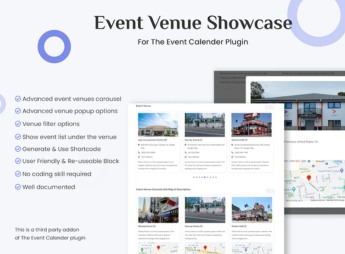
Event Venue Showcase for The Event Calendar creates a showcase page for the event venues registered in The Events Calendar, with filtering by city, an interactive map, venue photo, facility description, and a list of events scheduled per venue. It serves those who organize fairs, shows, or conferences at multiple addresses and need to display each venue with address, photo, audience capacity, and its own schedule of upcoming events.
Main Features of Event Venue Showcase for The Event Calendar
- Venue Showcase
Grid with each registered venue, cover photo, and full address. - Filter by City
Lets the visitor search for an event venue by region or neighborhood. - Interactive Map
Displays the location of each venue on a map embedded in the page. - Schedule by Venue
Lists the upcoming events linked to each address registered in the calendar. - Venue Profile
Individual page with description, capacity, and photo of each venue.
Benefits of Event Venue Showcase for The Event Calendar
- Venue Promotion
Gives its own visibility to each address, without mixing everything into a single list. - Navigation by Region
Helps the visitor find an event near home through the city filter. - Direct Integration
Uses the venues already registered in The Events Calendar without duplicating data. - Schedule Organization
Groups upcoming events by address, useful for those who have multiple venues.
Who Is Event Venue Showcase for The Event Calendar For?
- Those who organize fairs or exhibitions that change address with each edition.
- Those who manage an event space with multiple rooms or sections.
- Those who promote shows and festivals in different cities throughout the year.
- Event venues that rent out the space for third parties to organize.
How to Download Event Venue Showcase for The Event Calendar
Event Venue Showcase for The Event Calendar is available for download here at Ultrapack. After downloading the file, install it via Plugins > Add New > Upload Plugin with The Events Calendar already active on the site.
The plugin turns a simple list of addresses into its own section of the site, with photo, map, and schedule linked to each venue. This helps anyone dealing with an audience across more than one address keep the information up to date without relying on standalone posts.
Frequently asked questions
Is Event Venue Showcase for The Event Calendar GPL-licensed?
Yes. Event Venue Showcase for The Event Calendar is distributed under the GPL (GNU General Public License). You may legally use, modify and redistribute it on as many sites as you want.
Can I use Event Venue Showcase for The Event Calendar on multiple sites?
Yes. You can install Event Venue Showcase for The Event Calendar on as many sites as you want. Only automatic updates through Ultrapack Auto Updater have a limit: from 3 to 80 sites, depending on the plan.
How much does Event Venue Showcase for The Event Calendar cost at Ultrapack?
Event Venue Showcase for The Event Calendar costs US$2.99 as a single purchase, and it is also included in the subscription plans starting at US$12/mo (VIP I).
Does Event Venue Showcase for The Event Calendar include updates?
Yes. The current version of Event Venue Showcase for The Event Calendar is 1.0.2, published at Ultrapack on Apr 5, 2025. Subscribers update straight from the WordPress dashboard with UAU (Ultrapack Auto Updater).
Is Event Venue Showcase for The Event Calendar scanned before publication?
Yes. Every version of Event Venue Showcase for The Event Calendar goes through a malware scan (ClamAV and YARA rules, at UltraHub) before it is published.
How to install
Automatic updates: this item is updated by the Ultrapack Auto Updater. With it installed, the new version shows up in your dashboard like any other WordPress update (how to set it up).
The file on this page is the developer’s full package, documentation included. Do not upload that file through the dashboard: WordPress answers that the package does not contain a valid plugin. The plugin comes ready inside it, as a ZIP of its own, and that is the one you upload.
- Download the file
elements-event-venue-showcase-for-the-event-calendar.zipand extract it on your computer. - Look inside the extracted files for the file
event-venue-showcase-main/event-venue-showcase.zip. - In the WordPress dashboard, go to Plugins > Add New > Upload Plugin.
- Select that file, click Install Now and then Activate.
- There is nothing to zip. The ZIP inside the package is already in the format WordPress accepts.
- The rest of the package belongs to the author: documentation, license and sometimes sample files. None of that is installed through the dashboard.
Stuck on a step? Open a ticket telling us which one you stopped at.



