Description
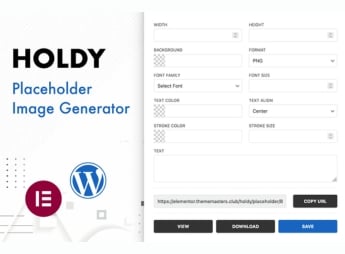
Holdy – Placeholder Image Generator & Widgets For Elementor creates custom placeholder images directly in the WordPress dashboard, adjusting dimensions, background color, and overlay text, and also adds two Elementor widgets dedicated to inserting these placeholders while building pages. Designed for designers and developers who prototype layouts in the builder, the plugin exposes a configurable URL API that generates, copies, downloads, or saves each image directly into the WordPress media library.
Key Features
- Generation via dashboard: creates placeholders in the WordPress dashboard by setting size, color, and overlay text.
- Widget Placeholder Generator: visual image generation tool within Elementor, also compatible with the Pro version.
- Widget Placeholder Image: inserts ready placeholder images into any section of a page built with Elementor.
- Placeholder API: configurable URL that returns the image with dimensions, color, and caption provided via parameters.
- Export actions: copies the link, downloads the file, or exports the result directly to the WordPress media library.
Benefits of Holdy – Placeholder Image Generator & Widgets For Elementor
- Faster prototyping: fills image blocks before the final content enters the project.
- Workflow within builder: avoids switching between Elementor and external placeholder generation services.
- Visual aligned with the project: adjusts color, size, and caption to match the evolving layout.
- Reusing via URL: the same API call serves multiple templates, emails, or test pages.
Who is it meant for?
- Designers who build mockups, wireframes, and approval screens in Elementor.
- WordPress developers in the early construction phase, before final images are ready.
- Agencies and freelancers who deliver clickable prototypes and demonstration templates to clients.
With PHP 8 requirement and GD extension enabled, Holdy – Placeholder Image Generator & Widgets For Elementor is aimed at those who work visually in the builder and need to fill image areas during the layout phase. For teams delivering wireframes, approval screens, and pages under construction before final content, it eliminates external placeholder services and keeps all files within the site itself.
Frequently asked questions
Is Holdy – Placeholder Image Generator & Widgets For Elementor GPL-licensed?
Yes. Holdy – Placeholder Image Generator & Widgets For Elementor is distributed under the GPL (GNU General Public License). You may legally use, modify and redistribute it on as many sites as you want.
Can I use Holdy – Placeholder Image Generator & Widgets For Elementor on multiple sites?
Yes. You can install Holdy – Placeholder Image Generator & Widgets For Elementor on as many sites as you want. Only automatic updates through Ultrapack Auto Updater have a limit: from 3 to 80 sites, depending on the plan.
How much does Holdy – Placeholder Image Generator & Widgets For Elementor cost at Ultrapack?
Holdy – Placeholder Image Generator & Widgets For Elementor costs US$2.99 as a single purchase, and it is also included in the subscription plans starting at US$12/mo (VIP I).
Does Holdy – Placeholder Image Generator & Widgets For Elementor include updates?
Yes. The current version of Holdy – Placeholder Image Generator & Widgets For Elementor is 1.0.0, published at Ultrapack on May 14, 2024. Subscribers update straight from the WordPress dashboard with UAU (Ultrapack Auto Updater).
Is Holdy – Placeholder Image Generator & Widgets For Elementor scanned before publication?
Yes. Every version of Holdy – Placeholder Image Generator & Widgets For Elementor goes through a malware scan (ClamAV and YARA rules, at UltraHub) before it is published.
How to install
Updates: manual. When a new version comes out, download it on this same page and upload it over the old one; WordPress asks whether you want to replace the current version.
The file on this page is the developer’s full package, documentation included. Do not upload that file through the dashboard: WordPress answers that the package does not contain a valid plugin. The plugin comes ready inside it, as a ZIP of its own, and that is the one you upload.
- Download the file
elements-holdy-placeholder-image-generator.zipand extract it on your computer. - Look inside the extracted files for the file
holdy.zip. - In the WordPress dashboard, go to Plugins > Add New > Upload Plugin.
- Select that file, click Install Now and then Activate.
- There is nothing to zip. The ZIP inside the package is already in the format WordPress accepts.
- The rest of the package belongs to the author: documentation, license and sometimes sample files. None of that is installed through the dashboard.
Stuck on a step? Open a ticket telling us which one you stopped at.