

 UAU Ready
Description
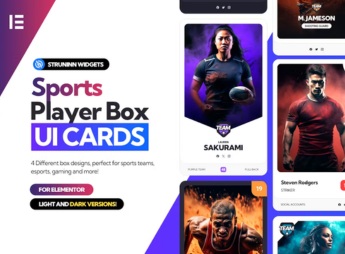
Struninn – Sports Player – UI Cards for Elementor adds a set of ready-made widgets to Elementor for displaying player and athlete cards, with dedicated areas for photo, jersey number, position, team, stats, and performance indicators. Built for club, league, sports blog, and fantasy game sites, the pack speeds up the creation of roster pages and individual profiles without any manual coding.
Key Features
- Native Elementor widgets: player card components you can drag straight into the visual editor.
- Varied UI card layouts: multiple ready-made designs to showcase athletes, lineups, and player profiles.
- Dedicated sports fields: blocks for name, number, position, nationality, age, and game stats.
- Full visual customization: control colors, typography, spacing, shadows, and borders right from the Elementor panel.
- Responsive design: specific adjustments for desktop, tablet, and mobile with instant preview.
Benefits of Struninn – Sports Player – UI Cards for Elementor
- Fast roster building: cuts the time it takes to create squad pages and athlete profile sheets.
- Consistent visual identity: keeps the same look across every player profile on the site.
- No developer needed: editors and content managers update cards without touching code.
- Built for sports content: components designed around the data structure teams and competitions actually use.
Who Is It For?
- Official sites for clubs, federations, youth programs, and sports academies.
- News portals, blogs, and digital magazines covering sports and fantasy game content.
- Agencies and freelancers building sites for teams, athletes, and sporting events in Elementor.
Sports communications teams and web studios get a ready-made set of player cards for Elementor, with fields already structured for the data they work with every day. The result: roster pages and individual profiles with a uniform presentation, direct editing in the visual builder, and quick updates all season long.
Frequently asked questions
Is Struninn – Sports Player – UI Cards for Elementor GPL-licensed?
Yes. Struninn – Sports Player – UI Cards for Elementor is distributed under the GPL (GNU General Public License). You may legally use, modify and redistribute it on as many sites as you want.
Can I use Struninn – Sports Player – UI Cards for Elementor on multiple sites?
Yes. You can install Struninn – Sports Player – UI Cards for Elementor on as many sites as you want. Only automatic updates through Ultrapack Auto Updater have a limit: from 3 to 80 sites, depending on the plan.
How much does Struninn – Sports Player – UI Cards for Elementor cost at Ultrapack?
Struninn – Sports Player – UI Cards for Elementor costs US$2.99 as a single purchase, and it is also included in the subscription plans starting at US$12/mo (VIP I).
Does Struninn – Sports Player – UI Cards for Elementor include updates?
Yes. The current version of Struninn – Sports Player – UI Cards for Elementor is 1.0.0, published at Ultrapack on Jul 7, 2024. Subscribers update straight from the WordPress dashboard with UAU (Ultrapack Auto Updater).
Is Struninn – Sports Player – UI Cards for Elementor scanned before publication?
Yes. Every version of Struninn – Sports Player – UI Cards for Elementor goes through a malware scan (ClamAV and YARA rules, at UltraHub) before it is published.
How to install
Automatic updates: this item is updated by the Ultrapack Auto Updater. With it installed, the new version shows up in your dashboard like any other WordPress update (how to set it up).
The file on this page is the developer’s full package, documentation included. Do not upload that file through the dashboard: WordPress answers that the package does not contain a valid plugin. The plugin comes ready inside it, as a ZIP of its own, and that is the one you upload.
- Download the file
elements-sports-player-box-elementor-ui-cards.zipand extract it on your computer. - Look inside the extracted files for the file
Struninn - Sports Player - UI Cards for Elementor/struninnuicards_sportsplayer.zip. - In the WordPress dashboard, go to Plugins > Add New > Upload Plugin.
- Select that file, click Install Now and then Activate.
- There is nothing to zip. The ZIP inside the package is already in the format WordPress accepts.
- The rest of the package belongs to the author: documentation, license and sometimes sample files. None of that is installed through the dashboard.
Stuck on a step? Open a ticket telling us which one you stopped at.


