Description
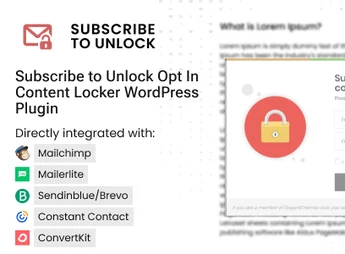
Subscribe To Unlock is a plugin that helps convert site visitors into subscribers. Ideal for those looking to optimize lead capture by providing exclusive content upon subscription to a newsletter or completion of other conversion actions.
Main Features
- Content triggers:
Allows creating exclusive content that can only be accessed after a visitor completes a specific action. - Message personalization:
Enables customizing of subscription request messages, making it easier to align with site layout. - SEO optimization:
Adheres to best SEO practices without harming site performance. - Email service integration:
Integrates with major email services, ensuring efficient subscriber management. - Display controls:
Allows determining where and when content locks appear on the site. - Responsive design:
Works perfectly on all devices, ensuring a consistent user experience.
Benefits of Subscribe To Unlock plugin
- Subscriber growth: Creates an efficient way to transform casual visitors into regular subscribers.
- User engagement: Encourages users to interact more with your site by providing exclusive content.
- Flexibility: With a variety of available settings, it adapts the subscriber acquisition strategy to your needs.
Who Should Use It?
- Sites that want to increase their subscriber base.
- Blogs that seek to engage more visitors.
- Online businesses that require a steady flow of leads for nurturing.
With Subscribe To Unlock, turning visitors into subscribers becomes a simple and effective task. Its complete and customizable features make it the ideal choice for sites that want to strengthen their relationship with the audience and build an engaged community.
Frequently asked questions
Is Subscribe to Unlock Opt In Content Locker WordPress Plugin GPL-licensed?
Yes. Subscribe to Unlock Opt In Content Locker WordPress Plugin is distributed under the GPL (GNU General Public License). You may legally use, modify and redistribute it on as many sites as you want.
Can I use Subscribe to Unlock Opt In Content Locker WordPress Plugin on multiple sites?
Yes. You can install Subscribe to Unlock Opt In Content Locker WordPress Plugin on as many sites as you want. Only automatic updates through Ultrapack Auto Updater have a limit: from 3 to 80 sites, depending on the plan.
How much does Subscribe to Unlock Opt In Content Locker WordPress Plugin cost at Ultrapack?
Subscribe to Unlock Opt In Content Locker WordPress Plugin costs US$2.99 as a single purchase, and it is also included in the subscription plans starting at US$12/mo (VIP I).
Does Subscribe to Unlock Opt In Content Locker WordPress Plugin include updates?
Yes. The current version of Subscribe to Unlock Opt In Content Locker WordPress Plugin is 2.1.2, published at Ultrapack on Aug 1, 2025. Subscribers update straight from the WordPress dashboard with UAU (Ultrapack Auto Updater).
Is Subscribe to Unlock Opt In Content Locker WordPress Plugin scanned before publication?
Yes. Every version of Subscribe to Unlock Opt In Content Locker WordPress Plugin goes through a malware scan (ClamAV and YARA rules, at UltraHub) before it is published.
How to install
Updates: manual. When a new version comes out, download it on this same page and upload it over the old one; WordPress asks whether you want to replace the current version.
- Download the file
elements-subscribe-to-unlock-opt-in-content-locker.zip. - In the WordPress dashboard, go to Plugins > Add New > Upload Plugin.
- Select the file
elements-subscribe-to-unlock-opt-in-content-locker.zipand click Install Now. - Click Activate.
Stuck on a step? Open a ticket telling us which one you stopped at.