 UAU Ready
Description
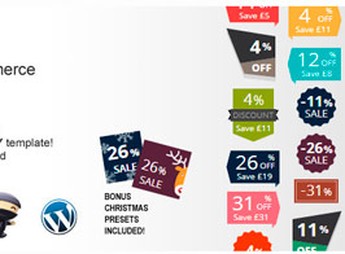
The Improved Sale Badges for WooCommerce enables the visual organization of concrete offers for anyone looking to highlight products on promotion and capture customers’ attention. With it, you turn WooCommerce standard sale badges into attractive, fully customizable graphic elements that can be configured globally or per product, making marketing campaign management much more efficient and dynamic.
Key Features of Improved Sale Badges for WooCommerce
- Replacement of Standard Badges
Swaps WooCommerce promotion badges for modern, customizable designs that grab attention. - Dynamic Discount Display
Shows price reductions as an exact percentage or the amount saved, clearly informing the customer. - Integrated Countdown Timers
Adds timers to offers to create a sense of urgency and drive quick purchases. - Professional Preset Library
Provides 17 styles of predefined badges, adaptable for different seasons, holidays, or events. - Badges with Customizable Text
Lets you create unique badges with personalized messages to highlight specific product attributes.
Benefits of Improved Sale Badges for WooCommerce
- Increase in Conversion Rate
Attractive badges and limited-time counters encourage fast buying decisions. - Brand Visual Consistency
Personalizes the style of promotion badges to align perfectly with your store’s identity. - Marketing Flexibility
Easily manages seasonal offers and specific campaigns for products or categories. - Product Management Optimization
Global and individual settings speed up the application and updating of promotional badges.
Who Is Improved Sale Badges for WooCommerce Intended For?
- Anyone selling products on WooCommerce and wanting to enhance promotions with a striking visual impact.
- You who need to create a sense of urgency in your offers, encouraging immediate purchase and inventory turnover.
- Anyone looking to harmonize the discount badge design with your brand’s visual identity while maintaining professionalism.
How to Download Improved Sale Badges for WooCommerce
The Improved Sale Badges for WooCommerce is available for download here on Ultrapack, ensuring immediate access to all its features. After downloading the .zip file, install it in Plugins > Add New > Upload plugin in the WordPress admin panel, selecting the file and activating it to start using. The plugin integrates with the WooCommerce dashboard to make configuration easier.
Transform the way your WooCommerce store presents promotions with Improved Sale Badges for WooCommerce, a robust tool to draw your customers’ attention. It optimizes the display of discounts and special offers, enabling clear and effective visual communication. Ideal for anyone looking not only to sell more, but also to professionalize the image of their online sales campaigns.
Frequently asked questions
Is Improved Sale Badges for WooCommerce GPL-licensed?
Yes. Improved Sale Badges for WooCommerce is distributed under the GPL (GNU General Public License). You may legally use, modify and redistribute it on as many sites as you want.
Can I use Improved Sale Badges for WooCommerce on multiple sites?
Yes. You can install Improved Sale Badges for WooCommerce on as many sites as you want. Only automatic updates through Ultrapack Auto Updater have a limit: from 3 to 80 sites, depending on the plan.
How much does Improved Sale Badges for WooCommerce cost at Ultrapack?
Improved Sale Badges for WooCommerce costs US$2.99 as a single purchase, and it is also included in the subscription plans starting at US$12/mo (VIP I).
Does Improved Sale Badges for WooCommerce include updates?
Yes. The current version of Improved Sale Badges for WooCommerce is 5.2.2, published at Ultrapack on Oct 13, 2025. Subscribers update straight from the WordPress dashboard with UAU (Ultrapack Auto Updater).
Is Improved Sale Badges for WooCommerce scanned before publication?
Yes. Every version of Improved Sale Badges for WooCommerce goes through a malware scan (ClamAV and YARA rules, at UltraHub) before it is published.
How to install
Automatic updates: this item is updated by the Ultrapack Auto Updater. With it installed, the new version shows up in your dashboard like any other WordPress update (how to set it up).
The file on this page is the developer’s full package. Do not upload that file through the dashboard: WordPress answers that the package does not contain a valid plugin. Inside it there are one or more ZIP files, and one of them is what you install.
- Download the file
codecanyon-9678382-improved-sale-badges-for-woocommerce.zipand extract it on your computer. - Look for the
.zipfiles inside. The plugin is the one named after the product. - In the WordPress dashboard, go to Plugins > Add New > Upload Plugin and upload that ZIP file.
- Click Install Now and then Activate.
- There is nothing to zip. The ZIP inside the package is already in the format WordPress accepts.
- Some packages carry more than one plugin: the main one and its add-ons. Install the ones you are going to use, each one the same way.
- If there is a documentation folder, it is not installed. It is reading material from the author.
Stuck on a step? Open a ticket telling us which one you stopped at.