

 UAU Ready
Description
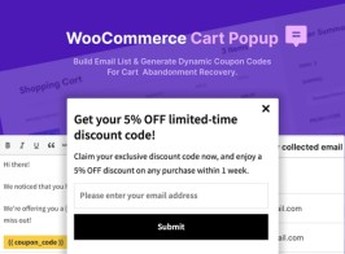
The WooCommerce Cart Popup – For Cart Abandonment Recovery displays an automatic popup when a visitor tries to leave the store with items in the cart, offering a configurable discount coupon to complete the purchase. This plugin integrates into WooCommerce a hover-mouse exit detector and inactivity timer, turning abandonment intentions into completed orders before the customer closes the tab.
Main Features
- Real-time abandonment detection: triggers the popup when cursor movement toward the address bar or after a defined inactivity period on the page is detected.
- Built-in discount coupon: allows linking a WooCommerce promotional code to the popup, offering a percentage or fixed discount to encourage completion.
- Popup visual editor: adjusts title, message, colors, buttons and image directly in the admin panel, without the need to edit code.
- Conditional display rules: sets on which pages, categories or minimum cart amounts the popup should appear, avoiding repeated display to the same user.
- Responsive layout: adapts the popup to desktops, tablets and mobile phones, maintaining readability and click-through on the coupon acceptance button.
Benefits of The WooCommerce Cart Popup – For Cart Abandonment Recovery
- Immediate revenue recovery: converts carts about to be abandoned into paid orders without relying on post-remarketing email.
- Conversion rate increase: delivers the right incentive (discount) at the exact moment the visitor hesitates to purchase.
- No-developer implementation: set up by the store owner in just minutes, eliminating theme customization.
- Margin control: the ability to set specific coupons for the popup prevents offering discount to those who would purchase without incentive.
Who is it recommended for?
- WooCommerce retailers suffering from high cart abandonment rates who want to act before the visitor leaves.
- Digital marketing teams running paid campaigns and needing to increase return per paid session.
- Small and medium online stores seeking a simple alternative to external retargeting platforms and recovery email.
Targeted at e-commerce operations that rely on every conversion to offset acquisition cost, The WooCommerce Cart Popup – For Cart Abandonment Recovery works in the last fraction of a second of the shopping journey, when the customer has already shown interest but hesitates to finalize. The combination of exit trigger and conditional coupon reduces lost orders without requiring external integrations or complex automation flows.
Frequently asked questions
Is WooCommerce Cart Popup – For Cart Abandonment Recovery GPL-licensed?
Yes. WooCommerce Cart Popup – For Cart Abandonment Recovery is distributed under the GPL (GNU General Public License). You may legally use, modify and redistribute it on as many sites as you want.
Can I use WooCommerce Cart Popup – For Cart Abandonment Recovery on multiple sites?
Yes. You can install WooCommerce Cart Popup – For Cart Abandonment Recovery on as many sites as you want. Only automatic updates through Ultrapack Auto Updater have a limit: from 3 to 80 sites, depending on the plan.
How much does WooCommerce Cart Popup – For Cart Abandonment Recovery cost at Ultrapack?
WooCommerce Cart Popup – For Cart Abandonment Recovery costs US$2.99 as a single purchase, and it is also included in the subscription plans starting at US$12/mo (VIP I).
Does WooCommerce Cart Popup – For Cart Abandonment Recovery include updates?
Yes. The current version of WooCommerce Cart Popup – For Cart Abandonment Recovery is 1.0.0, published at Ultrapack on Mar 18, 2024. Subscribers update straight from the WordPress dashboard with UAU (Ultrapack Auto Updater).
Is WooCommerce Cart Popup – For Cart Abandonment Recovery scanned before publication?
Yes. Every version of WooCommerce Cart Popup – For Cart Abandonment Recovery goes through a malware scan (ClamAV and YARA rules, at UltraHub) before it is published.
How to install
Automatic updates: this item is updated by the Ultrapack Auto Updater. With it installed, the new version shows up in your dashboard like any other WordPress update (how to set it up).
The file on this page is the developer’s full package, documentation included. Do not upload that file through the dashboard: WordPress answers that the package does not contain a valid plugin. The plugin comes ready inside it, as a ZIP of its own, and that is the one you upload.
- Download the file
elements-woocommerce-cart-popup.zipand extract it on your computer. - Look inside the extracted files for the file
Woocommerce-Cart-Popup-V1.0/woocommerce-cart-popup-v1.0.zip. - In the WordPress dashboard, go to Plugins > Add New > Upload Plugin.
- Select that file, click Install Now and then Activate.
- There is nothing to zip. The ZIP inside the package is already in the format WordPress accepts.
- The rest of the package belongs to the author: documentation, license and sometimes sample files. None of that is installed through the dashboard.
Stuck on a step? Open a ticket telling us which one you stopped at.


