

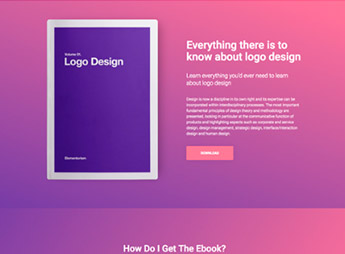
Description
When an author needs to launch an ebook without relying on a developer, Arceus brings together conversion-focused landing page templates you can import into Elementor, with an author bio section, testimonial block, image gallery, and contact form already in place. It’s for anyone who writes and sells ebooks, teaches courses, or is promoting a new book and wants a capture page published in just a few hours.
Key Features of Arceus
- Importable Elementor templates
Ready-made layouts that load into the builder and are edited visually, with no code. - Conversion landing page structure
Blocks arranged in sequence to present the ebook and guide visitors to sign up. - Author bio section
A dedicated area to introduce the person behind the book, with a photo and text. - Testimonial block
Space for social proof from readers, with quotes and attribution. - Built-in contact form
A capture field that uses the Elementor Pro form or free plugins such as Contact Form 7 and WPForms.
Benefits of Arceus
- Your page goes live sooner
The visual foundation is already built, so you skip designing the landing page from scratch. - Editing without technical help
Text, colors, and images are swapped right in the Elementor editor. - Built for lead capture
The block layout keeps the signup form visible as visitors scroll. - Freedom to choose your form
Works with the Elementor Pro feature or with free form plugins.
Who Is Arceus For?
- Anyone who has written an ebook and needs a page to promote and distribute it.
- Independent authors launching books who want to bring bio, testimonials, and signup together on a single page.
- You, if you already use Elementor and prefer starting from a finished layout instead of building the landing page from scratch.
How to Download Arceus
Arceus is available here on Ultrapack. Step-by-step instructions for getting this file onto your site are in the How to install tab, next to the description. Once imported, the kit’s layouts are available through the Elementor template library, ready to edit on any page.
Among the kits in the Elementorism line, Arceus focuses on one clearly defined goal: turning an ebook promotion into a single, cohesive page, from the author introduction all the way to the signup field. If you work with digital book launches, you get a consistent, adjustable visual foundation without having to rebuild the conversion structure for every new title.
Frequently asked questions
Is Elementorism Arceus – Ebook Landing Page GPL?
Yes. Elementorism Arceus – Ebook Landing Page is distributed under the GPL (GNU General Public License). You may legally use, modify and redistribute it on as many sites as you want.
Can I use Elementorism Arceus – Ebook Landing Page on more than one site?
Yes. You can use Elementorism Arceus – Ebook Landing Page on as many sites as you want.
How much does Elementorism Arceus – Ebook Landing Page cost at Ultrapack?
Elementorism Arceus – Ebook Landing Page costs US$2.99 as a single purchase, and it is also included in the subscription plans starting at US$12/mo (VIP I).
Does Elementorism Arceus – Ebook Landing Page include updates?
When a new version of Elementorism Arceus – Ebook Landing Page becomes available in the catalog, you can download the file during the access period of your purchase or subscription. To update, follow the installation or import procedure described in the documentation for the item and its platform.
Is Elementorism Arceus – Ebook Landing Page checked before it is made available for download?
Files for Elementorism Arceus – Ebook Landing Page are scanned before publication by UltraHub using ClamAV and YARA rules to detect known threats. This check does not guarantee the absence of risks. Check the item requirements, make a backup, and follow the installation or import instructions for its platform.
How to install
Updates: manual. When a new version comes out, download it on this same page and import it again under Saved Templates. Importing creates new templates and does not touch the pages you already built.
This item is not a theme: it is an Elementor template, with one or more ready-made pages saved as .json files that you import inside Elementor itself.
- Install and activate the Elementor plugin, which is also here in the catalog.
- Download the file
arceus.zip. You do not need to extract it: Elementor imports the ZIP as is. - In the WordPress dashboard, open Templates > Saved Templates. Starting with Elementor 4, that menu sits inside Elementor.
- Click Import Templates, select the file
arceus.zipand click Import Now. If Elementor shows the unfiltered file uploads warning, Import Without Enabling is enough: only SVG images are left out. - To use it, create a page, open it in Elementor, click the folder icon and insert the template from the My Templates tab.
- Do not upload this ZIP under Appearance > Themes. There is no theme inside it, and WordPress will reject the file.
- If your theme header and footer show up around the template and you do not want them, open the page settings in Elementor and set Page Layout to Elementor Canvas.
- This template uses widgets from Elementor Pro, which is also here in the catalog. Activate Pro before you insert the template into a page; without it, those widgets are left out.
Stuck on a step? Open a ticket telling us which one you stopped at.


