

Description
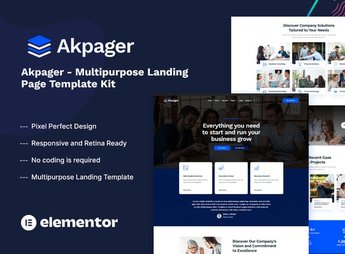
Akpager builds a complete landing page for apps, software, and startups inside Elementor, with ready-to-publish sections for product features, pricing plans, customer testimonials, and a final call to action to download the app already organized into ready-to-publish blocks. It works for anyone launching an app, a SaaS tool, or a software product who wants a ready presentation page without relying on a developer to build each section.
Main Features of Akpager
- Product features section
Displays software functionality in blocks with an icon and a short explanatory phrase. - Pricing plans table
Compares monthly and annual prices in side-by-side columns for the visitor. - Customer testimonials block
Shows reviews from people who already use the app to reinforce trust on the page. - Final call to action for conversion
Closes the page with a highlighted block for sign-up or app download. - Included Elementor widgets
Includes proprietary widgets for frequently asked questions, number counters, and partner logos.
Benefits of Akpager
- Fast page publishing
Reduces build time because the sections already come with a ready-made layout. - Clear product presentation
Organizes features, pricing, and social proof in the order that helps convert the visitor. - Mobile-adapted page
Keeps plans and testimonials readable at any screen size without manual adjustment. - Less dependence on a developer
Lets you change text, photo, and color directly in the Elementor visual editor.
Who Is Akpager For?
- Anyone launching an app who needs a presentation page.
- Anyone selling a SaaS tool who wants to showcase plans and features.
- Anyone who builds sites for clients in the technology and startup sector.
- Anyone who already uses Elementor and wants a closed kit instead of building the page section by section.
How to Download Akpager
Akpager is available for download here at Ultrapack. After downloading the file, import the kit under Elementor > Tools > Import Kit to load pages, widgets, and style settings all at once. The process replaces manually building each section.
Anyone launching an app or a SaaS tool needs a page that explains the product quickly, before the visitor leaves without understanding what is being offered. Akpager brings together features, pricing, and testimonials on a single page designed for conversion, which saves build time and makes it easier to test variations of text and image afterward.
Frequently asked questions
Is Akpager – Multipurpose Landing Page Template Kit GPL?
Yes. Akpager – Multipurpose Landing Page Template Kit is distributed under the GPL (GNU General Public License). You may legally use, modify and redistribute it on as many sites as you want.
Can I use Akpager – Multipurpose Landing Page Template Kit on more than one site?
Yes. You can use Akpager – Multipurpose Landing Page Template Kit on as many sites as you want.
How much does Akpager – Multipurpose Landing Page Template Kit cost at Ultrapack?
Akpager – Multipurpose Landing Page Template Kit costs US$2.99 as a single purchase, and it is also included in the subscription plans starting at US$17/mo (Desenvolvedor I).
Does Akpager – Multipurpose Landing Page Template Kit include updates?
When a new version of Akpager – Multipurpose Landing Page Template Kit becomes available in the catalog, you can download the file during the access period of your purchase or subscription. To update, follow the installation or import procedure described in the documentation for the item and its platform.
Is Akpager – Multipurpose Landing Page Template Kit checked before it is made available for download?
Files for Akpager – Multipurpose Landing Page Template Kit are scanned before publication by UltraHub using ClamAV and YARA rules to detect known threats. This check does not guarantee the absence of risks. Check the item requirements, make a backup, and follow the installation or import instructions for its platform.
How to install
Updates: manual. When a new version comes out, download it on this same page and import it again with Template Kit Import. Template Kits are not updated from the WordPress Themes or Plugins screen.
A template kit is neither a theme nor a plugin. It is imported, and it needs Elementor installed on the site.
- Install and activate the Template Kit Import plugin, which is also here in the catalog.
- Download the file
elements-akpager-multipurpose-landing-page-template-kit.zip. - In the WordPress dashboard, go to Template Kits > Import Kit and upload the file
elements-akpager-multipurpose-landing-page-template-kit.zip. - Pick the templates you want to import and confirm.
- The imported templates end up under Templates > Saved Templates, ready to open in Elementor.
- Some kits use Elementor Pro features. Without it the templates still import, but some blocks have no effect.
Stuck on a step? Open a ticket telling us which one you stopped at.


