Description
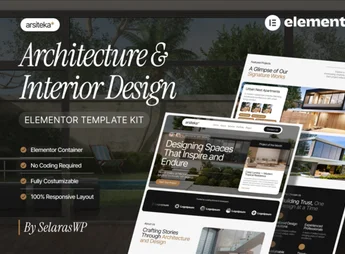
Archa brings together ready-made architecture and interior design pages that import directly into Elementor, with project showcase, firm profile, and contact sections already built. The idea is to shorten the process of creating an architecture firm’s website, starting from layouts you can edit in the visual builder instead of structuring every block from scratch, with typography and spacing designed to enhance photos of interiors and floor plans.
Key Features of Archa
- Direct import into Elementor
The templates load into the builder and are edited in the same visual interface as the site. - Project showcase layouts
Structured sections for displaying completed work, interiors, and studies in a visual grid. - Visual identity for architecture and interiors
A subdued palette, generous typography, and breathing room between blocks, well suited to visual portfolios. - No-code editing
Text, colors, images, and spacing are all adjusted through the builder’s own panels. - Responsive structure
Blocks rearrange themselves for comfortable reading on phone, tablet, and desktop screens.
Benefits of Archa
- Your site goes live sooner
You start from pages that are already built and focus your effort on the firm’s actual content. - Consistency across pages
The same visual vocabulary carries through the entire site, with no need to rebuild styles section by section. - Projects front and center
The layout gives room to interior photos, which are the real selling point of the service. - Freedom to update
New projects go up on the site without relying on coding or outside help.
Who Is Archa For?
- Anyone who designs residential or commercial interiors and needs to show completed work online.
- Architecture firms that want a site with a portfolio, profile, and contact channel.
- You, if you already work with Elementor and want to start from a visual foundation built for this niche.
- Anyone offering remodeling, decorating, or interior consulting services who depends on imagery to sell.
How to Download Archa
Archa is available for download here on Ultrapack. Step-by-step installation instructions for this file are in the How to install tab, next to the description. Once imported, the templates are available in your Elementor library, ready to be applied to your site’s pages.
Instead of commissioning a custom build for every new firm website, Archa puts the niche’s visual structure inside Elementor with the work already done. For anyone signing off on interior design and architecture projects, that means turning a collection of photos into a browsable site, with presentation, portfolio, and contact pages that work together and stay editable at any time.
Frequently asked questions
Is Archa – Interior Design & Architecture Elementor Template Kit GPL?
Yes. Archa – Interior Design & Architecture Elementor Template Kit is distributed under the GPL (GNU General Public License). You may legally use, modify and redistribute it on as many sites as you want.
Can I use Archa – Interior Design & Architecture Elementor Template Kit on more than one site?
Yes. You can use Archa – Interior Design & Architecture Elementor Template Kit on as many sites as you want.
How much does Archa – Interior Design & Architecture Elementor Template Kit cost at Ultrapack?
Archa – Interior Design & Architecture Elementor Template Kit costs US$2.99 as a single purchase, and it is also included in the subscription plans starting at US$17/mo (Desenvolvedor I).
Does Archa – Interior Design & Architecture Elementor Template Kit include updates?
When a new version of Archa – Interior Design & Architecture Elementor Template Kit becomes available in the catalog, you can download the file during the access period of your purchase or subscription. To update, follow the installation or import procedure described in the documentation for the item and its platform.
Is Archa – Interior Design & Architecture Elementor Template Kit checked before it is made available for download?
Files for Archa – Interior Design & Architecture Elementor Template Kit are scanned before publication by UltraHub using ClamAV and YARA rules to detect known threats. This check does not guarantee the absence of risks. Check the item requirements, make a backup, and follow the installation or import instructions for its platform.
How to install
Updates: manual. When a new version comes out, download it on this same page and import it again with Template Kit Import. Template Kits are not updated from the WordPress Themes or Plugins screen.
A template kit is neither a theme nor a plugin. It is imported, and it needs Elementor installed on the site.
- Install and activate the Template Kit Import plugin, which is also here in the catalog.
- Download the file
archa-interior-design-architecture-elementor-templ.zip. - In the WordPress dashboard, go to Template Kits > Import Kit and upload the file
archa-interior-design-architecture-elementor-templ.zip. - Pick the templates you want to import and confirm.
- The imported templates end up under Templates > Saved Templates, ready to open in Elementor.
- Some kits use Elementor Pro features. Without it the templates still import, but some blocks have no effect.
Stuck on a step? Open a ticket telling us which one you stopped at.