

Description
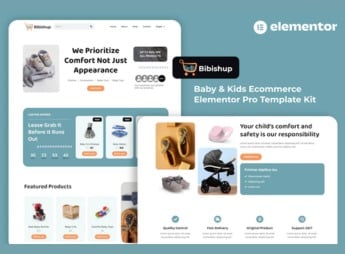
Bibishup builds a complete online store for baby and children’s products inside Elementor, with showcase pages, a detailed product page, cart, checkout and categories by age group already structured, with emphasis on product photos. The kit serves those who sell clothes, toys, accessories or baby layette items in an online store and need a cute, colorful and organized layout without coding page by page from scratch.
Bibishup’s Main Features
- Showcase by category
Organizes clothes, toys and accessories into sections separated by age group. - Detailed product page
Shows size, color, material and photos from various angles of the item. - Integrated cart and checkout
Guides the customer from product choice to payment without leaving the store. - Promotions banner
Highlights seasonal offers and new releases right in the homepage’s first fold. - Parent testimonials section
Displays reviews from those who have already bought, with the customer’s photo and name.
Bibishup’s Benefits
- Visuals designed for babies
Uses soft colors and playful icons that match children’s products. - Guided purchase to the end
Reduces cart abandonment with a simple checkout and few steps. - Trust for online shoppers
Gathers reviews and badges that reduce the insecurity of buying at a distance. - Ready for Elementor
Works with the builder’s native features, with no extra plugin required.
Who Is Bibishup For?
- Those who sell baby clothes and layette items online.
- Educational toy stores that want an organized online catalog.
- Studios making personalized items for the baby’s room.
- Children’s fashion brands that need a cute digital showcase that’s quick to set up.
How to Download Bibishup
Bibishup is available for download here at Ultrapack. After downloading the file, import the kit under Elementor > Tools > Import Kit, selecting the showcase, product and cart pages that make sense for the children’s store.
An online store for children’s products lives on conveying trust and visual organization, since those buying for a baby tend to research a lot before placing an order. With the pages already structured by category and the product page ready to go, the setup work drops significantly and the store can go live within a few days.
Frequently asked questions
Is Bibishup – Baby & Kids Ecommerce Elementor Pro Template Kit GPL?
Yes. Bibishup – Baby & Kids Ecommerce Elementor Pro Template Kit is distributed under the GPL (GNU General Public License). You may legally use, modify and redistribute it on as many sites as you want.
Can I use Bibishup – Baby & Kids Ecommerce Elementor Pro Template Kit on more than one site?
Yes. You can use Bibishup – Baby & Kids Ecommerce Elementor Pro Template Kit on as many sites as you want.
How much does Bibishup – Baby & Kids Ecommerce Elementor Pro Template Kit cost at Ultrapack?
Bibishup – Baby & Kids Ecommerce Elementor Pro Template Kit costs US$2.99 as a single purchase, and it is also included in the subscription plans starting at US$17/mo (Desenvolvedor I).
Does Bibishup – Baby & Kids Ecommerce Elementor Pro Template Kit include updates?
When a new version of Bibishup – Baby & Kids Ecommerce Elementor Pro Template Kit becomes available in the catalog, you can download the file during the access period of your purchase or subscription. To update, follow the installation or import procedure described in the documentation for the item and its platform.
Is Bibishup – Baby & Kids Ecommerce Elementor Pro Template Kit checked before it is made available for download?
Files for Bibishup – Baby & Kids Ecommerce Elementor Pro Template Kit are scanned before publication by UltraHub using ClamAV and YARA rules to detect known threats. This check does not guarantee the absence of risks. Check the item requirements, make a backup, and follow the installation or import instructions for its platform.
How to install
Updates: manual. When a new version comes out, download it on this same page and import it again with Template Kit Import. Template Kits are not updated from the WordPress Themes or Plugins screen.
A template kit is neither a theme nor a plugin. It is imported, and it needs Elementor installed on the site.
- Install and activate the Template Kit Import plugin, which is also here in the catalog.
- Download the file
elements-bibishup-baby-kids-ecommerce-elementor-pro-template-kit.zip. - In the WordPress dashboard, go to Template Kits > Import Kit and upload the file
elements-bibishup-baby-kids-ecommerce-elementor-pro-template-kit.zip. - Pick the templates you want to import and confirm.
- The imported templates end up under Templates > Saved Templates, ready to open in Elementor.
- Some kits use Elementor Pro features. Without it the templates still import, but some blocks have no effect.
Stuck on a step? Open a ticket telling us which one you stopped at.


