

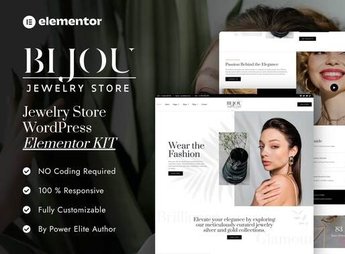
Description
Bijou sets up an online jewelry store for gold-plated pieces, semi-fine jewelry and accessories, with Elementor blocks for the product showcase, piece detail page, categories by material, reviews and shopping cart. Anyone selling jewelry, semi-fine pieces or handmade accessories online gets ready-made pages to display each piece with photos, price and material details without depending on a designer to build the store from scratch for every new collection launched.
Key Features of Bijou
- Product showcase
Organizes rings, necklaces, earrings and bracelets in an image grid. - Piece detail page
Details material, size and care instructions for each piece of jewelry. - Categories by material
Separates gold, silver and gold-plated pieces into their own sections. - Shopping cart
Lets customers add several pieces before completing the order. - Customer reviews
Displays rating and comments right below each piece’s detail page.
Benefits of Bijou
- More online sales
Shortens the distance between whoever sees the piece and whoever buys it. - Sophisticated look
Uses a neutral background and photos that highlight the shine of each piece. - Responsive layout
Adapts the showcase and cart for mobile without losing detail. - No-code editing
Lets you change photo, price and description directly in the Elementor editor.
Who Is Bijou For?
- Anyone selling jewelry and semi-fine pieces online.
- Anyone producing handmade accessories on a small scale.
- Anyone running a physical store who also wants to sell online.
- Anyone reselling pieces from suppliers through their own catalog.
How to Download Bijou
Bijou is available for download here at Ultrapack. After downloading the file, import it through Elementor > Tools > Import Kit, which applies pages, colors and fonts to the active site within minutes, with no code editing required.
Jewelry sells on detail: shine, finish and proportion only come through when the photo is large and well positioned. With a ready-made showcase, piece detail page and reviews, the kit helps display each item with the care the material calls for, without depending on expensive professional photography for every new collection.
Frequently asked questions
Is Bijou – Jewelry Store Elementor Pro Template Kit GPL?
Yes. Bijou – Jewelry Store Elementor Pro Template Kit is distributed under the GPL (GNU General Public License). You may legally use, modify and redistribute it on as many sites as you want.
Can I use Bijou – Jewelry Store Elementor Pro Template Kit on more than one site?
Yes. You can use Bijou – Jewelry Store Elementor Pro Template Kit on as many sites as you want.
How much does Bijou – Jewelry Store Elementor Pro Template Kit cost at Ultrapack?
Bijou – Jewelry Store Elementor Pro Template Kit costs US$2.99 as a single purchase, and it is also included in the subscription plans starting at US$17/mo (Desenvolvedor I).
Does Bijou – Jewelry Store Elementor Pro Template Kit include updates?
When a new version of Bijou – Jewelry Store Elementor Pro Template Kit becomes available in the catalog, you can download the file during the access period of your purchase or subscription. To update, follow the installation or import procedure described in the documentation for the item and its platform.
Is Bijou – Jewelry Store Elementor Pro Template Kit checked before it is made available for download?
Files for Bijou – Jewelry Store Elementor Pro Template Kit are scanned before publication by UltraHub using ClamAV and YARA rules to detect known threats. This check does not guarantee the absence of risks. Check the item requirements, make a backup, and follow the installation or import instructions for its platform.
How to install
Updates: manual. When a new version comes out, download it on this same page and import it again with Template Kit Import. Template Kits are not updated from the WordPress Themes or Plugins screen.
A template kit is neither a theme nor a plugin. It is imported, and it needs Elementor installed on the site.
- Install and activate the Template Kit Import plugin, which is also here in the catalog.
- Download the file
elements-bijou-jewelry-store-elementor-pro-template-kit.zip. - In the WordPress dashboard, go to Template Kits > Import Kit and upload the file
elements-bijou-jewelry-store-elementor-pro-template-kit.zip. - Pick the templates you want to import and confirm.
- The imported templates end up under Templates > Saved Templates, ready to open in Elementor.
- Some kits use Elementor Pro features. Without it the templates still import, but some blocks have no effect.
Stuck on a step? Open a ticket telling us which one you stopped at.


