Description
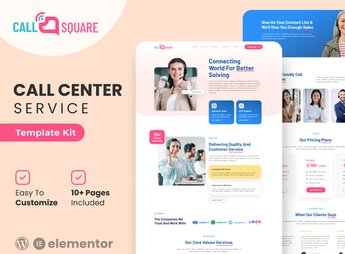
Call Square structures, in Elementor, the website of a call center or support hub company, with blocks for service plans, multichannel contact channels, team presentation, performance indicators, and a quote request form. It serves anyone who outsources customer service, technical support, or phone sales, and needs to present plans, response time, and differentiators before the lead requests a detailed business proposal.
Main Features of Call Square
- Service Plans
Presents the support and call center packages offered by the company. - Contact Channels
Brings together phone, chat, email, and WhatsApp in a single block. - Team Presentation
Shows agents and supervisors with photo and role. - Performance Indicators
Displays numbers such as average response time and customer satisfaction. - Quote Form
Collects lead data to generate a service proposal.
Benefits of Call Square
- More Closed Proposals
Makes it easier to request a quote directly from the homepage. - Business Credibility
Conveys confidence to those who will outsource customer service. - Clarity on Plans
Avoids doubts about what each support package includes. - Customization without Code
Allows adjusting colors, texts, and blocks directly through Elementor.
Who Is Call Square For?
- Call center companies that outsource customer service for other brands.
- Technical support hubs that provide service by phone and chat.
- Anyone who sells telemarketing services or phone sales.
- Agencies that manage customer service for third parties.
How to Download Call Square
Call Square is available for download here on Ultrapack. After importing the file, use the path Elementor > Tools > Import Kit to load the ready-made pages onto your website. The plan, team, and contact blocks already arrive editable through Elementor.
Those looking to outsource customer service usually compare several hubs before signing a contract, and a website that clearly shows plans and team reduces the distance to the first business meeting. With the content already structured, the website is ready to publish without depending on a development team.
Frequently asked questions
Is Call Square – Call Center & Support Company Elementor Template Kit GPL?
Yes. Call Square – Call Center & Support Company Elementor Template Kit is distributed under the GPL (GNU General Public License). You may legally use, modify and redistribute it on as many sites as you want.
Can I use Call Square – Call Center & Support Company Elementor Template Kit on more than one site?
Yes. You can use Call Square – Call Center & Support Company Elementor Template Kit on as many sites as you want.
How much does Call Square – Call Center & Support Company Elementor Template Kit cost at Ultrapack?
Call Square – Call Center & Support Company Elementor Template Kit costs US$2.99 as a single purchase, and it is also included in the subscription plans starting at US$17/mo (Desenvolvedor I).
Does Call Square – Call Center & Support Company Elementor Template Kit include updates?
When a new version of Call Square – Call Center & Support Company Elementor Template Kit becomes available in the catalog, you can download the file during the access period of your purchase or subscription. To update, follow the installation or import procedure described in the documentation for the item and its platform.
Is Call Square – Call Center & Support Company Elementor Template Kit checked before it is made available for download?
Files for Call Square – Call Center & Support Company Elementor Template Kit are scanned before publication by UltraHub using ClamAV and YARA rules to detect known threats. This check does not guarantee the absence of risks. Check the item requirements, make a backup, and follow the installation or import instructions for its platform.
How to install
Updates: manual. When a new version comes out, download it on this same page and import it again with Template Kit Import. Template Kits are not updated from the WordPress Themes or Plugins screen.
A template kit is neither a theme nor a plugin. It is imported, and it needs Elementor installed on the site.
- Install and activate the Template Kit Import plugin, which is also here in the catalog.
- Download the file
elements-call-square-call-center-support-company-elemen.zip. - In the WordPress dashboard, go to Template Kits > Import Kit and upload the file
elements-call-square-call-center-support-company-elemen.zip. - Pick the templates you want to import and confirm.
- The imported templates end up under Templates > Saved Templates, ready to open in Elementor.
- Some kits use Elementor Pro features. Without it the templates still import, but some blocks have no effect.
Stuck on a step? Open a ticket telling us which one you stopped at.