

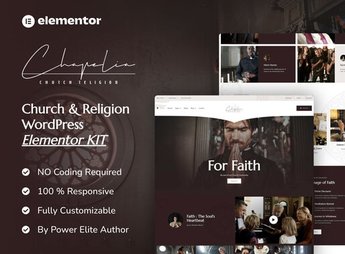
Description
Chapelia builds, inside Elementor, a site for a church or religious community, with sections for service times, events, ministries, video sermons, and photo gallery, all editable by drag and drop, without needing to write code. It serves whoever handles a church’s communications and needs to publicize service times, events, study groups, recorded sermons, and ways to donate on a welcoming, easy-to-navigate site.
Chapelia’s Main Features
- Service and mass times
Displays the days, times, and locations of the community’s gatherings prominently. - Event calendar
Lists retreats, conferences, and special celebrations with date and description. - Photo and video gallery
Gathers records of services, baptisms, and community activities in a grid. - Online donation form
Comes with a ready field for receiving contributions and tithes over the internet. - Elementor Pro widgets
Uses dynamic Elementor Pro widgets to build grids and icons.
Chapelia’s Benefits
- Centralized communication
Brings together schedules, events, and contact information in one place, outside social media. - Welcoming visuals
Conveys a receptive atmosphere to anyone visiting the church for the first time. - Time savings on setup
Avoids designing the church’s event, gallery, and contact pages from scratch. - No-developer editing
Lets you swap texts, photos, and schedules directly through Elementor’s visual editor.
Who Is Chapelia For?
- A church or parish that wants to publicize schedules and events.
- A ministry or Bible study group with regular activities.
- A religious community that receives donations online.
- An agency that builds sites for churches and religious organizations.
How to Download Chapelia
Chapelia is available for download here at Ultrapack. After downloading the file, import the kit under Elementor > Tools > Import Kit, right from the WordPress dashboard. Elementor applies the pages, blocks, and visual style in just a few minutes.
A ready-made template kit saves the work of designing from scratch the pages a church needs: schedules, events, and donations. Just adjust texts, photos, and colors to match the community’s identity.
Frequently asked questions
Is Chapelia – Church & Religion Elementor Pro Template Kit GPL?
Yes. Chapelia – Church & Religion Elementor Pro Template Kit is distributed under the GPL (GNU General Public License). You may legally use, modify and redistribute it on as many sites as you want.
Can I use Chapelia – Church & Religion Elementor Pro Template Kit on more than one site?
Yes. You can use Chapelia – Church & Religion Elementor Pro Template Kit on as many sites as you want.
How much does Chapelia – Church & Religion Elementor Pro Template Kit cost at Ultrapack?
Chapelia – Church & Religion Elementor Pro Template Kit costs US$2.99 as a single purchase, and it is also included in the subscription plans starting at US$17/mo (Desenvolvedor I).
Does Chapelia – Church & Religion Elementor Pro Template Kit include updates?
When a new version of Chapelia – Church & Religion Elementor Pro Template Kit becomes available in the catalog, you can download the file during the access period of your purchase or subscription. To update, follow the installation or import procedure described in the documentation for the item and its platform.
Is Chapelia – Church & Religion Elementor Pro Template Kit checked before it is made available for download?
Files for Chapelia – Church & Religion Elementor Pro Template Kit are scanned before publication by UltraHub using ClamAV and YARA rules to detect known threats. This check does not guarantee the absence of risks. Check the item requirements, make a backup, and follow the installation or import instructions for its platform.
How to install
Updates: manual. When a new version comes out, download it on this same page and import it again with Template Kit Import. Template Kits are not updated from the WordPress Themes or Plugins screen.
A template kit is neither a theme nor a plugin. It is imported, and it needs Elementor installed on the site.
- Install and activate the Template Kit Import plugin, which is also here in the catalog.
- Download the file
elements-chapelia-church-religion-elementor-pro-templat.zip. - In the WordPress dashboard, go to Template Kits > Import Kit and upload the file
elements-chapelia-church-religion-elementor-pro-templat.zip. - Pick the templates you want to import and confirm.
- The imported templates end up under Templates > Saved Templates, ready to open in Elementor.
- Some kits use Elementor Pro features. Without it the templates still import, but some blocks have no effect.
Stuck on a step? Open a ticket telling us which one you stopped at.


