

Description
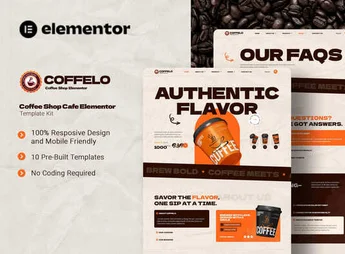
Coffelo – Coffee Shop Cafe Elementor is a template kit perfect for those looking to create an attractive website for cafes, bakeries or restaurants. With an elegant and modern design, the kit is made to highlight products and create a welcoming online environment, ideal for businesses that want to delight their customers and increase their online sales.
Main Features
- Elegant design:
The modern, sophisticated look of Coffelo attracts attention and creates a welcoming atmosphere. - Easy to customize:
With Elementor, you can modify the design without needing programming knowledge. - SEO optimized:
Coffelo is designed to be search-engine friendly, helping attract more visitors to your site. - Responsive:
The design adapts to any screen size, ensuring the site looks great on both computers and mobile devices. - WooCommerce integration:
The kit is compatible with WooCommerce, simplifying the creation of an efficient online store. - Contact forms:
Coffelo includes contact forms to streamline communication with customers.
Benefits of Coffelo – Coffee Shop Cafe Elementor Template Kit
- Highlight your products: With an attractive design, Coffelo helps showcase your products.
- Increase online sales: WooCommerce integration makes it easy to set up a virtual store.
- Attract more visitors: SEO optimized, Coffelo helps improve your site’s visibility in search engines.
Who is it recommended for?
- Owners of coffee shops, bakeries, or restaurants looking to create an attractive site.
- Businesses looking to increase sales through an efficient online store.
- Businesses wanting to improve their online presence and attract more clients.
Coffelo – Coffee Shop Cafe Elementor Template Kit is the ideal solution for anyone looking for an elegant and efficient site. Its features and benefits make it the perfect choice to showcase products, delight customers, and increase online sales.
Frequently asked questions
Is Coffelo – Coffee Shop Cafe Elementor Template Kit GPL?
Yes. Coffelo – Coffee Shop Cafe Elementor Template Kit is distributed under the GPL (GNU General Public License). You may legally use, modify and redistribute it on as many sites as you want.
Can I use Coffelo – Coffee Shop Cafe Elementor Template Kit on more than one site?
Yes. You can use Coffelo – Coffee Shop Cafe Elementor Template Kit on as many sites as you want.
How much does Coffelo – Coffee Shop Cafe Elementor Template Kit cost at Ultrapack?
Coffelo – Coffee Shop Cafe Elementor Template Kit costs US$2.99 as a single purchase, and it is also included in the subscription plans starting at US$17/mo (Desenvolvedor I).
Does Coffelo – Coffee Shop Cafe Elementor Template Kit include updates?
When a new version of Coffelo – Coffee Shop Cafe Elementor Template Kit becomes available in the catalog, you can download the file during the access period of your purchase or subscription. To update, follow the installation or import procedure described in the documentation for the item and its platform.
Is Coffelo – Coffee Shop Cafe Elementor Template Kit checked before it is made available for download?
Files for Coffelo – Coffee Shop Cafe Elementor Template Kit are scanned before publication by UltraHub using ClamAV and YARA rules to detect known threats. This check does not guarantee the absence of risks. Check the item requirements, make a backup, and follow the installation or import instructions for its platform.
How to install
Updates: manual. When a new version comes out, download it on this same page and import it again with Template Kit Import. Template Kits are not updated from the WordPress Themes or Plugins screen.
A template kit is neither a theme nor a plugin. It is imported, and it needs Elementor installed on the site.
- Install and activate the Template Kit Import plugin, which is also here in the catalog.
- Download the file
elements-coffelo-coffee-shop-cafe-elementor-template-kit.zip. - In the WordPress dashboard, go to Template Kits > Import Kit and upload the file
elements-coffelo-coffee-shop-cafe-elementor-template-kit.zip. - Pick the templates you want to import and confirm.
- The imported templates end up under Templates > Saved Templates, ready to open in Elementor.
- Some kits use Elementor Pro features. Without it the templates still import, but some blocks have no effect.
Stuck on a step? Open a ticket telling us which one you stopped at.


