Description
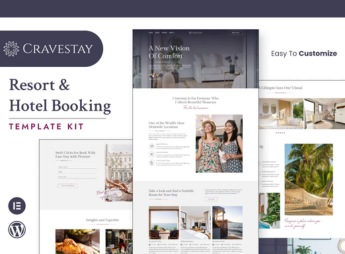
Cravestay structures a luxury hotel & resort website in Elementor, with a suite gallery, availability calendar, and booking form with date selection ready to publish. It serves those who manage a high-standard guesthouse, a beachfront resort, or a hospitality network and need to showcase accommodations, amenities, and rates in a layout that conveys sophistication from the first scroll to the contact page.
Main Features of Cravestay
- Suite and room gallery
Displays photos and description of each available accommodation category. - Booking form with dates
Receives check-in, check-out, and number of guests to initiate the request. - Amenities section
Lists pool, spa, restaurant, and other hotel services with icons. - Location map
Shows the hotel’s position and nearby tourist attractions prominently. - Guest reviews
Gathers ratings and comments from those who have already stayed at the property.
Benefits of Cravestay
- Sense of sophistication
Featured photos and generous spacing reinforce the hotel’s standard. - More direct bookings
The proprietary form reduces dependence on third-party platforms to book. - Fast publication
The pages are already ready, leaving only the need to adjust photos, texts, and brand colors. - Visual consistency between pages
Colors, fonts, and buttons follow the same pattern throughout the website.
Who is Cravestay for?
- Those who manage a high-standard hotel or guesthouse.
- Those who operate a beachfront or rural resort.
- Those who manage a hospitality network with more than one unit.
- Those who rent seasonal properties with hotel-like standards.
How to Download Cravestay
Cravestay is available for download here on Ultrapack. After downloading the file, import the kit in Elementor > Tools > Import Kit, choose the suite and booking pages of interest, and replace photos and texts with your hotel’s.
The pages follow a composition with large photos and little text, designed for hotels where the image of the place already convinces on its own. It works for both a unique property and as a starting point to replicate the same pattern in other units of the network.
Frequently asked questions
Is Cravestay – Luxury Hotel & Resort Elementor Template Kit GPL?
Yes. Cravestay – Luxury Hotel & Resort Elementor Template Kit is distributed under the GPL (GNU General Public License). You may legally use, modify and redistribute it on as many sites as you want.
Can I use Cravestay – Luxury Hotel & Resort Elementor Template Kit on more than one site?
Yes. You can use Cravestay – Luxury Hotel & Resort Elementor Template Kit on as many sites as you want.
How much does Cravestay – Luxury Hotel & Resort Elementor Template Kit cost at Ultrapack?
Cravestay – Luxury Hotel & Resort Elementor Template Kit costs US$2.99 as a single purchase, and it is also included in the subscription plans starting at US$17/mo (Desenvolvedor I).
Does Cravestay – Luxury Hotel & Resort Elementor Template Kit include updates?
When a new version of Cravestay – Luxury Hotel & Resort Elementor Template Kit becomes available in the catalog, you can download the file during the access period of your purchase or subscription. To update, follow the installation or import procedure described in the documentation for the item and its platform.
Is Cravestay – Luxury Hotel & Resort Elementor Template Kit checked before it is made available for download?
Files for Cravestay – Luxury Hotel & Resort Elementor Template Kit are scanned before publication by UltraHub using ClamAV and YARA rules to detect known threats. This check does not guarantee the absence of risks. Check the item requirements, make a backup, and follow the installation or import instructions for its platform.
How to install
Updates: manual. When a new version comes out, download it on this same page and import it again with Template Kit Import. Template Kits are not updated from the WordPress Themes or Plugins screen.
A template kit is neither a theme nor a plugin. It is imported, and it needs Elementor installed on the site.
- Install and activate the Template Kit Import plugin, which is also here in the catalog.
- Download the file
elements-cravestay-luxury-hotel-resort-elementor-template-kit.zip. - In the WordPress dashboard, go to Template Kits > Import Kit and upload the file
elements-cravestay-luxury-hotel-resort-elementor-template-kit.zip. - Pick the templates you want to import and confirm.
- The imported templates end up under Templates > Saved Templates, ready to open in Elementor.
- Some kits use Elementor Pro features. Without it the templates still import, but some blocks have no effect.
Stuck on a step? Open a ticket telling us which one you stopped at.