

Description
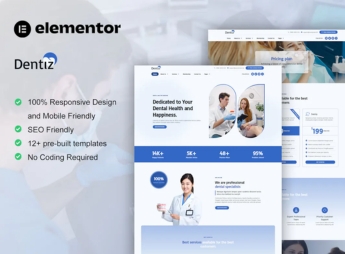
Dentiz builds, inside Elementor, a dental clinic’s website, with presentation of dentists by specialty, list of treatments, appointment scheduling, insurance plan coverage, photos of the office, and patient testimonials, all ready to edit by dragging and dropping. It serves those who manage a dental clinic, private practice, or dental franchise network and need to showcase specialties, accepted insurance plans, equipment used, and scheduling options on a site with a clinical look.
Main Features of Dentiz
- Dentist presentation
Shows the photo, specialty, and license number (CRO) of each professional at the clinic. - Treatment list
Details procedures such as orthodontics, implants, and whitening offered by the clinic. - Appointment scheduling
Receives appointment time requests directly through the contact page form. - Insurance plan coverage
Lists the dental insurance plans accepted by the clinic in a visible block. - Patient testimonials
Displays real reviews in a carousel to reinforce visitors’ trust.
Benefits of Dentiz
- Clinical credibility
Conveys confidence to those seeking dental treatment for the first time. - Appointment capture
Makes it easy for patients who want to schedule a consultation or evaluation to get in touch. - Time savings
Avoids building each page of the clinic manually from scratch. - No-code editing
Allows swapping photos, text, and colors directly in the Elementor editor.
Who Is Dentiz Recommended For?
- Dental clinics and private practices that serve both insurance and private-pay patients.
- Dental franchise networks that need to standardize the website of each unit.
- Orthodontists and implant specialists who promote specific specialties.
How to Download Dentiz
Dentiz is available for download here at Ultrapack. To install, go to Elementor > Tools > Import Kit and select the uploaded file. Then just swap the team photos, treatments, and colors before publishing the site.
The treatment sections follow the same visual grid throughout the page, which keeps the clinic looking consistent even with several specialties listed. It is also possible to reorder the blocks according to the clinic’s priority, placing the procedures most sought after by patients first.
Frequently asked questions
Is Dentiz – Dentist & Dental Care Elementor Pro Template Kit GPL?
Yes. Dentiz – Dentist & Dental Care Elementor Pro Template Kit is distributed under the GPL (GNU General Public License). You may legally use, modify and redistribute it on as many sites as you want.
Can I use Dentiz – Dentist & Dental Care Elementor Pro Template Kit on more than one site?
Yes. You can use Dentiz – Dentist & Dental Care Elementor Pro Template Kit on as many sites as you want.
How much does Dentiz – Dentist & Dental Care Elementor Pro Template Kit cost at Ultrapack?
Dentiz – Dentist & Dental Care Elementor Pro Template Kit costs US$2.99 as a single purchase, and it is also included in the subscription plans starting at US$17/mo (Desenvolvedor I).
Does Dentiz – Dentist & Dental Care Elementor Pro Template Kit include updates?
When a new version of Dentiz – Dentist & Dental Care Elementor Pro Template Kit becomes available in the catalog, you can download the file during the access period of your purchase or subscription. To update, follow the installation or import procedure described in the documentation for the item and its platform.
Is Dentiz – Dentist & Dental Care Elementor Pro Template Kit checked before it is made available for download?
Files for Dentiz – Dentist & Dental Care Elementor Pro Template Kit are scanned before publication by UltraHub using ClamAV and YARA rules to detect known threats. This check does not guarantee the absence of risks. Check the item requirements, make a backup, and follow the installation or import instructions for its platform.
How to install
Updates: manual. When a new version comes out, download it on this same page and import it again with Template Kit Import. Template Kits are not updated from the WordPress Themes or Plugins screen.
A template kit is neither a theme nor a plugin. It is imported, and it needs Elementor installed on the site.
- Install and activate the Template Kit Import plugin, which is also here in the catalog.
- Download the file
elements-dentiz-dentist-dental-care-elementor-pro-template-kit.zip. - In the WordPress dashboard, go to Template Kits > Import Kit and upload the file
elements-dentiz-dentist-dental-care-elementor-pro-template-kit.zip. - Pick the templates you want to import and confirm.
- The imported templates end up under Templates > Saved Templates, ready to open in Elementor.
- Some kits use Elementor Pro features. Without it the templates still import, but some blocks have no effect.
Stuck on a step? Open a ticket telling us which one you stopped at.



