

Description
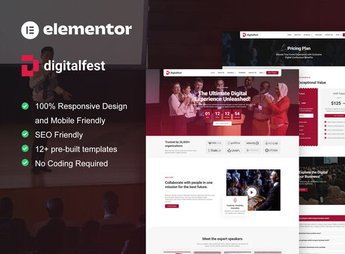
DigitalFest builds the website for events, conferences, and festivals inside Elementor, with ready-made sections for the schedule grid, each speaker’s profile, sponsors, and a registration form. The kit brings together the blocks that an in-person or hybrid event needs to sell tickets and inform the audience, which helps those organizing conferences, technology fairs, workshops, and music festivals publish the page for each edition without redesigning everything from scratch.
Main Features of DigitalFest
- Schedule grid
Displays the agenda by day, time, and room, with filtering by event track. - Speaker profiles
Shows the photo, biography, and social networks of each guest in individual cards. - Countdown timer
Marks the days, hours, and minutes remaining until the event opens. - Sponsor showcase
Organizes supporters’ logos by sponsorship tier in a dedicated section. - Registration form
Captures name, email, and chosen ticket directly on the event page.
Benefits of DigitalFest
- Time savings
Reduces the work of building each event page from scratch. - More registrations
Shortens the path to the form, which reduces registration abandonment. - Professional look
Conveys credibility to sponsors and speakers invited to take part in the event. - Adaptable to any format
Works for in-person conferences as well as hybrid or fully online festivals.
Who Is DigitalFest For?
- Those organizing conferences and technology fairs.
- Those promoting music or cultural festivals.
- Communication teams promoting corporate conferences.
- Event production companies selling tickets online.
How to Download DigitalFest
DigitalFest is available for download here at Ultrapack. After downloading the package, import it through Elementor under Elementor > Tools > Import Kit, choosing which pages and blocks go into your site. The process creates the templates ready for immediate editing.
A well-built event website starts selling tickets even before the first social media post, and the first impression in the browser weighs just as much as the announced line-up. Keeping the templates up to date prevents the page from looking dated with each new edition, something that matters when it comes to attracting sponsors.
Frequently asked questions
Is DigitalFest – Event & Conference Elementor Pro Template Kit GPL?
Yes. DigitalFest – Event & Conference Elementor Pro Template Kit is distributed under the GPL (GNU General Public License). You may legally use, modify and redistribute it on as many sites as you want.
Can I use DigitalFest – Event & Conference Elementor Pro Template Kit on more than one site?
Yes. You can use DigitalFest – Event & Conference Elementor Pro Template Kit on as many sites as you want.
How much does DigitalFest – Event & Conference Elementor Pro Template Kit cost at Ultrapack?
DigitalFest – Event & Conference Elementor Pro Template Kit costs US$2.99 as a single purchase, and it is also included in the subscription plans starting at US$17/mo (Desenvolvedor I).
Does DigitalFest – Event & Conference Elementor Pro Template Kit include updates?
When a new version of DigitalFest – Event & Conference Elementor Pro Template Kit becomes available in the catalog, you can download the file during the access period of your purchase or subscription. To update, follow the installation or import procedure described in the documentation for the item and its platform.
Is DigitalFest – Event & Conference Elementor Pro Template Kit checked before it is made available for download?
Files for DigitalFest – Event & Conference Elementor Pro Template Kit are scanned before publication by UltraHub using ClamAV and YARA rules to detect known threats. This check does not guarantee the absence of risks. Check the item requirements, make a backup, and follow the installation or import instructions for its platform.
How to install
Updates: manual. When a new version comes out, download it on this same page and import it again with Template Kit Import. Template Kits are not updated from the WordPress Themes or Plugins screen.
A template kit is neither a theme nor a plugin. It is imported, and it needs Elementor installed on the site.
- Install and activate the Template Kit Import plugin, which is also here in the catalog.
- Download the file
elements-digitalfest-event-conference-elementor-pro-tem.zip. - In the WordPress dashboard, go to Template Kits > Import Kit and upload the file
elements-digitalfest-event-conference-elementor-pro-tem.zip. - Pick the templates you want to import and confirm.
- The imported templates end up under Templates > Saved Templates, ready to open in Elementor.
- Some kits use Elementor Pro features. Without it the templates still import, but some blocks have no effect.
Stuck on a step? Open a ticket telling us which one you stopped at.



