Description
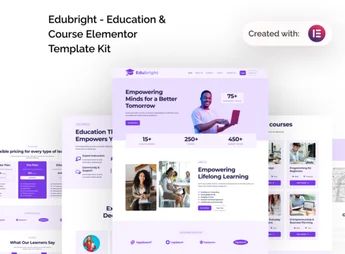
Edubright is a template kit created especially to facilitate the development of online course and education websites. Developed to be used with Elementor, it offers educational content creators a fast and efficient way to create attractive and easy-to-navigate learning platforms. Moreover, with its extensive customization options, designs can be adapted to meet various educational niches.
Main Features
- Elementor Compatibility:
Facilitates page creation and editing. - Responsive Design:
Ensures the site adapts perfectly to any screen size. - SEO Optimized:
Ensures better search engine rankings. - WooCommerce Integration:
Allows the sale of courses directly within the platform. - Varied Layouts:
Offers multiple design options for course pages, teacher pages, and more. - Custom Contact Forms:
Provides customizable contact forms.
Benefits of Edubright
- Easy Customization: Adjustments and changes can be made with just a few clicks.
- Attractive Content: High-quality layouts to present courses effectively.
- Time Saving: Reduces development time with pre-made templates.
- Engagement Boost: Intuitive and attractive design that keeps visitors engaged.
Who is It For?
- Instructors looking to offer their courses online.
- Education institutions that want to increase their online presence.
- Entrepreneurs in the educational niche.
With Edubright, creating and managing an online course website becomes a simple and direct task. Its compatibility with Elementor and integration with WooCommerce provide flexibility, while the professional and attractive templates ensure a visually impressive site. For those seeking to build an effective and engaging educational platform, Edubright is the right choice.
Frequently asked questions
Is Edubright – Online Course & Education Elementor Template Kit GPL?
Yes. Edubright – Online Course & Education Elementor Template Kit is distributed under the GPL (GNU General Public License). You may legally use, modify and redistribute it on as many sites as you want.
Can I use Edubright – Online Course & Education Elementor Template Kit on more than one site?
Yes. You can use Edubright – Online Course & Education Elementor Template Kit on as many sites as you want.
How much does Edubright – Online Course & Education Elementor Template Kit cost at Ultrapack?
Edubright – Online Course & Education Elementor Template Kit costs US$2.99 as a single purchase, and it is also included in the subscription plans starting at US$17/mo (Desenvolvedor I).
Does Edubright – Online Course & Education Elementor Template Kit include updates?
When a new version of Edubright – Online Course & Education Elementor Template Kit becomes available in the catalog, you can download the file during the access period of your purchase or subscription. To update, follow the installation or import procedure described in the documentation for the item and its platform.
Is Edubright – Online Course & Education Elementor Template Kit checked before it is made available for download?
Files for Edubright – Online Course & Education Elementor Template Kit are scanned before publication by UltraHub using ClamAV and YARA rules to detect known threats. This check does not guarantee the absence of risks. Check the item requirements, make a backup, and follow the installation or import instructions for its platform.
How to install
Updates: manual. When a new version comes out, download it on this same page and import it again with Template Kit Import. Template Kits are not updated from the WordPress Themes or Plugins screen.
A template kit is neither a theme nor a plugin. It is imported, and it needs Elementor installed on the site.
- Install and activate the Template Kit Import plugin, which is also here in the catalog.
- Download the file
elements-edubright-online-course-education-elementor-te.zip. - In the WordPress dashboard, go to Template Kits > Import Kit and upload the file
elements-edubright-online-course-education-elementor-te.zip. - Pick the templates you want to import and confirm.
- The imported templates end up under Templates > Saved Templates, ready to open in Elementor.
- Some kits use Elementor Pro features. Without it the templates still import, but some blocks have no effect.
Stuck on a step? Open a ticket telling us which one you stopped at.