

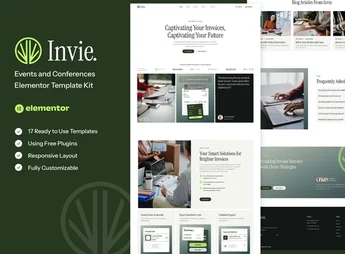
Description
Invie is a template kit designed for creating billing and SaaS websites with ease. Featuring a clean and modern design, it was created to meet the needs of tech companies, startups, and online billing services. Its pre-built pages allow you to build a professional website quickly, even without advanced technical knowledge.
Key Features
- Modern and clean design:
It conveys a professional image, attracting and retaining clients. - Pre-built pages:
Streamline the process of creating a complete website in a short time. - Elementor compatibility:
Allows easy website customization without the need for coding. - SEO optimization:
Increases online visibility and drives more traffic to your site. - Responsive layout:
Ensures a great user experience on any device. - WooCommerce integration:
Simplifies the creation of a virtual store on your site.
Benefits of Invie
- Website creation agility: With pre-built pages, save time and effort.
- Easy customization: Compatibility with Elementor enables easy customization according to your needs.
- Enhanced SEO: Boost online visibility and attract more traffic with optimized SEO.
- Better user experience: Responsive layout provides a smooth navigation experience on any device.
Who is Invie for?
- Technology companies and startups
- Online invoicing services
- Businesses seeking an online presence
With Invie, building a professional invoicing or SaaS website becomes a simple task. Its clean and modern design, combined with features like optimized SEO and WooCommerce integration, makes it the perfect choice for businesses seeking a strong and effective online presence.
Frequently asked questions
Is Invie – Invoicing Platform & SaaS Elementor Template Kit GPL?
Yes. Invie – Invoicing Platform & SaaS Elementor Template Kit is distributed under the GPL (GNU General Public License). You may legally use, modify and redistribute it on as many sites as you want.
Can I use Invie – Invoicing Platform & SaaS Elementor Template Kit on more than one site?
Yes. You can use Invie – Invoicing Platform & SaaS Elementor Template Kit on as many sites as you want.
How much does Invie – Invoicing Platform & SaaS Elementor Template Kit cost at Ultrapack?
Invie – Invoicing Platform & SaaS Elementor Template Kit costs US$2.99 as a single purchase, and it is also included in the subscription plans starting at US$17/mo (Desenvolvedor I).
Does Invie – Invoicing Platform & SaaS Elementor Template Kit include updates?
When a new version of Invie – Invoicing Platform & SaaS Elementor Template Kit becomes available in the catalog, you can download the file during the access period of your purchase or subscription. To update, follow the installation or import procedure described in the documentation for the item and its platform.
Is Invie – Invoicing Platform & SaaS Elementor Template Kit checked before it is made available for download?
Files for Invie – Invoicing Platform & SaaS Elementor Template Kit are scanned before publication by UltraHub using ClamAV and YARA rules to detect known threats. This check does not guarantee the absence of risks. Check the item requirements, make a backup, and follow the installation or import instructions for its platform.
How to install
Updates: manual. When a new version comes out, download it on this same page and import it again with Template Kit Import. Template Kits are not updated from the WordPress Themes or Plugins screen.
A template kit is neither a theme nor a plugin. It is imported, and it needs Elementor installed on the site.
- Install and activate the Template Kit Import plugin, which is also here in the catalog.
- Download the file
elements-invie-invoicing-platform-saas-elementor-templa.zip. - In the WordPress dashboard, go to Template Kits > Import Kit and upload the file
elements-invie-invoicing-platform-saas-elementor-templa.zip. - Pick the templates you want to import and confirm.
- The imported templates end up under Templates > Saved Templates, ready to open in Elementor.
- Some kits use Elementor Pro features. Without it the templates still import, but some blocks have no effect.
Stuck on a step? Open a ticket telling us which one you stopped at.


