

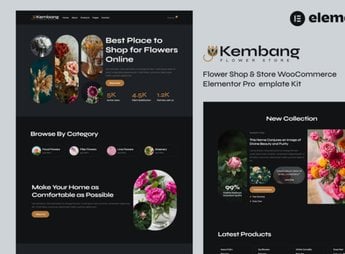
Description
Bring your online flower store to life with the Kembang – Flower Shop & Store WooCommerce Elementor Pro Template Kit. This template kit was created especially for online stores that sell flowers and related products. It offers a modern and attractive design that perfectly matches the charm and elegance of your products.
Key Features
- Ready-Made Pages:
Offers a variety of pre-designed pages including Home, About, Shop, Product Details, Cart, Checkout, Blog, and Contact. - WooCommerce Integration:
Compatible with WooCommerce, allowing you to create a complete online store. - SEO Optimized:
Improves your store’s visibility in search engines. - Responsive Design:
Your website will automatically adjust to fit any type of device, whether desktop, tablet, or smartphone. - Flexible Customization:
The possibilities are endless with Elementor Pro. Customize your website however you want. - Contact Forms:
Includes ready-made contact forms to make communication with your customers easier.
Benefits of Kembang – Flower Shop & Store WooCommerce Elementor Pro Template Kit
- Convenience: Launch your online store quickly with pre-designed pages.
- Visibility: Improve your search engine rankings with an SEO-optimized template.
- Adaptability: Reach all your customers, regardless of the device they are using.
- Customization: Give your store the look and feel of your brand through countless customization possibilities.
Who Is It For?
- Online flower stores and related product stores seeking an attractive and modern design.
- Businesses that want to improve their search engine rankings.
- Anyone looking for ease when setting up and managing their online store.
Choosing the Kembang – Flower Shop & Store WooCommerce Elementor Pro Template Kit is ideal for making your business stand out in the digital world. It is the perfect option for anyone who wants a modern, attractive, and easy-to-manage online store. Get your template now and make your sales bloom!
Frequently asked questions
Is Kembang – Flower Shop & Store WooCommerce Elementor Pro Template Kit GPL?
Yes. Kembang – Flower Shop & Store WooCommerce Elementor Pro Template Kit is distributed under the GPL (GNU General Public License). You may legally use, modify and redistribute it on as many sites as you want.
Can I use Kembang – Flower Shop & Store WooCommerce Elementor Pro Template Kit on more than one site?
Yes. You can use Kembang – Flower Shop & Store WooCommerce Elementor Pro Template Kit on as many sites as you want.
How much does Kembang – Flower Shop & Store WooCommerce Elementor Pro Template Kit cost at Ultrapack?
Kembang – Flower Shop & Store WooCommerce Elementor Pro Template Kit costs US$2.99 as a single purchase, and it is also included in the subscription plans starting at US$17/mo (Desenvolvedor I).
Does Kembang – Flower Shop & Store WooCommerce Elementor Pro Template Kit include updates?
When a new version of Kembang – Flower Shop & Store WooCommerce Elementor Pro Template Kit becomes available in the catalog, you can download the file during the access period of your purchase or subscription. To update, follow the installation or import procedure described in the documentation for the item and its platform.
Is Kembang – Flower Shop & Store WooCommerce Elementor Pro Template Kit checked before it is made available for download?
Files for Kembang – Flower Shop & Store WooCommerce Elementor Pro Template Kit are scanned before publication by UltraHub using ClamAV and YARA rules to detect known threats. This check does not guarantee the absence of risks. Check the item requirements, make a backup, and follow the installation or import instructions for its platform.
How to install
Updates: manual. When a new version comes out, download it on this same page and import it again with Template Kit Import. Template Kits are not updated from the WordPress Themes or Plugins screen.
A template kit is neither a theme nor a plugin. It is imported, and it needs Elementor installed on the site.
- Install and activate the Template Kit Import plugin, which is also here in the catalog.
- Download the file
elements-kembang-flower-shop-store-woocommerce-elemento.zip. - In the WordPress dashboard, go to Template Kits > Import Kit and upload the file
elements-kembang-flower-shop-store-woocommerce-elemento.zip. - Pick the templates you want to import and confirm.
- The imported templates end up under Templates > Saved Templates, ready to open in Elementor.
- Some kits use Elementor Pro features. Without it the templates still import, but some blocks have no effect.
Stuck on a step? Open a ticket telling us which one you stopped at.


