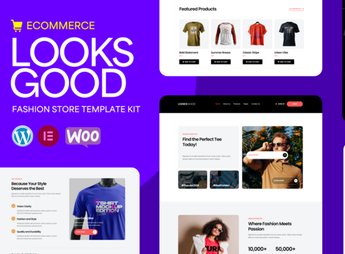
Description
LooksGood sets up complete pages for a t-shirt store within Elementor, with ready-made storefront, product detail page, cart, and checkout blocks already linked to WooCommerce, all adjustable with your own text and images. It’s perfect for those who sell custom, printed, or branded clothing online and need to quickly publish a complete online storefront, without hiring a programmer to build each store page from scratch.
LooksGood’s Main Features
- Product Showcase
Displays t-shirts in a responsive grid with filtering by category and size. - Product Detail Page
Shows color and size variations with automatic image switching when selecting. - Slide-Out Cart
Opens a sliding panel with a purchase summary without leaving the page. - Checkout Page
Gathers address, shipping, and payment in a single screen integrated with WooCommerce. - Testimonials Section
Displays customer reviews in a carousel to reinforce confidence in the purchase.
LooksGood’s Benefits
- Time Savings
Reduces the work of building each page manually in the Elementor editor. - Consistent Visual Identity
Maintains colors, fonts, and spacing aligned across all store pages. - Navigation on Any Screen
Adapts blocks and images for mobile, tablet, and desktop without manual adjustment. - Ready-to-Sell Structure
Comes with a configured cart and checkout, you just need to register the products.
Who is LooksGood For?
- Those who print and sell custom t-shirts online.
- Those who manage an author clothing brand and need their own store.
- Those who resell streetwear and t-shirts on a small scale.
- Those who build WooCommerce stores for fashion industry clients.
How to Download LooksGood
LooksGood is available for download here on Ultrapack. After downloading the file, import via the path Elementor > Tools > Import Kit, which applies the pages, blocks, and styles completely to the site. In just a few minutes, the t-shirt store is ready to receive products.
A kit like this saves the most time-consuming step of opening an online store: deciding how to organize each page section. The t-shirts stand out right on the first scroll, and the visitor can go from product to payment without changing the layout along the way, which helps reduce cart abandonment.
Frequently asked questions
Is LooksGood – T-shirt Store Elementor Pro Template Kit GPL?
Yes. LooksGood – T-shirt Store Elementor Pro Template Kit is distributed under the GPL (GNU General Public License). You may legally use, modify and redistribute it on as many sites as you want.
Can I use LooksGood – T-shirt Store Elementor Pro Template Kit on more than one site?
Yes. You can use LooksGood – T-shirt Store Elementor Pro Template Kit on as many sites as you want.
How much does LooksGood – T-shirt Store Elementor Pro Template Kit cost at Ultrapack?
LooksGood – T-shirt Store Elementor Pro Template Kit costs US$2.99 as a single purchase, and it is also included in the subscription plans starting at US$17/mo (Desenvolvedor I).
Does LooksGood – T-shirt Store Elementor Pro Template Kit include updates?
When a new version of LooksGood – T-shirt Store Elementor Pro Template Kit becomes available in the catalog, you can download the file during the access period of your purchase or subscription. To update, follow the installation or import procedure described in the documentation for the item and its platform.
Is LooksGood – T-shirt Store Elementor Pro Template Kit checked before it is made available for download?
Files for LooksGood – T-shirt Store Elementor Pro Template Kit are scanned before publication by UltraHub using ClamAV and YARA rules to detect known threats. This check does not guarantee the absence of risks. Check the item requirements, make a backup, and follow the installation or import instructions for its platform.
How to install
Updates: manual. When a new version comes out, download it on this same page and import it again with Template Kit Import. Template Kits are not updated from the WordPress Themes or Plugins screen.
A template kit is neither a theme nor a plugin. It is imported, and it needs Elementor installed on the site.
- Install and activate the Template Kit Import plugin, which is also here in the catalog.
- Download the file
elements-looksgood-t-shirt-store-elementor-pro-template-k.zip. - In the WordPress dashboard, go to Template Kits > Import Kit and upload the file
elements-looksgood-t-shirt-store-elementor-pro-template-k.zip. - Pick the templates you want to import and confirm.
- The imported templates end up under Templates > Saved Templates, ready to open in Elementor.
- Some kits use Elementor Pro features. Without it the templates still import, but some blocks have no effect.
Stuck on a step? Open a ticket telling us which one you stopped at.