Description
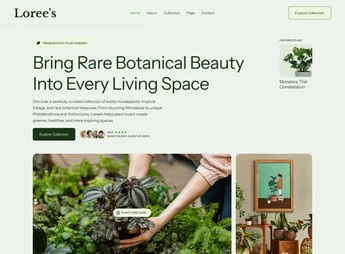
Loree’s brings together ready-to-import page templates for Elementor, with a visual identity built for exotic plant stores and botanical products. The kit creates the complete showcase of a plant boutique, covering catalog presentation, institutional pages, and contact sections, and is aimed at those who sell rare plants, succulents, pots, and gardening accessories and need a coherent look without starting from a blank screen.
Main Features of Loree’s
- Importable templates in Elementor
Ready pages that enter the builder’s library and become editable block by block. - Complete page structure
Layouts for home, institutional, product catalog, blog, and contact. - Botanical visual identity
Palette, typography, and compositions aligned with the world of plants and boutique. - Reusable sections
Highlight blocks, testimonials, and calls that can be recombined into new pages. - Code-free editing
All customization happens through Elementor’s visual panel, without touching CSS.
Benefits of Loree’s
- Website live faster
Template import eliminates weeks of manual layout page by page. - Guaranteed visual consistency
Colors and typography already harmonized prevent pages with conflicting styles. - Less technical dependency
Text, image, and color adjustments are in the hands of the content manager. - Ready base to grow
New pages are born from existing sections, maintaining the project’s standard.
Who is Loree’s For?
- Those who sell exotic plants, succulents, and rare species and need a polished online showcase.
- Nurseries, florists, and gardening stores looking to migrate their physical operation to the web.
- You who already use Elementor and want to start from a ready botanical layout instead of designing from scratch.
How to Download Loree’s
Loree’s is available for download here on Ultrapack. After downloading the .zip file, upload the kit via the WordPress panel at Elementor > Templates > Import Templates and select the package files. The layouts will appear in the builder’s library, ready to use on any page.
Botanical commerce projects depend on visual presentation: well-framed photos, spacious spacing, and comfortable catalog reading. Loree’s solves this design layer in advance, leaving the work focused on photographing products well and writing good descriptions. For those who manage the store and website alone, this means delivering a polished digital presence without hiring a designer for each new page.
Frequently asked questions
Is Loree’s – Exotic Plant Boutique Elementor Template Kit GPL?
Yes. Loree’s – Exotic Plant Boutique Elementor Template Kit is distributed under the GPL (GNU General Public License). You may legally use, modify and redistribute it on as many sites as you want.
Can I use Loree’s – Exotic Plant Boutique Elementor Template Kit on more than one site?
Yes. You can use Loree’s – Exotic Plant Boutique Elementor Template Kit on as many sites as you want.
How much does Loree’s – Exotic Plant Boutique Elementor Template Kit cost at Ultrapack?
Loree’s – Exotic Plant Boutique Elementor Template Kit costs US$2.99 as a single purchase, and it is also included in the subscription plans starting at US$17/mo (Desenvolvedor I).
Does Loree’s – Exotic Plant Boutique Elementor Template Kit include updates?
When a new version of Loree’s – Exotic Plant Boutique Elementor Template Kit becomes available in the catalog, you can download the file during the access period of your purchase or subscription. To update, follow the installation or import procedure described in the documentation for the item and its platform.
Is Loree’s – Exotic Plant Boutique Elementor Template Kit checked before it is made available for download?
Files for Loree’s – Exotic Plant Boutique Elementor Template Kit are scanned before publication by UltraHub using ClamAV and YARA rules to detect known threats. This check does not guarantee the absence of risks. Check the item requirements, make a backup, and follow the installation or import instructions for its platform.
How to install
Updates: manual. When a new version comes out, download it on this same page and import it again with Template Kit Import. Template Kits are not updated from the WordPress Themes or Plugins screen.
A template kit is neither a theme nor a plugin. It is imported, and it needs Elementor installed on the site.
- Install and activate the Template Kit Import plugin, which is also here in the catalog.
- Download the file
elements-loree-s-exotic-plant-boutique-elementor-template-kit.zip. - In the WordPress dashboard, go to Template Kits > Import Kit and upload the file
elements-loree-s-exotic-plant-boutique-elementor-template-kit.zip. - Pick the templates you want to import and confirm.
- The imported templates end up under Templates > Saved Templates, ready to open in Elementor.
- Some kits use Elementor Pro features. Without it the templates still import, but some blocks have no effect.
Stuck on a step? Open a ticket telling us which one you stopped at.