

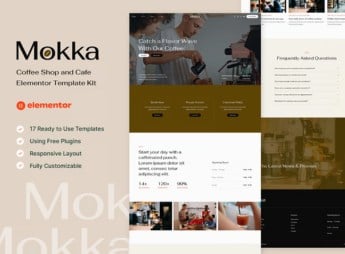
Description
Within Elementor, Mokka organizes the complete pages of a coffee shop or restaurant website, with ready-made blocks for menu, ambiance, staff, customer testimonials and a table reservation form. It serves whoever manages a coffee shop, specialty coffee house or small restaurant and needs to publish a menu, photos of the venue, promotions and business hours on a ready-made website, without hiring a developer to build each page of the site alone.
Main Features of Mokka
- Digital menu in blocks
Displays drinks, dishes and prices organized by category within the page. - Ambiance gallery
Shows photos of the dining room, counter and outdoor area in a responsive grid. - Table reservation section
Receives reservation requests with date, time and number of guests. - Staff profile
Presents baristas and cooks with photo, role and dish specialty. - Testimonials block
Displays customer reviews with rating, comment and visit date.
Benefits of Mokka
- Faster publishing
Reduces build time with pages already laid out for the food service industry. - Consistent cozy visual style
Keeps warm colors, typography and photos aligned across every page. - Fits any screen
Adjusts menu and photos for mobile, tablet and desktop without manual rework. - No-code editing
Lets you swap menu, photos and prices directly in Elementor, without an external editor.
Who Is Mokka For?
- Neighborhood coffee shops that want an online menu.
- Specialty coffee houses that sell beans and brewing methods.
- Small restaurants that take table reservations through the site.
- Bakeries and pastry shops that promote seasonal menus and specials.
How to Download Mokka
Mokka is available for download here on Ultrapack. After downloading the file, import the kit under Elementor > Tools > Import Kit, directly from the WordPress dashboard, and the pages, menu and blocks are added ready to use to the active site.
The kit brings together color variations to distinguish coffee shop, restaurant or bakery, and includes extra pages that can be removed when the site needs fewer sections. Anyone already using Elementor can update the menu and photos without opening another editing program.
Frequently asked questions
Is Mokka – Coffee Shop & Cafe Elementor Template Kit GPL?
Yes. Mokka – Coffee Shop & Cafe Elementor Template Kit is distributed under the GPL (GNU General Public License). You may legally use, modify and redistribute it on as many sites as you want.
Can I use Mokka – Coffee Shop & Cafe Elementor Template Kit on more than one site?
Yes. You can use Mokka – Coffee Shop & Cafe Elementor Template Kit on as many sites as you want.
How much does Mokka – Coffee Shop & Cafe Elementor Template Kit cost at Ultrapack?
Mokka – Coffee Shop & Cafe Elementor Template Kit costs US$2.99 as a single purchase, and it is also included in the subscription plans starting at US$17/mo (Desenvolvedor I).
Does Mokka – Coffee Shop & Cafe Elementor Template Kit include updates?
When a new version of Mokka – Coffee Shop & Cafe Elementor Template Kit becomes available in the catalog, you can download the file during the access period of your purchase or subscription. To update, follow the installation or import procedure described in the documentation for the item and its platform.
Is Mokka – Coffee Shop & Cafe Elementor Template Kit checked before it is made available for download?
Files for Mokka – Coffee Shop & Cafe Elementor Template Kit are scanned before publication by UltraHub using ClamAV and YARA rules to detect known threats. This check does not guarantee the absence of risks. Check the item requirements, make a backup, and follow the installation or import instructions for its platform.
How to install
Updates: manual. When a new version comes out, download it on this same page and import it again with Template Kit Import. Template Kits are not updated from the WordPress Themes or Plugins screen.
A template kit is neither a theme nor a plugin. It is imported, and it needs Elementor installed on the site.
- Install and activate the Template Kit Import plugin, which is also here in the catalog.
- Download the file
elements-mokka-coffee-shop-cafe-elementor-template-kit.zip. - In the WordPress dashboard, go to Template Kits > Import Kit and upload the file
elements-mokka-coffee-shop-cafe-elementor-template-kit.zip. - Pick the templates you want to import and confirm.
- The imported templates end up under Templates > Saved Templates, ready to open in Elementor.
- Some kits use Elementor Pro features. Without it the templates still import, but some blocks have no effect.
Stuck on a step? Open a ticket telling us which one you stopped at.


