

Description
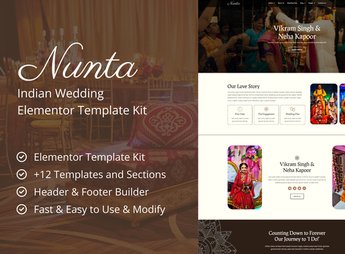
Nunta builds, in Elementor, a wedding invitation website for traditional weddings and religious ceremonies, with a photo gallery of the couple, a ceremony timeline, a map of the party venues, and an RSVP form. It’s for anyone who is going to celebrate a wedding with specific religious or cultural rituals and wants to present guests with the complete schedule of the event, from the ceremony to the reception, all in a single shareable link.
Key Features of Nunta
- Couple Photo Gallery
Displays photos of the couple in an organized mosaic on the invitation page. - Ceremony Timeline
Details every step of the religious ritual and the reception with times. - Map of Event Venues
Embeds the address and an interactive map of the ceremony and the party. - RSVP Form
Collects guest RSVPs directly through the site, with no external spreadsheet. - Wedding Countdown
Shows the days, hours, and minutes remaining until the ceremony begins.
Benefits of Nunta
- Invitation Aligned with Tradition
Organizes the schedule of cultural rituals that go beyond the standard format. - Fewer Guest Questions
Brings together the time, location, and stages of the ceremony in a single place. - Fast Invitation Publishing
Reduces the time between deciding on the wedding and having the site live. - No-Code Editing
Lets you change photos, text, and colors directly through the Elementor editor.
Who Is Nunta For?
- Couples who are going to celebrate specific religious or cultural ceremonies.
- Wedding planners who organize weddings with traditional rituals.
- Families who want to centralize the wedding schedule in one place.
How to Download Nunta
Nunta is available for download here at Ultrapack. The package installation follows Elementor > Tools > Import Kit, which applies the invitation, gallery, and RSVP pages directly to the site. After that, just replace the photos and text with the couple’s and ceremony’s details.
Weddings with religious or cultural rituals tend to have a longer schedule than the standard ceremony-and-party format, which confuses guests who aren’t familiar with the tradition. Explaining each stage on a dedicated website avoids repeated messages explaining the day’s itinerary.
Frequently asked questions
Is Nunta – Cultural Wedding Elementor Template Kit GPL?
Yes. Nunta – Cultural Wedding Elementor Template Kit is distributed under the GPL (GNU General Public License). You may legally use, modify and redistribute it on as many sites as you want.
Can I use Nunta – Cultural Wedding Elementor Template Kit on more than one site?
Yes. You can use Nunta – Cultural Wedding Elementor Template Kit on as many sites as you want.
How much does Nunta – Cultural Wedding Elementor Template Kit cost at Ultrapack?
Nunta – Cultural Wedding Elementor Template Kit costs US$2.99 as a single purchase, and it is also included in the subscription plans starting at US$17/mo (Desenvolvedor I).
Does Nunta – Cultural Wedding Elementor Template Kit include updates?
When a new version of Nunta – Cultural Wedding Elementor Template Kit becomes available in the catalog, you can download the file during the access period of your purchase or subscription. To update, follow the installation or import procedure described in the documentation for the item and its platform.
Is Nunta – Cultural Wedding Elementor Template Kit checked before it is made available for download?
Files for Nunta – Cultural Wedding Elementor Template Kit are scanned before publication by UltraHub using ClamAV and YARA rules to detect known threats. This check does not guarantee the absence of risks. Check the item requirements, make a backup, and follow the installation or import instructions for its platform.
How to install
Updates: manual. When a new version comes out, download it on this same page and import it again with Template Kit Import. Template Kits are not updated from the WordPress Themes or Plugins screen.
A template kit is neither a theme nor a plugin. It is imported, and it needs Elementor installed on the site.
- Install and activate the Template Kit Import plugin, which is also here in the catalog.
- Download the file
elements-nunta-cultural-wedding-elementor-template-kit.zip. - In the WordPress dashboard, go to Template Kits > Import Kit and upload the file
elements-nunta-cultural-wedding-elementor-template-kit.zip. - Pick the templates you want to import and confirm.
- The imported templates end up under Templates > Saved Templates, ready to open in Elementor.
- Some kits use Elementor Pro features. Without it the templates still import, but some blocks have no effect.
Stuck on a step? Open a ticket telling us which one you stopped at.



