Description
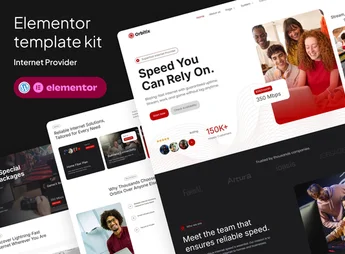
Built with Elementor, Orbitix brings together importable templates for internet provider pages, including home, services, plans, coverage, support, contact, header, footer, and MetForm forms. The Elementor template kit helps those who sell broadband, fiber optic, Wi-Fi, or corporate connectivity build an internet provider website with ready-made pages and customizable sections without writing code.
Orbitix Key Features
- Provider templates
Includes pages for services, plans, coverage, support, contact, and careers. - Use with Elementor Free
Imports editable layouts without relying on Elementor Pro. - Forms with MetForm
Uses form blocks for contact and website sign-up. - Header and footer
Includes configurable global templates with ElementsKit Lite. - Responsive layout
Adjusts the presentation for desktop, tablet, and mobile devices.
Orbitix Benefits
- Faster publishing
Reduces the time needed to create the website’s main pages. - Clearer communication
Organizes plans, coverage, and services into easy-to-compare sections. - Code-free editing
Lets you adjust text, colors, images, and blocks in Elementor. - More consistent presence
Maintains a unified visual identity across internal pages and forms.
Who Is Orbitix For?
- Those who sell residential internet plans and need to display coverage, packages, and contact channels.
- Fiber optic companies that want to showcase services, technical advantages, and service areas.
- Wi-Fi, telecommunications, or connectivity operations that already use Elementor and want ready-made pages for customization.
How to Download Orbitix
Orbitix is available for download here on Ultrapack. After downloading the .zip file, import the kit through the WordPress dashboard under Templates > Saved Templates > Import Templates or through a kit importer compatible with Elementor. Then, customize pages, forms, the header, and the footer in the visual builder.
Orbitix works well for websites that need to explain technical services without making navigation heavy or confusing. The combination of plan, coverage, support, and contact pages creates a practical foundation for presenting connectivity, capturing inquiries, and maintaining consistent visual communication throughout the website.
Frequently asked questions
Is Orbitix – Broadband & Internet Provider Elementor Template Kit GPL?
Yes. Orbitix – Broadband & Internet Provider Elementor Template Kit is distributed under the GPL (GNU General Public License). You may legally use, modify and redistribute it on as many sites as you want.
Can I use Orbitix – Broadband & Internet Provider Elementor Template Kit on more than one site?
Yes. You can use Orbitix – Broadband & Internet Provider Elementor Template Kit on as many sites as you want.
How much does Orbitix – Broadband & Internet Provider Elementor Template Kit cost at Ultrapack?
Orbitix – Broadband & Internet Provider Elementor Template Kit costs US$2.99 as a single purchase, and it is also included in the subscription plans starting at US$17/mo (Desenvolvedor I).
Does Orbitix – Broadband & Internet Provider Elementor Template Kit include updates?
When a new version of Orbitix – Broadband & Internet Provider Elementor Template Kit becomes available in the catalog, you can download the file during the access period of your purchase or subscription. To update, follow the installation or import procedure described in the documentation for the item and its platform.
Is Orbitix – Broadband & Internet Provider Elementor Template Kit checked before it is made available for download?
Files for Orbitix – Broadband & Internet Provider Elementor Template Kit are scanned before publication by UltraHub using ClamAV and YARA rules to detect known threats. This check does not guarantee the absence of risks. Check the item requirements, make a backup, and follow the installation or import instructions for its platform.
How to install
Updates: manual. When a new version comes out, download it on this same page and import it again with Template Kit Import. Template Kits are not updated from the WordPress Themes or Plugins screen.
A template kit is neither a theme nor a plugin. It is imported, and it needs Elementor installed on the site.
- Install and activate the Template Kit Import plugin, which is also here in the catalog.
- Download the file
elements-orbitix-broadband-internet-provider-elementor.zip. - In the WordPress dashboard, go to Template Kits > Import Kit and upload the file
elements-orbitix-broadband-internet-provider-elementor.zip. - Pick the templates you want to import and confirm.
- The imported templates end up under Templates > Saved Templates, ready to open in Elementor.
- Some kits use Elementor Pro features. Without it the templates still import, but some blocks have no effect.
Stuck on a step? Open a ticket telling us which one you stopped at.