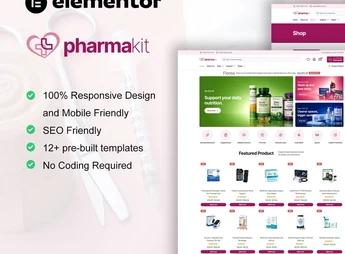
Description
Pharmavo structures a set of eCommerce pages for Elementor aimed at selling medical products and equipment, with sections for catalogs, categories, product pages with photos, reviews, and a shopping cart. It serves those who sell hospital supplies, physiotherapy equipment, or pharmaceutical articles online and need to organize the catalog by category, display prices and delivery conditions without programming each store page from scratch.
Pharmavo’s Main Features
- Category catalog
Organizes medical products into categories such as equipment, supplies, and orthopedics. - Detailed product page
Shows photos, technical specifications, and price for each item sold. - Cart and checkout
Allows gathering multiple products and completing the purchase in a few steps. - Guarantee and security seal
Displays information about the origin and certification of medical products. - Reviews block
Gathers customer comments on the products purchased in the store.
Pharmavo’s Benefits
- Ready-to-sell store
Reduces the time to assemble product and category pages. - Clearer navigation
Facilitates finding the right product among various medical categories. - More confidence in the purchase
Reinforces security with seals, reviews, and visible technical information. - Code-free editing
Adjusts colors, texts, and images directly in the Elementor panel.
Who is Pharmavo for?
- Those who sell hospital or physiotherapy equipment online.
- Those who market medical supplies and clinical use material.
- Those who operate an online pharmacy with health products and accessories.
- Those who distribute orthopedic equipment to clinics and offices.
How to Download Pharmavo
Pharmavo is available for download here on Ultrapack. After obtaining the file, import the pages in Elementor > Tools > Import Kit and select the store templates you want to use. The pages arrive already organized by category and product.
The Pharmavo layout maintains a consistent visual pattern between the catalog, product page, and checkout, which avoids the feeling of a store assembled little by little. This leaves more time available to register products and take care of logistics, instead of adjusting the design of each new page.
Frequently asked questions
Is Pharmavo | Medical Supplies eCommerce Elementor Template Kit GPL?
Yes. Pharmavo | Medical Supplies eCommerce Elementor Template Kit is distributed under the GPL (GNU General Public License). You may legally use, modify and redistribute it on as many sites as you want.
Can I use Pharmavo | Medical Supplies eCommerce Elementor Template Kit on more than one site?
Yes. You can use Pharmavo | Medical Supplies eCommerce Elementor Template Kit on as many sites as you want.
How much does Pharmavo | Medical Supplies eCommerce Elementor Template Kit cost at Ultrapack?
Pharmavo | Medical Supplies eCommerce Elementor Template Kit costs US$2.99 as a single purchase, and it is also included in the subscription plans starting at US$17/mo (Desenvolvedor I).
Does Pharmavo | Medical Supplies eCommerce Elementor Template Kit include updates?
When a new version of Pharmavo | Medical Supplies eCommerce Elementor Template Kit becomes available in the catalog, you can download the file during the access period of your purchase or subscription. To update, follow the installation or import procedure described in the documentation for the item and its platform.
Is Pharmavo | Medical Supplies eCommerce Elementor Template Kit checked before it is made available for download?
Files for Pharmavo | Medical Supplies eCommerce Elementor Template Kit are scanned before publication by UltraHub using ClamAV and YARA rules to detect known threats. This check does not guarantee the absence of risks. Check the item requirements, make a backup, and follow the installation or import instructions for its platform.
How to install
Updates: manual. When a new version comes out, download it on this same page and import it again with Template Kit Import. Template Kits are not updated from the WordPress Themes or Plugins screen.
A template kit is neither a theme nor a plugin. It is imported, and it needs Elementor installed on the site.
- Install and activate the Template Kit Import plugin, which is also here in the catalog.
- Download the file
pharmavo-medical-supplies-ecommerce-elementor-temp.zip. - In the WordPress dashboard, go to Template Kits > Import Kit and upload the file
pharmavo-medical-supplies-ecommerce-elementor-temp.zip. - Pick the templates you want to import and confirm.
- The imported templates end up under Templates > Saved Templates, ready to open in Elementor.
- Some kits use Elementor Pro features. Without it the templates still import, but some blocks have no effect.
Stuck on a step? Open a ticket telling us which one you stopped at.