Description
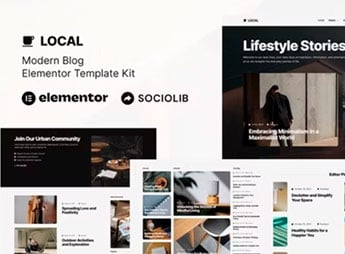
Presto builds a complete blog inside Elementor with a modern look, with ready-made pages for a post list, article page, categories, search, and an author area with a bio. It’s for anyone who writes about a specific topic, keeps a personal column, or publishes content as a team every day and needs a clean reading layout, with good text and image hierarchy, without hiring a designer from scratch.
Presto’s Main Features
- Grid post list
Organizes the most recent articles into cards with a featured image. - Article page
Displays the text with readable typography and room for large images. - Category filter
Lets the reader browse by subject without using the site’s search. - Author area
Brings together bio, photo, and the list of posts published by each writer. - Search field
Helps the reader find an old article by title or keyword.
Presto’s Benefits
- Faster publishing
Cuts down build time because the blog structure already comes ready. - More comfortable reading
Uses spacing and typography designed for long texts on screen. - Organized navigation
Makes it easier to find content by category, author, or direct search. - Responsive structure
Keeps text and images readable on mobile, tablet, and desktop.
Who Is Presto For?
- Anyone who writes about a specific topic and wants a blog of their own.
- Anyone who keeps a personal column with frequent posts.
- Anyone who publishes content as a team, with multiple authors.
- Anyone who wants to replace an old blog with a more modern reading layout.
How to Download Presto
Presto is available for download here on Ultrapack. After extracting the file, import the kit under Elementor > Tools > Import Kit right in the WordPress editor. The import replaces pages, menus, and colors with the blog layout.
A template kit works as a starting point: the sections come with sample posts that you just need to swap for your own text and images. This avoids building the post list and the article page from scratch and keeps the same visual identity throughout the blog, which helps maintain frequent publishing with a polished look.
Frequently asked questions
Is Presto – Modern Blog Elementor Template Kit GPL?
Yes. Presto – Modern Blog Elementor Template Kit is distributed under the GPL (GNU General Public License). You may legally use, modify and redistribute it on as many sites as you want.
Can I use Presto – Modern Blog Elementor Template Kit on more than one site?
Yes. You can use Presto – Modern Blog Elementor Template Kit on as many sites as you want.
How much does Presto – Modern Blog Elementor Template Kit cost at Ultrapack?
Presto – Modern Blog Elementor Template Kit costs US$2.99 as a single purchase, and it is also included in the subscription plans starting at US$17/mo (Desenvolvedor I).
Does Presto – Modern Blog Elementor Template Kit include updates?
When a new version of Presto – Modern Blog Elementor Template Kit becomes available in the catalog, you can download the file during the access period of your purchase or subscription. To update, follow the installation or import procedure described in the documentation for the item and its platform.
Is Presto – Modern Blog Elementor Template Kit checked before it is made available for download?
Files for Presto – Modern Blog Elementor Template Kit are scanned before publication by UltraHub using ClamAV and YARA rules to detect known threats. This check does not guarantee the absence of risks. Check the item requirements, make a backup, and follow the installation or import instructions for its platform.
How to install
Updates: manual. When a new version comes out, download it on this same page and import it again with Template Kit Import. Template Kits are not updated from the WordPress Themes or Plugins screen.
A template kit is neither a theme nor a plugin. It is imported, and it needs Elementor installed on the site.
- Install and activate the Template Kit Import plugin, which is also here in the catalog.
- Download the file
presto-modern-blog-elementor-template-kit.zip. - In the WordPress dashboard, go to Template Kits > Import Kit and upload the file
presto-modern-blog-elementor-template-kit.zip. - Pick the templates you want to import and confirm.
- The imported templates end up under Templates > Saved Templates, ready to open in Elementor.
- Some kits use Elementor Pro features. Without it the templates still import, but some blocks have no effect.
Stuck on a step? Open a ticket telling us which one you stopped at.